

Lesson 5: SLR-ish: Categorical Covariates

Nicky Wakim

2026-01-21

Learning Objectives

  1. Understand why we need a new way to code categorical variables compared to continuous variables
  2. Write the regression equation for a categorical variable using reference cell coding
  3. Calculate and interpret coefficients for reference cell coding
  4. Change the reference level in a categorical variable for reference cell coding
  5. Create new variables and interpret coefficient for ordinal / scoring coding

Why “SLR-ish”?

  • The strict definition of simple linear regression: only two variables that are BOTH continuous


  • Common (but kinda wrong) use of simple linear regression: only two variables with outcome continuous and predictor not specified


  • I’m including multi-level categorical covariates in SLR mostly because it’s easier to learn now!

Let’s map that to our regression analysis process

Model Selection

  • Building a model

  • Selecting variables

  • Prediction vs interpretation

  • Comparing potential models

Model Fitting

  • Find best fit line

  • Using OLS in this class

  • Parameter estimation

  • Categorical covariates

  • Interactions

Model Evaluation

  • Evaluation of model fit
  • Testing model assumptions
  • Residuals
  • Transformations
  • Influential points
  • Multicollinearity

Model Use (Inference)

  • Inference for coefficients
  • Hypothesis testing for coefficients
  • Inference for expected \(Y\) given \(X\)

Learning Objectives

  1. Understand why we need a new way to code categorical variables compared to continuous variables
  1. Write the regression equation for a categorical variable using reference cell coding
  2. Calculate and interpret coefficients for reference cell coding
  3. Change the reference level in a categorical variable for reference cell coding
  4. Create new variables and interpret coefficient for ordinal / scoring coding

Still looking at Gapminder Life Expectancy data

  • We will look at life expectancy vs. these Freedom statuss

  • You can access my codebook here

  • Gapminder measures freedom status: This is a descriptive text of the real-world rights and freedoms enjoyed by individuals. It is determined by the freedom rating which is the average of political rights and civil liberties ratings.

    • Not free (NF)
    • Partly free (PF)
    • Free (F)
  • Freedom status is a multi-level categorical covariate: it has three statuses


  • Note: I am calling the expected life expectancy \(\widehat{LE}\)
    • Previously, I have written \(\widehat{\text{life expectancy}}\)

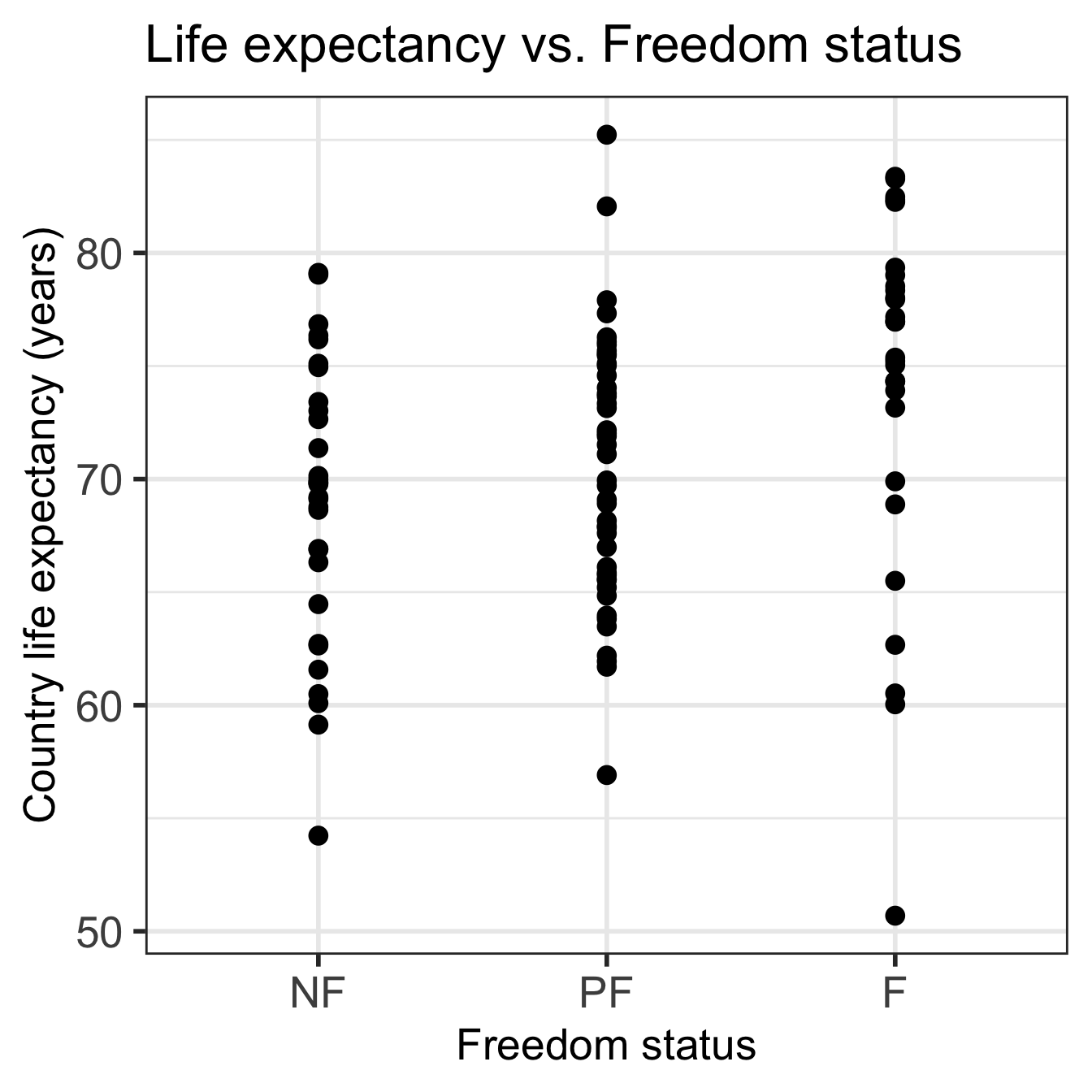
Visualizing the relationship

Bad option for visualization:

Code
ggplot(gapm, aes(x = fct_reorder(freedom_status, fs_order), y = life_exp)) +
  geom_point() +
  labs(x = "Freedom status", 
       y = "Country life expectancy (years)",
       title = "Life expectancy vs. Freedom status") +
  theme(axis.title = element_text(size = 20), 
        axis.text = element_text(size = 20), 
        title = element_text(size = 20))
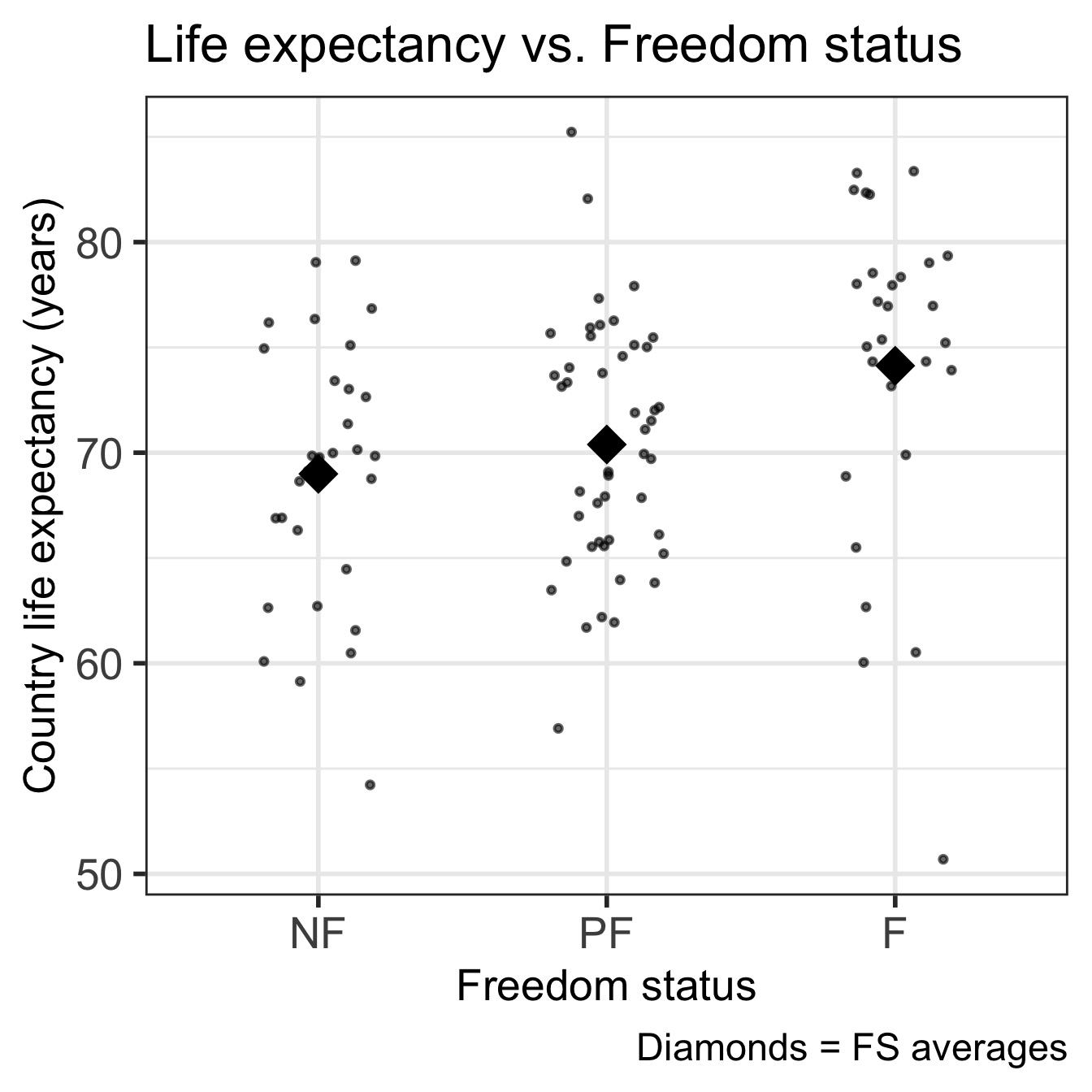
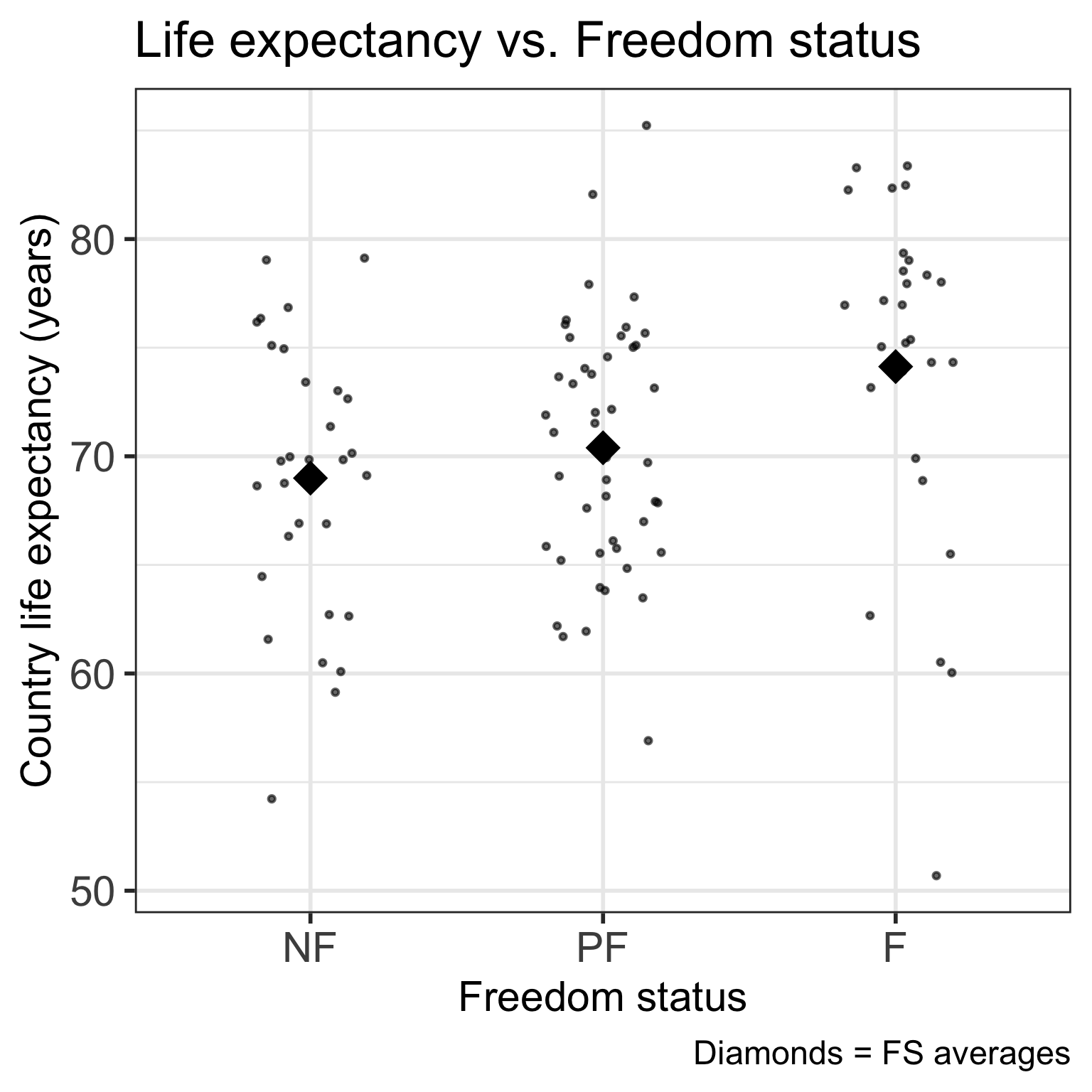
Good option for visualization:

Code
ggplot(gapm, aes(x = fct_reorder(freedom_status, fs_order), y = life_exp)) +
  geom_jitter(size = 1, alpha = .6, width = 0.2) +
  stat_summary(fun = mean, geom = "point", size = 8, shape = 18) +
  labs(x = "Freedom status", 
       y = "Country life expectancy (years)",
       title = "Life expectancy vs. Freedom status",
       caption = "Diamonds = FS averages") +
  theme(axis.title = element_text(size = 20), 
        axis.text = element_text(size = 20), 
        title = element_text(size = 20))
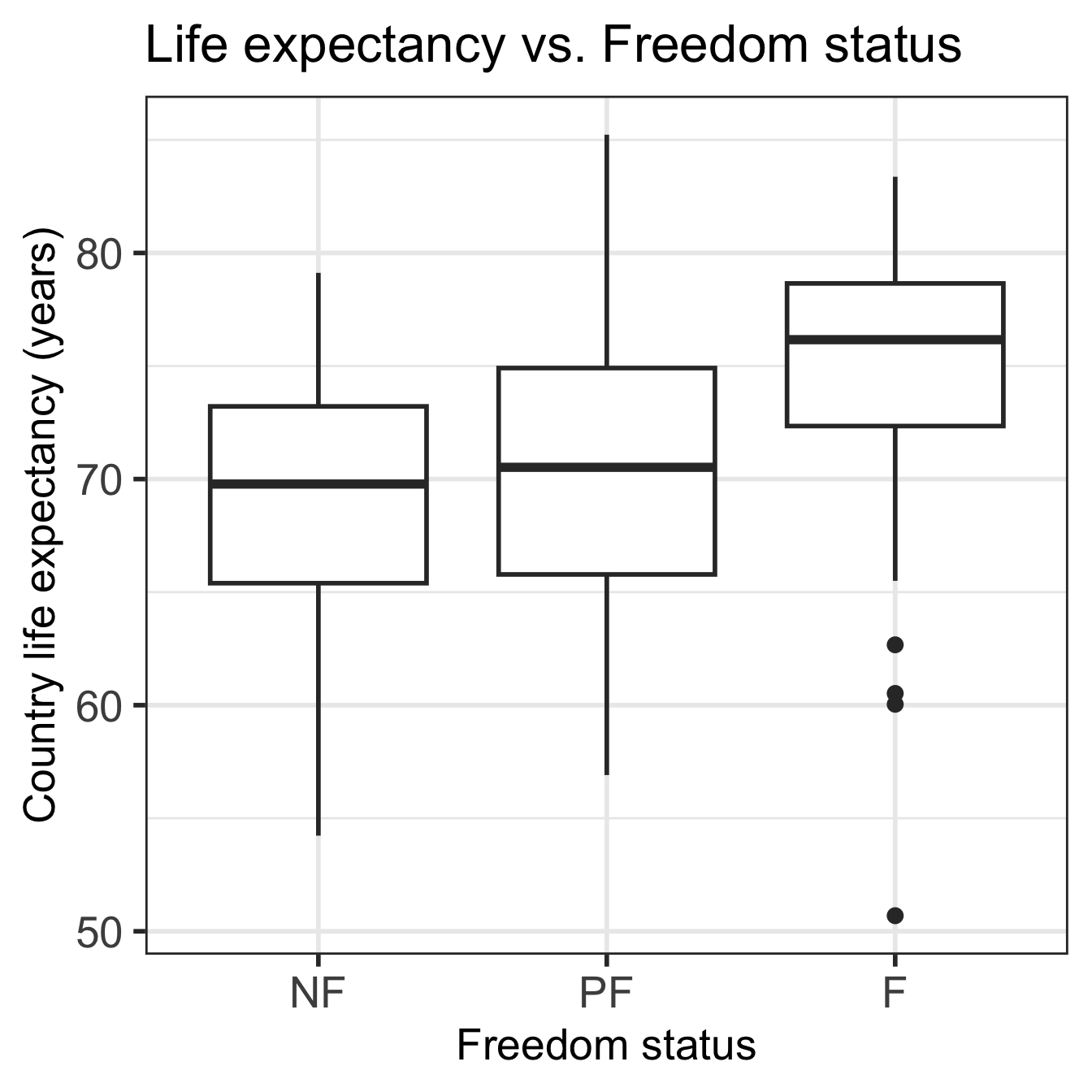
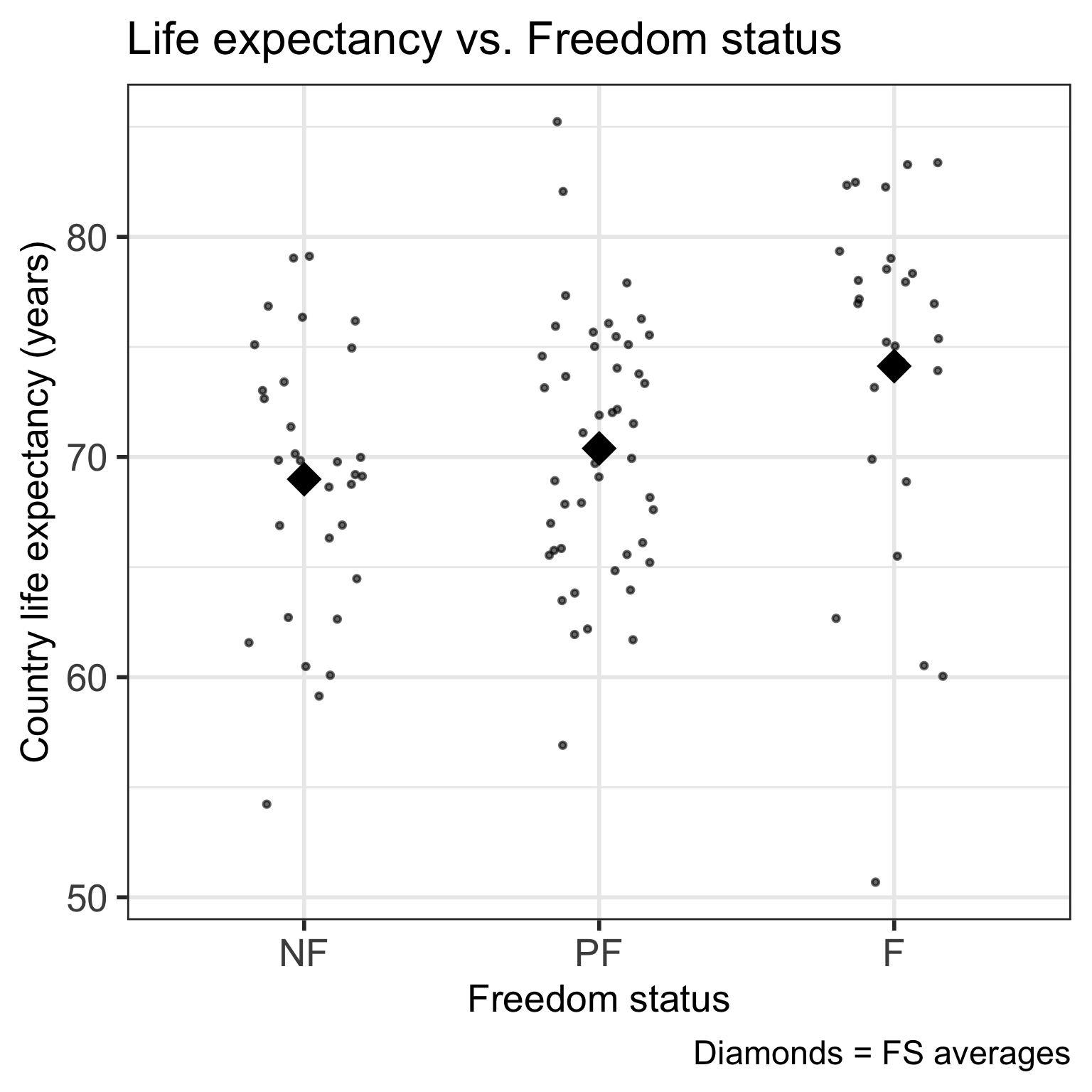
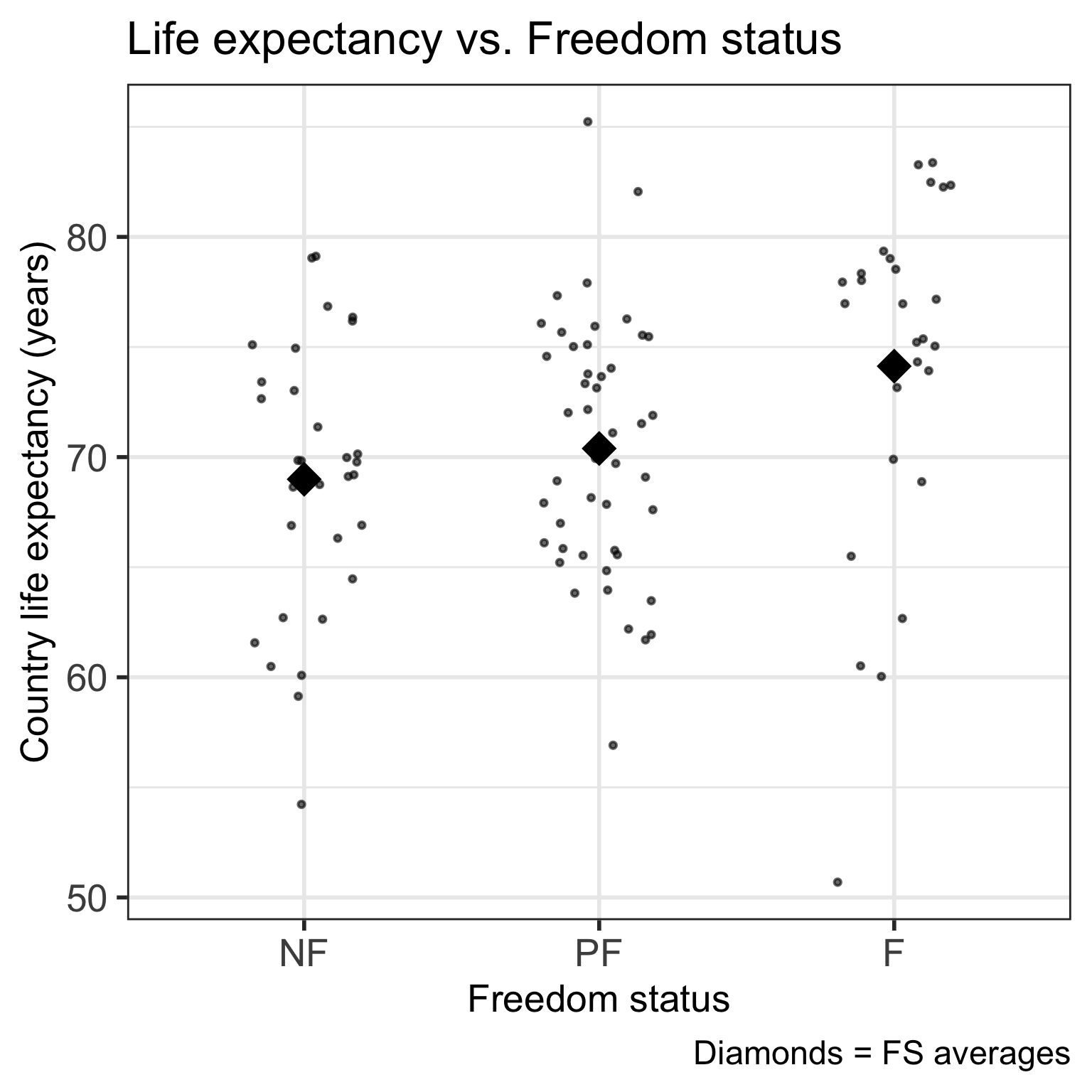
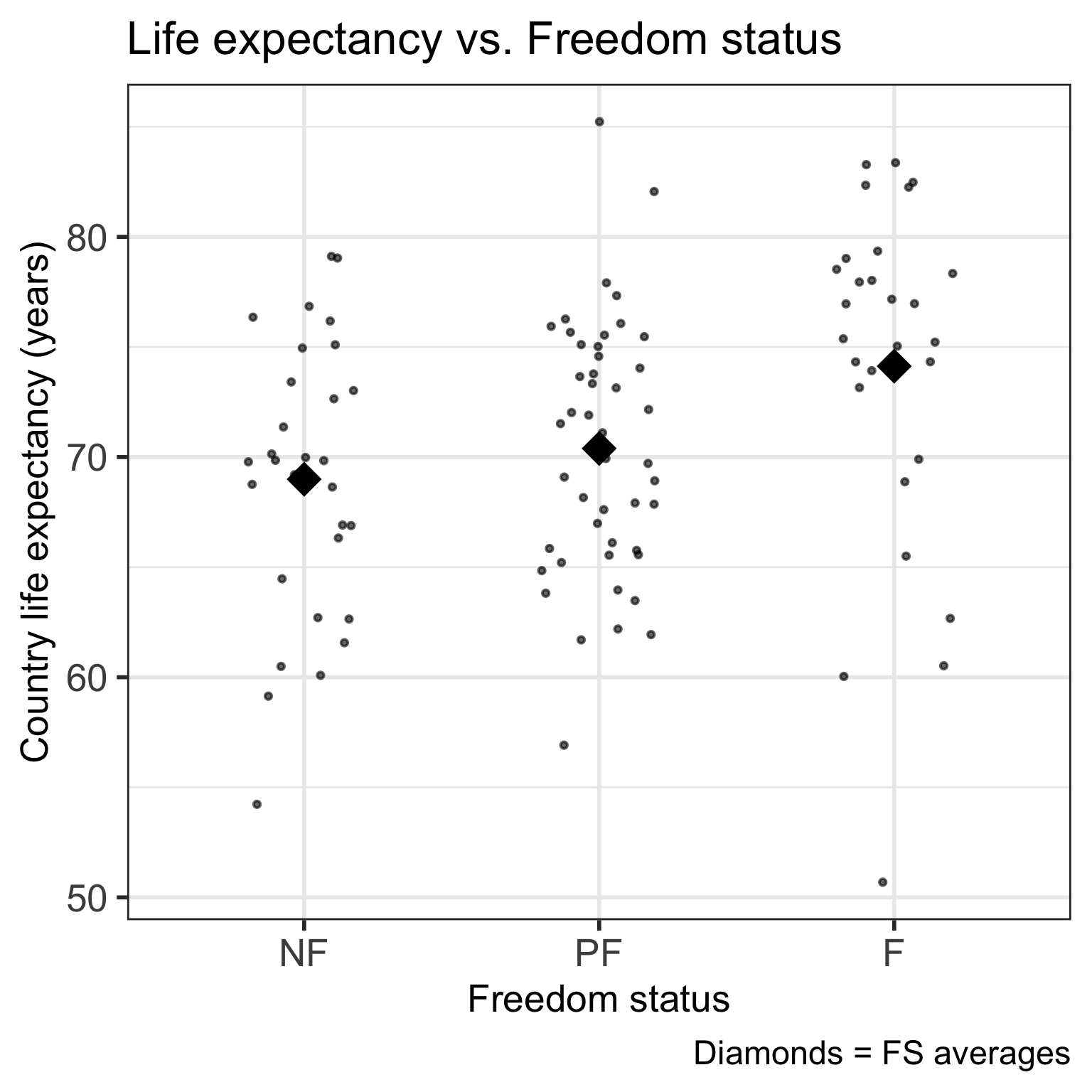
  • Used geom_jitter()

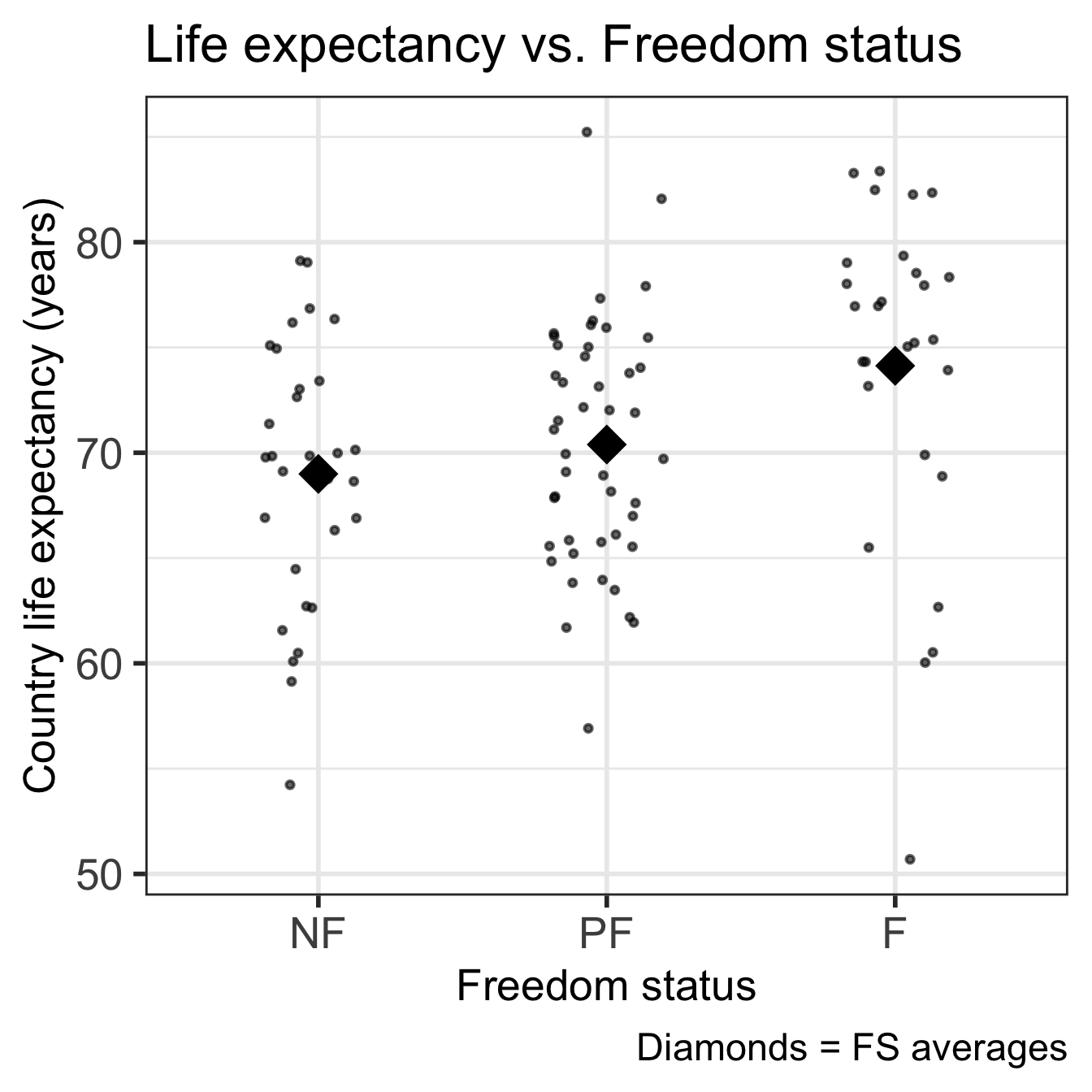
Good option for visualization:

Code
ggplot(gapm, aes(x = fct_reorder(freedom_status, fs_order), y = life_exp)) +
  geom_boxplot() +
  labs(x = "Freedom status", 
       y = "Country life expectancy (years)",
       title = "Life expectancy vs. Freedom status") +
  theme(axis.title = element_text(size = 20), 
        axis.text = element_text(size = 20), 
        title = element_text(size = 20))
Linear regression with a categorical covariate

  • When using a categorical covariate/predictor,

    • We do NOT, technically, find a best-fit line
  • Instead we model the means of the outcome

    • For the different levels of the categorical variable


  • In 511/525, we used Kruskal-Wallis test and our ANOVA table to test if groups means were statistically different from one another

  • We can do this using linear models AND we can include other variables in the model

There are different ways to code categorical variables

Reference Cell Coding

  • Sometimes called dummy coding
  • Compares each level of a variable to the omitted (reference) level

Effect coding

  • Sometimes called sum coding or deviation coding
  • Compares deviations from the grand mean
  • Not covered in our class

Ordinal encoding

  • Sometimes called scoring
  • Categories have a natural, even spaced ordering
  • Linear relationship between levels


If you want to learn more about these and other coding schemes:

Building the regression equation: problem with a single coefficient

Previously: simple linear regression

  • Outcome \(Y\) = numerical variable
  • Predictor \(X\) = numerical variable

The regression (best-fit) line is: \[\widehat{Y} = \widehat{\beta}_0 + \widehat{\beta}_1 \cdot X \]

New: what if the explanatory variable is categorical?

Naively, we could Write: \(\widehat{Y} = \widehat{\beta}_0 + \widehat{\beta}_1 \cdot X\)

Or, with our variables: \[\widehat{\textrm{LE}} = \widehat{\beta}_0 + \widehat{\beta}_1 \cdot \textrm{FS} \]

  • But what does \(\textrm{FS}\) (freedom status) mean in this equation?

    • What values can it take? How do we represent each FS?


  • Note: the above is WRONG

Building the regression equation: how do we map categories to means?

  • If we only have freedom status in our model and want to map it to an average life expectancy…
  • We want to create a function that can map each freedom status to life expectancy

    • If not free: \(\widehat{LE} = 68.99\) years

    • If partly free: \(\widehat{LE} = 70.39\) years

    • If free: \(\widehat{LE} = 74.13\) years


  • Can we make one equation for \(\widehat{LE}\) by putting the “if” statements within the equation?

Building the regression equation: Indicator functions

  • In order to represent each status in the equation, we need to introduce a new function:

    • Indicator function:

    \[I(X = x) \text{ or } I(x) = \left\{ \begin{array}{@{}ll@{}} 1, & \text{if}\ X = x \\ 0, & \text{else} \end{array}\right. \]

    • This basically a binary yes/no if \(X\) is a specific value \(x\)
  • For example, if we want to identify a country as partly free, we can make:

    \[I(FS = \text{partly free}) \text{ or }I(\text{partly free}) = \left\{ \begin{array}{@{}ll@{}} 1, & \text{if}\ FS = \text{partly free} \\ 0, & \text{else} \end{array}\right. \]

Poll Everywhere Question 1

Learning Objectives

  1. Understand why we need a new way to code categorical variables compared to continuous variables
  1. Write the regression equation for a categorical variable using reference cell coding
  1. Calculate and interpret coefficients for reference cell coding
  2. Change the reference level in a categorical variable for reference cell coding
  3. Create new variables and interpret coefficient for ordinal / scoring coding

Building the regression equation: Indicators in our equation

\[\begin{aligned} \widehat{\textrm{LE}} = & 68.99 \cdot I(\text{not free}) + 70.39 \cdot I(\text{partly free}) + \\ &74.13 \cdot I(\text{free}) \end{aligned}\]

  • However, a linear regression equation still requires an intercept!

    • So one of our statuses need to become our “reference” group
    • We’ll use “not free” as our reference
    • That means we need to adjust all the numbers

\[\begin{aligned} \widehat{\textrm{LE}} = & 68.99 + 1.4 \cdot I(\text{partly free}) + \\ &5.14 \cdot I(\text{free}) \\ \widehat{\textrm{LE}} = & \widehat\beta_0 + \widehat\beta_1 \cdot I(\text{partly free}) + \\ & \widehat\beta_2 \cdot I(\text{free}) \end{aligned}\]

Viewing the regression equation another way

\[\widehat{\textrm{LE}} = \widehat\beta_0 + \widehat\beta_1 \cdot I(FS = \text{partly free}) + \widehat\beta_2 \cdot I(FS = \text{free})\]

Freedom status Regression equation for FS Average Life Expectancy for FS
Not free \(\begin{aligned} \widehat{\textrm{LE}} = &\widehat\beta_0 + \widehat\beta_1 \cdot 0 + \widehat\beta_2 \cdot 0 \end{aligned}\) \(\widehat{\textrm{LE}} = \widehat\beta_0\)
Partly free \(\begin{aligned} \widehat{\textrm{LE}} = &\widehat\beta_0 + \widehat\beta_1 \cdot 1+ \widehat\beta_2 \cdot 0\end{aligned}\) \(\widehat{\textrm{LE}} = \widehat\beta_0 + \widehat\beta_1\)
Free \(\begin{aligned} \widehat{\textrm{LE}} = &\widehat\beta_0 + \widehat\beta_1 \cdot 0 + \widehat\beta_2 \cdot 1\end{aligned}\) \(\widehat{\textrm{LE}} = \widehat\beta_0 + \widehat\beta_2\)

Learning Objectives

  1. Understand why we need a new way to code categorical variables compared to continuous variables
  2. Write the regression equation for a categorical variable using reference cell coding
  1. Calculate and interpret coefficients for reference cell coding
  1. Change the reference level in a categorical variable for reference cell coding
  2. Create new variables and interpret coefficient for ordinal / scoring coding

Interpretation of regression equation coefficients

Remember: expected, mean, and average are interchangeable

Coefficient

Interpretation

Expected/mean/average life expectancy of countries that are not free

Difference in mean life expectancy between partly free and not free countries -OR-

Mean difference in life expectancy between partly free and not free countries

Difference in mean life expectancy between free and not free countries -OR-

Mean difference in life expectancy between free and not free countries

Poll Everywhere Question 2

Regression table with lm() function

model1 = gapm %>%
  lm(formula = life_exp ~ freedom_status)

tidy(model1, conf.int=T) %>% gt() %>% tab_options(table.font.size = 38) %>% 
  fmt_number(decimals = 2)
term estimate std.error statistic p.value conf.low conf.high
(Intercept) 68.99 1.17 58.88 0.00 66.67 71.32
freedom_statusPF 1.40 1.52 0.92 0.36 −1.61 4.40
freedom_statusF 5.14 1.70 3.02 0.00 1.76 8.51

\[\widehat{\textrm{LE}} = 68.99 + 1.4 \cdot I(\text{PF}) + 5.14 \cdot I(\text{F})\]

  • Which Freedom status did R choose as the reference level?

  • How you would calculate the mean life expectancies of freedom statuss using only the results from the regression table?

Bringing in the numbers/units/95% CI

Coefficient Interpretation
\(\widehat{\beta}_0\) Average life expectancy of countries that are not free is 68.99 (95% CI: 66.67, 71.32).
\(\widehat{\beta}_1\) The difference in mean life expectancy between countries that are partly free and not free is 1.4 (95% CI: -1.61, 4.4).
\(\widehat{\beta}_2\) The difference in mean life expectancy between countries that are free and not free is 5.14 (95% CI: 1.76, 8.51).
  • Don’t forget that we can use the confidence intervals to assess whether the mean difference with “not free” is significant or not

We can also use R to report each status’s average life expectancy

Find the 95% CI’s for the mean life expectancy for the countries that are partly free and free

  • Use the base R predict() function (see Lesson 4 for more info)
  • Requires specification of a newdata “value”
newdata = data.frame(freedom_status = c("NF", "PF", "F")) 
(pred = predict(model1, 
                newdata=newdata, 
                interval="confidence"))
       fit      lwr      upr
1 68.99387 66.66958 71.31816
2 70.39000 68.48194 72.29806
3 74.12893 71.68329 76.57457

Interpretations

  • The average life expectancy for countries that are partly free is 70.39 years (95% CI: 68.48, 72.3).
  • The average life expectancy for countries that are free is 74.13 years (95% CI: 71.68, 76.57).

Another way to look at coefficient values

\[\widehat{\textrm{LE}} = \widehat\beta_0 + \widehat\beta_1 \cdot I(\text{PF}) + \widehat\beta_2 \cdot I(\text{F})\]

Code
# means of each level of `freedom_status`
gapm2_ave <- gapm %>% 
  group_by(freedom_status) %>% 
  summarise(life_ave = mean(life_exp))

# mean of `africa`
mean_NF <- gapm2_ave %>% 
  filter(freedom_status == "NF") %>% 
  pull(life_ave)

# differences in means between levels of `freedom_status` and `africa`
gapm2_ave_diff <- gapm2_ave %>% 
  mutate(`Difference with NF` = life_ave - mean_NF) %>%
  rename(`Freedom status` = freedom_status, 
         `Average life expectancy` = life_ave)

# At the beginning of the Rmd we loaded knitr, which is where the kable command is from
# library(knitr)
gapm2_ave_diff %>% kable(
  digits = 1,
  format = "markdown"
  ) 
Freedom status Average life expectancy Difference with NF
NF 69.0 0.0
PF 70.4 1.4
F 74.1 5.1

\[\widehat{\textrm{LE}} = 68.99 + 1.4 \cdot I(\text{PF}) + 5.14 \cdot I(\text{F})\]

10 minute break here?

Learning Objectives

  1. Understand why we need a new way to code categorical variables compared to continuous variables
  2. Write the regression equation for a categorical variable using reference cell coding
  3. Calculate and interpret coefficients for reference cell coding
  1. Change the reference level in a categorical variable for reference cell coding
  1. Create new variables and interpret coefficient for ordinal / scoring coding

Reference levels

Why is NF not one of the variables in the regression equation?

\[\widehat{\textrm{LE}} = \widehat\beta_0 + \widehat\beta_1 \cdot I(\text{PF}) + \widehat\beta_2 \cdot I(\text{F})\]

  • Categorical variables must have at least 2 levels. If they have 2 levels, we call them binary


  • We choose one level as our reference level to which all other levels of the categorical variable are compared

    • The levels and $ are compared to the level \(\text{not free}\)


  • The intercept of the regression equation is the mean of the outcome restricted to the reference level

    • Recall that the intercept is the mean life expectancy of countries that are not free, which was our reference level


  • If the categorical variable has \(r\) levels, then we need \(r-1\) variables/coefficients to model it!

We can change the reference level to PF (1/2)

  • Suppose we want to compare the mean life expectancies of freedom statuses to the \(\text{partly free}\) level instead of \(\text{not free}\)

  • Below is the estimated regression equation for when \(\text{not free}\) is the reference level

\[\widehat{\textrm{LE}} = \widehat\beta_0 + \widehat\beta_1 \cdot I(\text{PF}) + \widehat\beta_2 \cdot I(\text{F})\]

  • Update the variables to make \(\text{partly free}\) the reference level:

\[\widehat{\textrm{LE}} = \widehat\beta_0 + \widehat\beta_1 \cdot I(\text{NF}) + \widehat\beta_2 \cdot I(\text{F})\]

We can change the reference level to PF (2/2)

  • Now update the coefficients of the regression equation using the output below.
Freedom status Average life expectancy Difference with PF
NF 68.99 -1.40
PF 70.39 0.00
F 74.13 3.74

\[\widehat{\textrm{LE}} = 70.39 -1.4 \cdot I(\text{NF}) + 3.74 \cdot I(\text{F})\]

R: Change reference level to PF

  • freedom_status data type was originally a character

  • check this with str() or class() or glimpse()

str(gapm$freedom_status) 
 Factor w/ 3 levels "NF","PF","F": 1 2 1 3 2 1 2 2 3 2 ...
  • To change the reference level, we can use fct_relevel() from the forcats package (part of tidyverse)
  • Any levels not mentioned will be left in their existing order, after the explicitly mentioned levels.
gapm2 = gapm %>% 
 mutate(
   freedom_status = fct_relevel(freedom_status, "PF")
     )
  • Check the order:
levels(gapm2$freedom_status)
[1] "PF" "NF" "F" 

R: Run model with PF as the reference level

levels(gapm2$freedom_status)
[1] "PF" "NF" "F" 
model2 = gapm2 %>% lm(formula = life_exp ~ freedom_status)
tidy(model2) %>% gt() %>% tab_options(table.font.size = 35) %>% 
  fmt_number(decimals = 2)
term estimate std.error statistic p.value
(Intercept) 70.39 0.96 73.17 0.00
freedom_statusNF −1.40 1.52 −0.92 0.36
freedom_statusF 3.74 1.56 2.39 0.02

\[\begin{aligned}\widehat{\textrm{LE}} &= \widehat\beta_0 + \widehat\beta_1 \cdot I(\text{NF}) + \widehat\beta_2 \cdot I(\text{F}) + \\ \widehat{\textrm{LE}} &= 70.39 -1.4 \cdot I(\text{NF}) + 3.74 \cdot I(\text{F}) \end{aligned}\]

Fitted values & residuals

Similar to as before:

  • Observed values \(Y\) are the values in the dataset

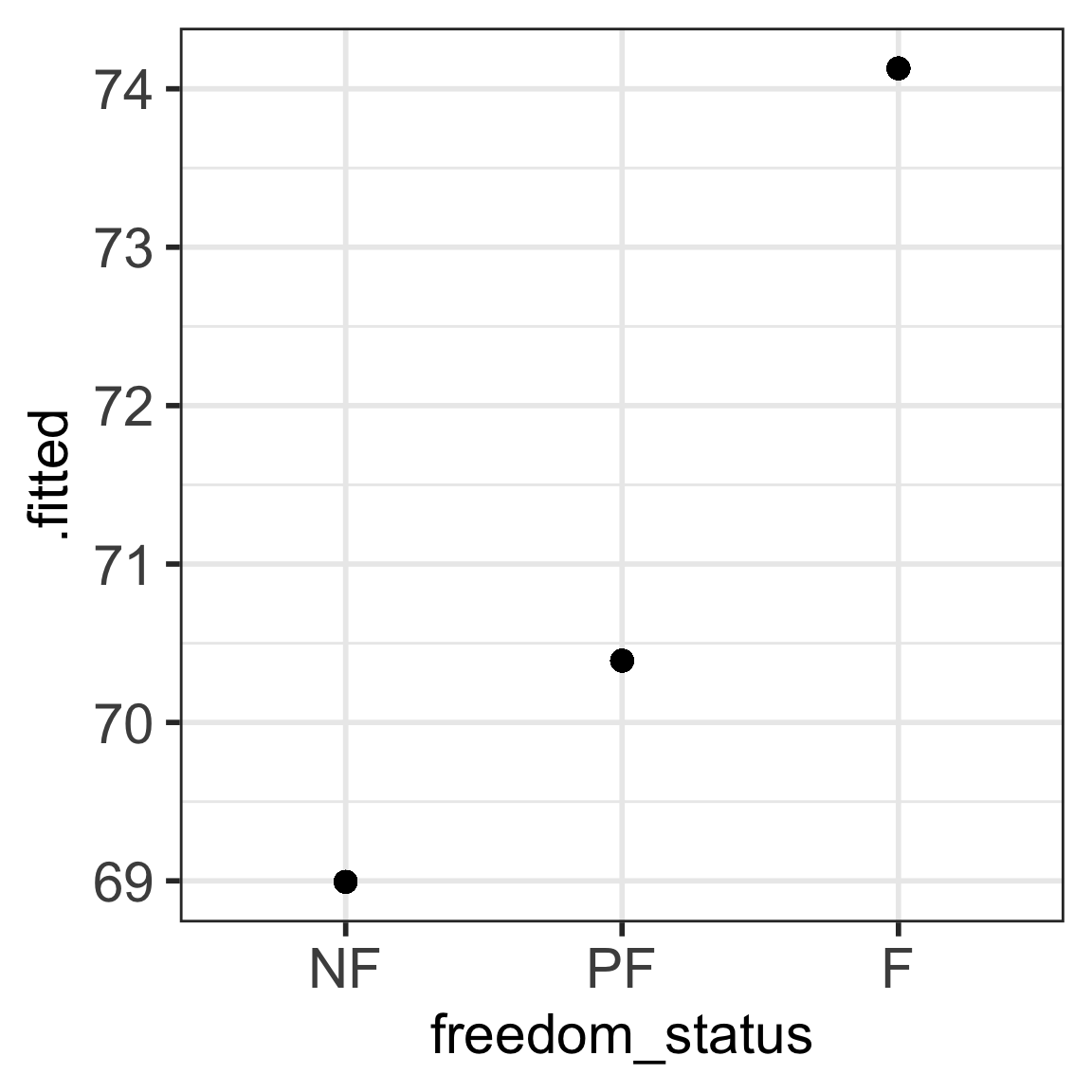
  • Fitted values \(\widehat{Y}\) are the values that fall on the best-fit line for a specific value of x are the means of the outcome stratified by the categorical predictor’s levels

  • Residuals (\(\widehat{\epsilon} = Y - \widehat{Y}\)) are the differences between the two

Fitted values are the same as the means

m1_aug <- augment(model1)

ggplot(m1_aug, aes(x = freedom_status, y = .fitted)) + geom_point() +
  theme(axis.text = element_text(size = 22), axis.title = element_text(size = 22))

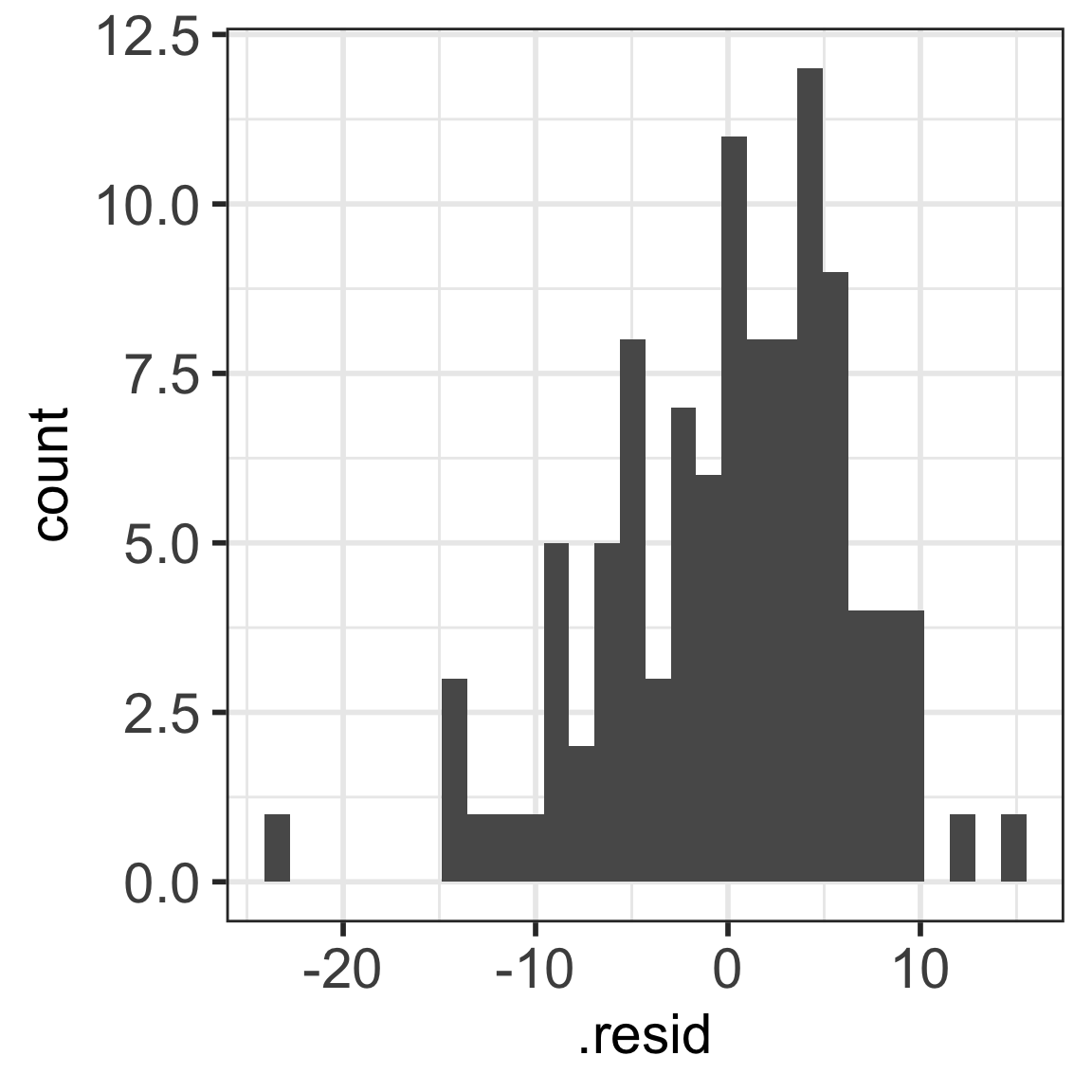
Residual plots (now the spread within each status)

ggplot(m1_aug, aes(x=.resid)) + geom_histogram() + 
  theme(axis.text = element_text(size = 22), title = element_text(size = 22))

Poll Everywhere Question 3

Learning Objectives

  1. Understand why we need a new way to code categorical variables compared to continuous variables
  2. Write the regression equation for a categorical variable using reference cell coding
  3. Calculate and interpret coefficients for reference cell coding
  4. Change the reference level in a categorical variable for reference cell coding
  1. Create new variables and interpret coefficient for ordinal / scoring coding

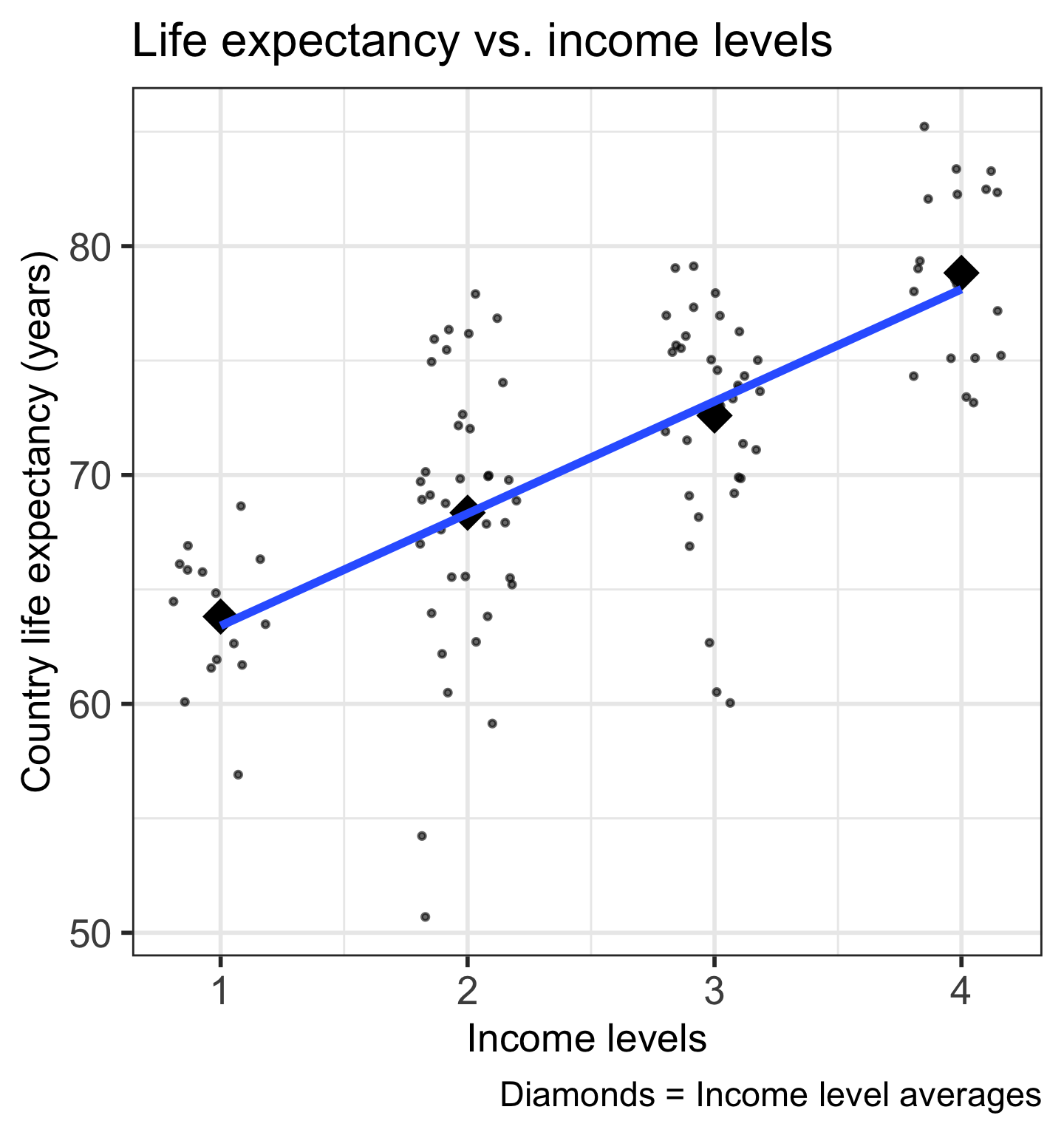
Let’s look at life expectancy vs. four income levels


  • Income levels for a country is based on average GDP per capita, and grouped into:

    • Low income

    • Lower middle income

    • Upper middle income

    • High income

Visualizing the ordinal variable, income levels

A few changes needed:

  • Put the income levels in order
gapm2 = gapm2 %>%
 mutate(income_level_4 = fct_relevel(
          income_level_4, 
            "Low income", 
            "Lower middle income", 
            "Upper middle income", 
            "High income"
 ))

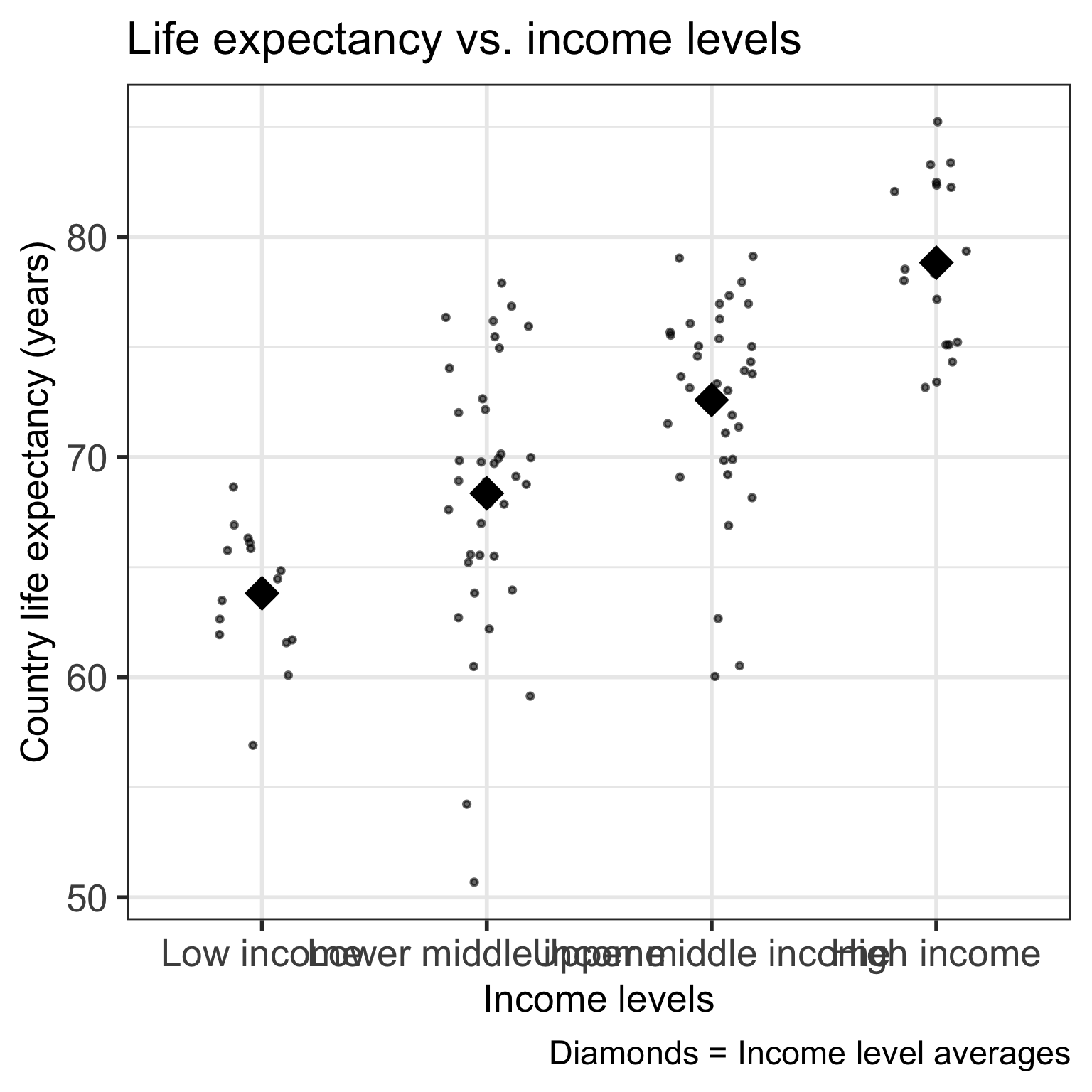
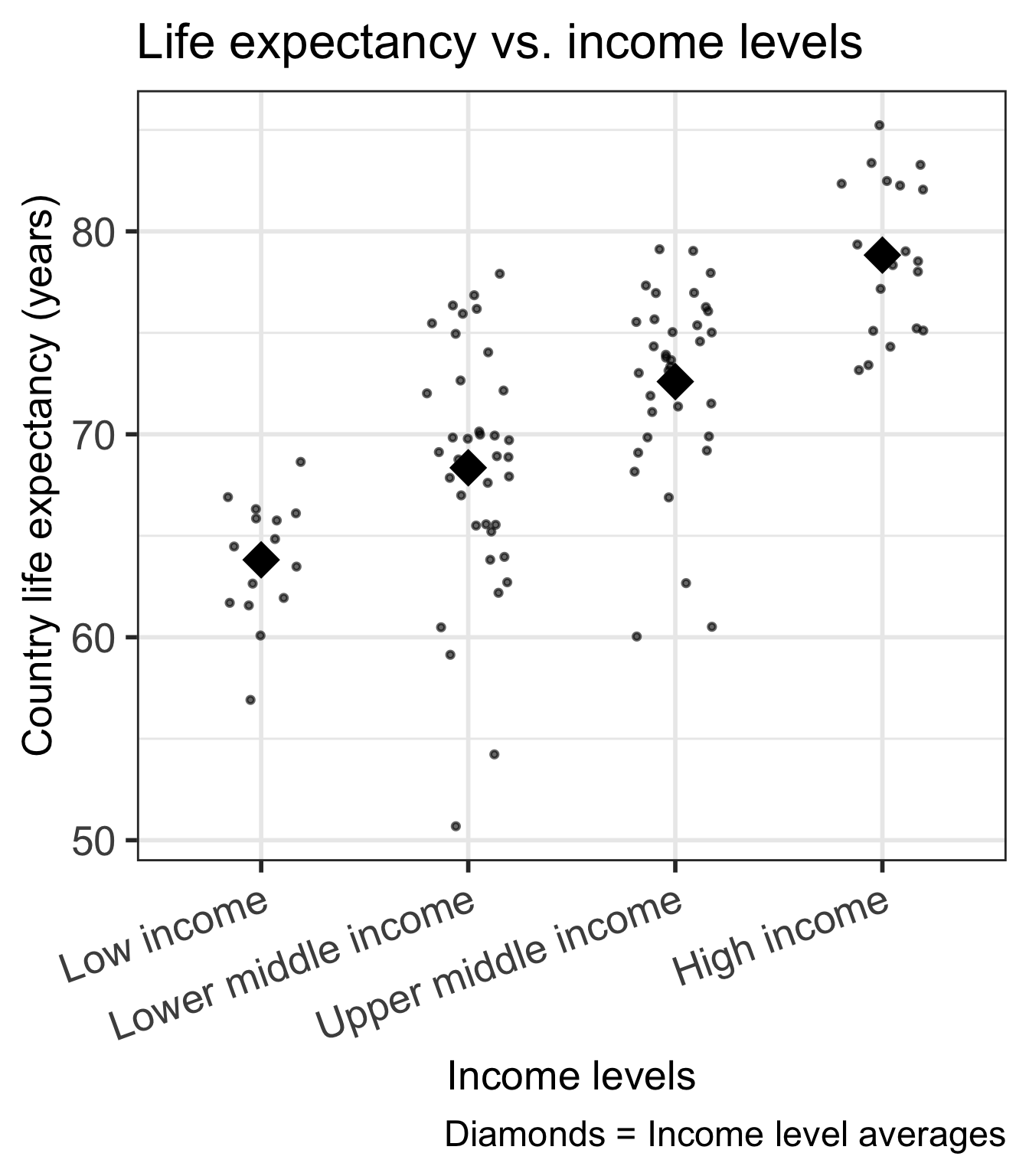
Much better: Visualizing the ordinal variable, income levels

ggplot(gapm2, aes(x = income_level_4, y = life_exp)) +
  geom_jitter(size = 1, alpha = .6, width = 0.2) +
  stat_summary(fun = mean, geom = "point", size = 8, shape = 18) +
  labs(x = "Income levels", 
       y = "Country life expectancy (years)",
       title = "Life expectancy vs. income levels",
       caption = "Diamonds = Income level averages") +
  theme(axis.title = element_text(size = 20), 
        axis.text = element_text(size = 20), 
        title = element_text(size = 20), 
        axis.text.x=element_text(angle = 20, vjust = 1, hjust=1))

How can we code this variable?

We have two options:

Treat the levels as nominal, and use reference cell coding

  • Like we did with freedom status

  • This option will not break the linearity assumption

  • For \(g\) categories of the variable, we will have \(g-1\) coefficients to estimate

Use the ordinal values to score the levels and treat as a numerical variable

  • Even if a variable is inherently ordered, we need to check that linearity holds if categories are represented as numbers

  • This way of coding preserves more power in the model (less coefficients to estimate means more power)

  • Only one coefficient to estimate

Some important considerations when scoring ordinal variables

  • Even if a variable is inherently ordered, we need to check that linearity holds if categories are represented as numbers (more in next lessons)
    • Linearity is an assumption of linear regression: that the relationship between X and Y is linear


  • Assumes differences between adjacent groups are equal

    • Income levels are pre-set groups by Gapminder
    • Might be hard to interpret “every 1-level increase in income level”


  • Is the variable part of the main relationship that you are investigating? (even if linearity holds)

    • If yes, consider leaving as reference cell coding unless the interpretation makes sense

    • If no, and just needed as an adjustment in your model, then power benefit of scoring might be worth it!

Check that linearity holds for income levels

  • Using visual assessment, linearity holds for our income levels (more in next lessons)

  • We can use the ordinal encoding for income levels

Poll Everywhere Question 4

Ordinal coding / Scoring

  • Map each income level to a number

  • Usually start at 1

Income Level Score
Low income 1
Lower middle income 2
Upper middle income 3
High income 4
gapm2 = gapm2 %>%
  mutate(income_num = case_when(
    income_level_4 == "Low income" ~ 1,
    income_level_4 == "Lower middle income" ~ 2,
    income_level_4 == "Upper middle income" ~ 3,
    income_level_4 == "High income" ~ 4
  ))
gapm2 %>% select(income_level_4, income_num) %>% 
  head(6)
# A tibble: 6 × 2
  income_level_4      income_num
  <fct>                    <dbl>
1 Low income                   1
2 Upper middle income          3
3 High income                  4
4 Upper middle income          3
5 Upper middle income          3
6 Upper middle income          3

Run the model with the scored income

mod_inc2 = gapm2 %>% lm(formula = life_exp ~ income_num)
tidy(mod_inc2) %>% gt() %>% tab_options(table.font.size = 37) %>%
  fmt_number(decimals = 2)
term estimate std.error statistic p.value
(Intercept) 58.51 1.38 42.47 0.00
income_num 4.90 0.51 9.66 0.00

\[\begin{aligned} \widehat{\textrm{LE}} &= \widehat\beta_0 + \widehat\beta_1 \cdot \text{Income level} \\ \widehat{\textrm{LE}} &= 58.51 + 4.9 \cdot \text{Income level} \end{aligned}\]

  • Keep in mind: We cannot calculate the expected outcome outside of the scoring values

    • For example, we cannot find the mean life expectancy for an income level of 1.5

Interpreting the model

term estimate std.error statistic p.value conf.low conf.high
(Intercept) 58.51 1.38 42.47 0.00 55.78 61.24
income_num 4.90 0.51 9.66 0.00 3.90 5.91

\[\widehat{\textrm{LE}} = 54.01 + 6.25 \cdot \text{Income level}\]

  • Interpreting the intercept: At an income level of 0, mean life expectancy is 54.01 (95% CI: 51.92, 56.10).

    • Note: this does not make sense because there is no income level of 0!
  • Interpreting the coefficient for income: For every 1-level increase in income level, mean life expectancy increases 4.9 years (95% CI: 3.9, 5.91).

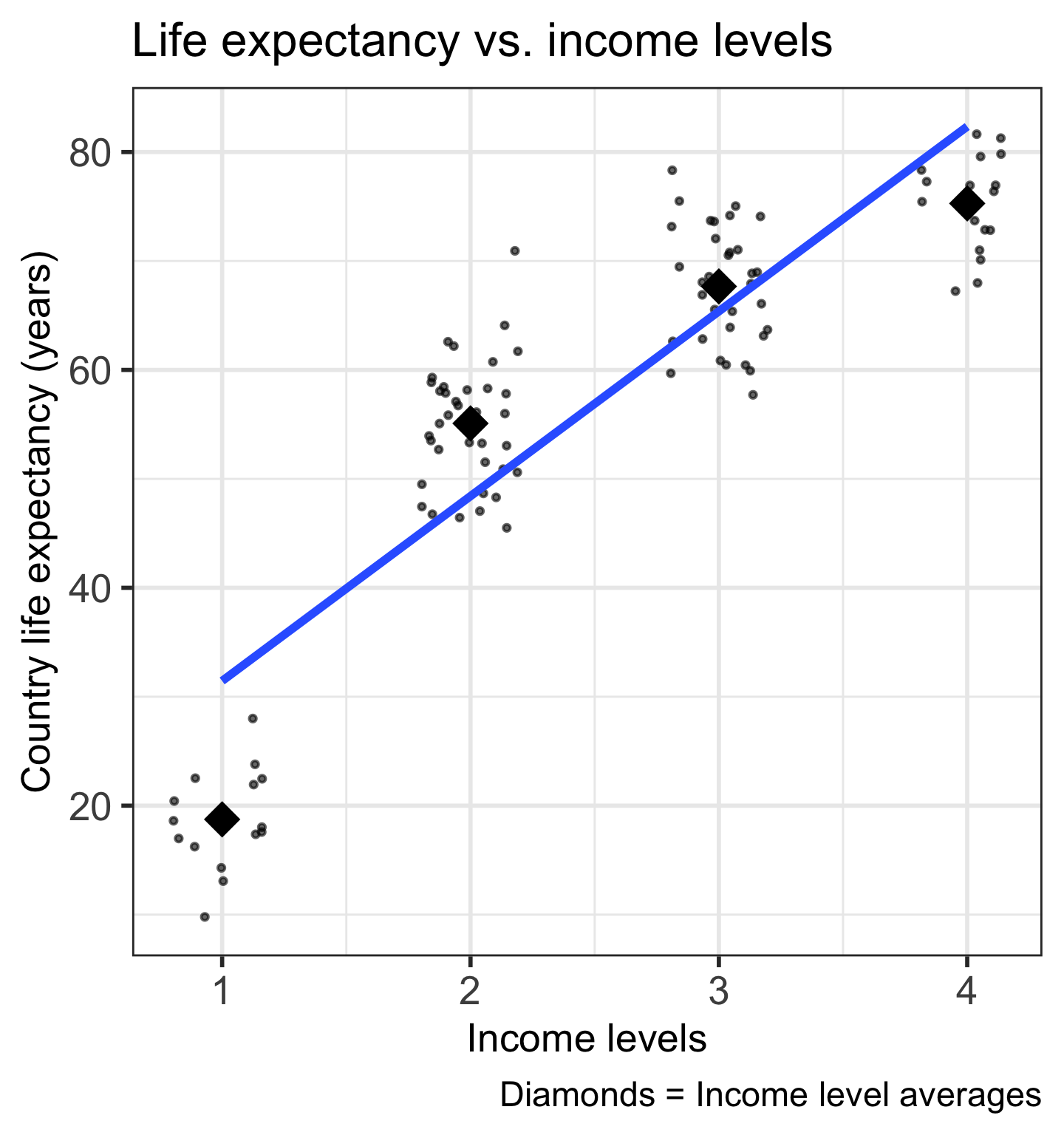
What if life expectancy vs. income level looked like this?

  • No longer maintaining the linearity assumption
  • Need to use reference cell coding


  • We would fit the following model: \[\begin{aligned} \textrm{LE} = & \beta_0 + \beta_1 \cdot I(\text{Lower middle income}) + \\ & \beta_2 \cdot I(\text{Upper middle income}) + \\ & \beta_3 \cdot I(\text{High income}) + \epsilon \end{aligned}\]

If time…

Let’s walk through categorical variables that have multiple selections

  • So each group is not mutually exclusive

  • We could make an indicator for each category, but individuals could be a part of multiple categories


  • Also, thinking about income levels - can we combine two groups to make one??