2026-03-02
Understand the overall steps for purposeful selection as a model building strategy
Apply purposeful selection to a dataset using R
Use different approaches to assess the linear scale of continuous variables in linear regression


Model Selection
Building a model
Selecting variables
Prediction vs interpretation
Comparing potential models
Model Fitting
Find best fit line
Using OLS in this class
Parameter estimation
Categorical covariates
Interactions
Model Evaluation
Model Use (Inference)
Apply purposeful selection to a dataset using R
Use different approaches to assess the linear scale of continuous variables in linear regression
“Successful modeling of a complex data set is part science, part statistical methods, and part experience and common sense.”
Hosmer, Lemeshow, and Sturdivant Textbook, pg. 101
Exploratory data analysis
Check unadjusted associations in simple linear regression
Enter all covariates in model that meet some threshold
Remove those that no longer reach some threshold
Check scaling of continuous and coding of categorical covariates
Check for interactions
Assess model fit
Pre-step:
Step 1:
Step 2:
Step 3:
Step 4:
Step 5:
Step 6:
Exploratory data analysis (EDA)
Simple linear regressions / analysis
Preliminary variable selection
Assess change in coefficients
Assess scale for continuous variables
Check for interactions
Assess model fit
Things we have been doing over the quarter in class and in our project
I will not discuss some of the methods mentioned in our lab and data management class
A few things we can do:
Get to know the potential values for the data
Categories
Units
Make yourself a codebook for reference
Then make sure the summary of values makes sense
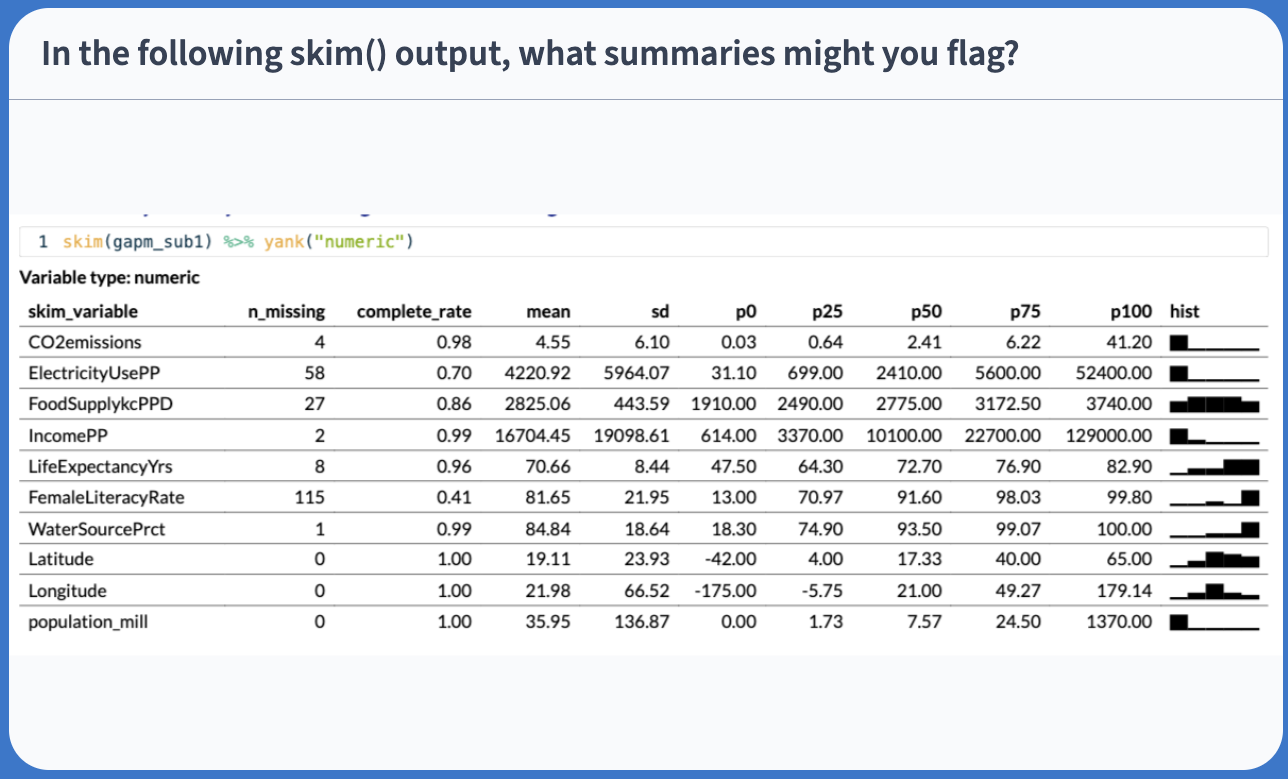
Look at a summary for the raw data
Typical use:
Note that skim(gapm) looks different because I had to create factors
I am breaking down the skim() function into the categorical and continuous variables only because I want to show them on the slides
Variable type: numeric
| skim_variable | n_missing | complete_rate | mean | sd | p0 | p25 | p50 | p75 | p100 | hist |
|---|---|---|---|---|---|---|---|---|---|---|
| cell_phones_100 | 0 | 1 | 116.52 | 34.56 | 32.06 | 99.13 | 116.68 | 137.18 | 207.28 | ▂▃▇▃▁ |
| life_exp | 0 | 1 | 70.97 | 6.76 | 50.69 | 66.11 | 71.52 | 75.67 | 85.23 | ▁▃▆▇▂ |
| vax_rate | 0 | 1 | 91.45 | 8.78 | 63.00 | 89.00 | 95.00 | 98.00 | 99.00 | ▁▁▁▂▇ |
| basic_sani | 0 | 1 | 79.76 | 23.75 | 21.64 | 61.11 | 92.80 | 97.99 | 100.00 | ▁▂▁▂▇ |
| co2_emissions | 0 | 1 | 5356.04 | 12822.92 | 17.67 | 285.50 | 871.27 | 4881.84 | 102490.55 | ▇▁▁▁▁ |
| happiness_score | 0 | 1 | 52.35 | 11.65 | 12.81 | 43.59 | 53.78 | 60.44 | 77.29 | ▁▂▆▇▂ |
Started this a little bit in previous slide (skim()), but you may want to look at things like:
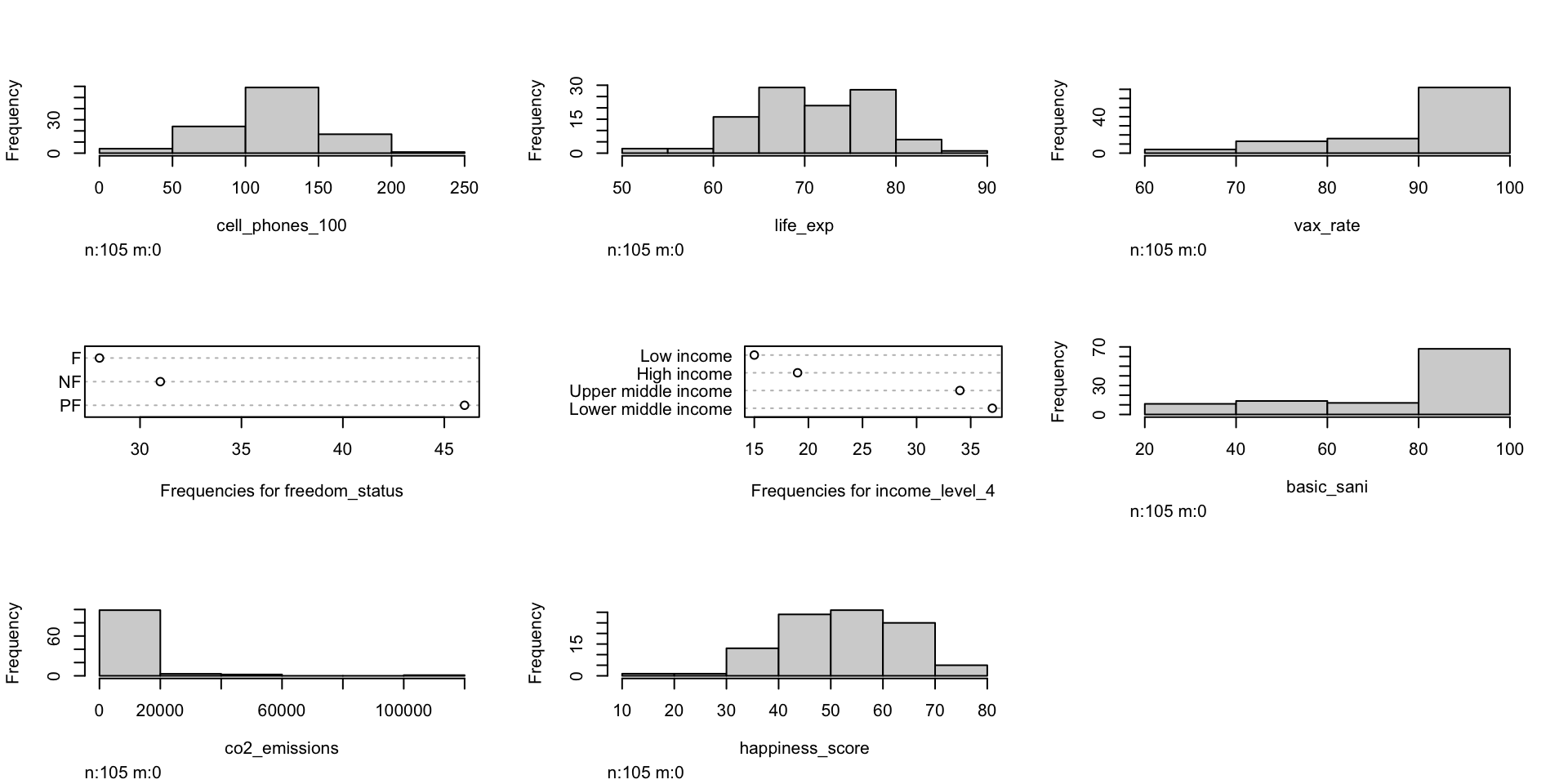
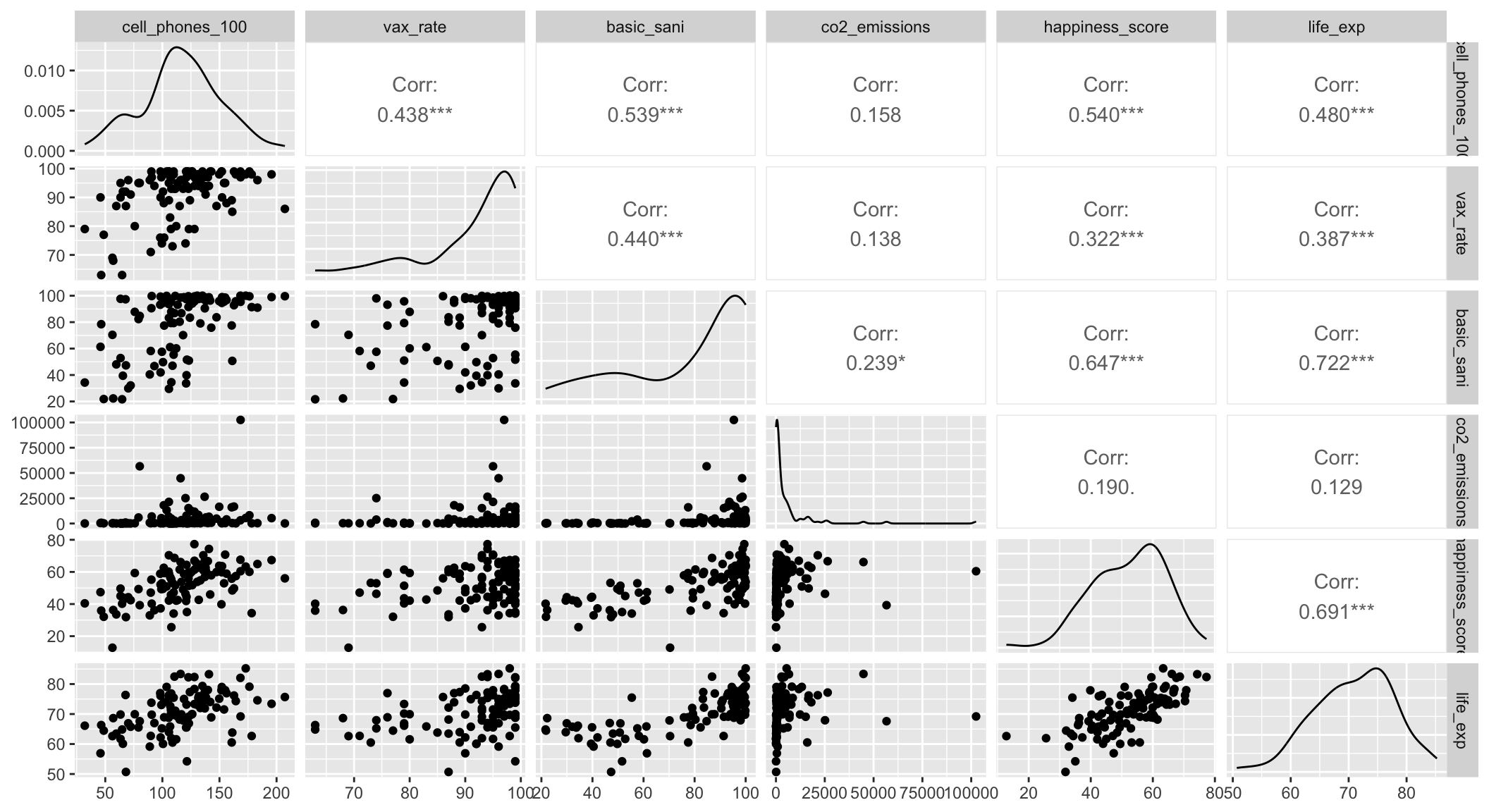
Can also look at visuals
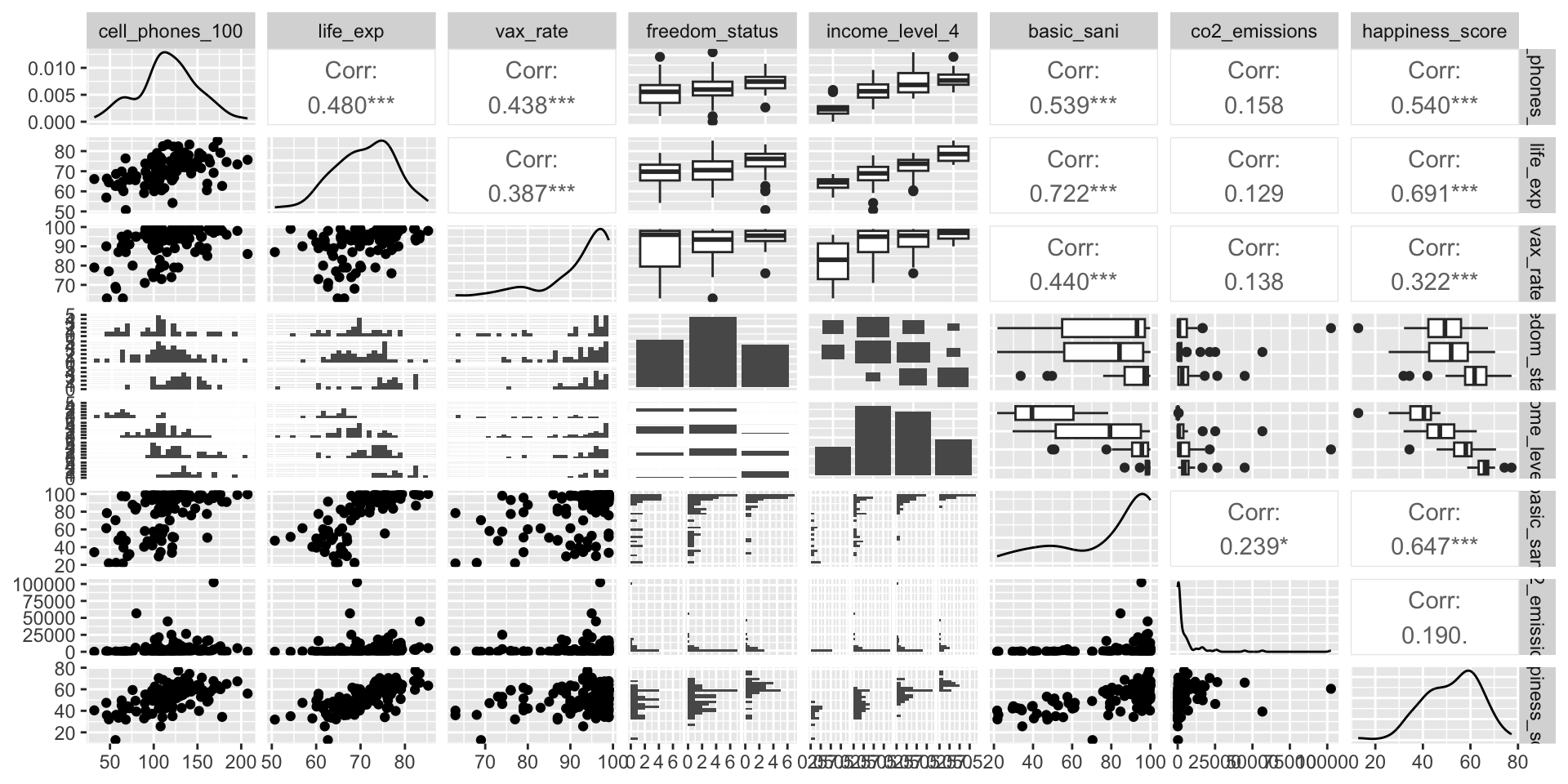
For each covariate, we want to see how it relates to the outcome (without adjusting for other covariates)
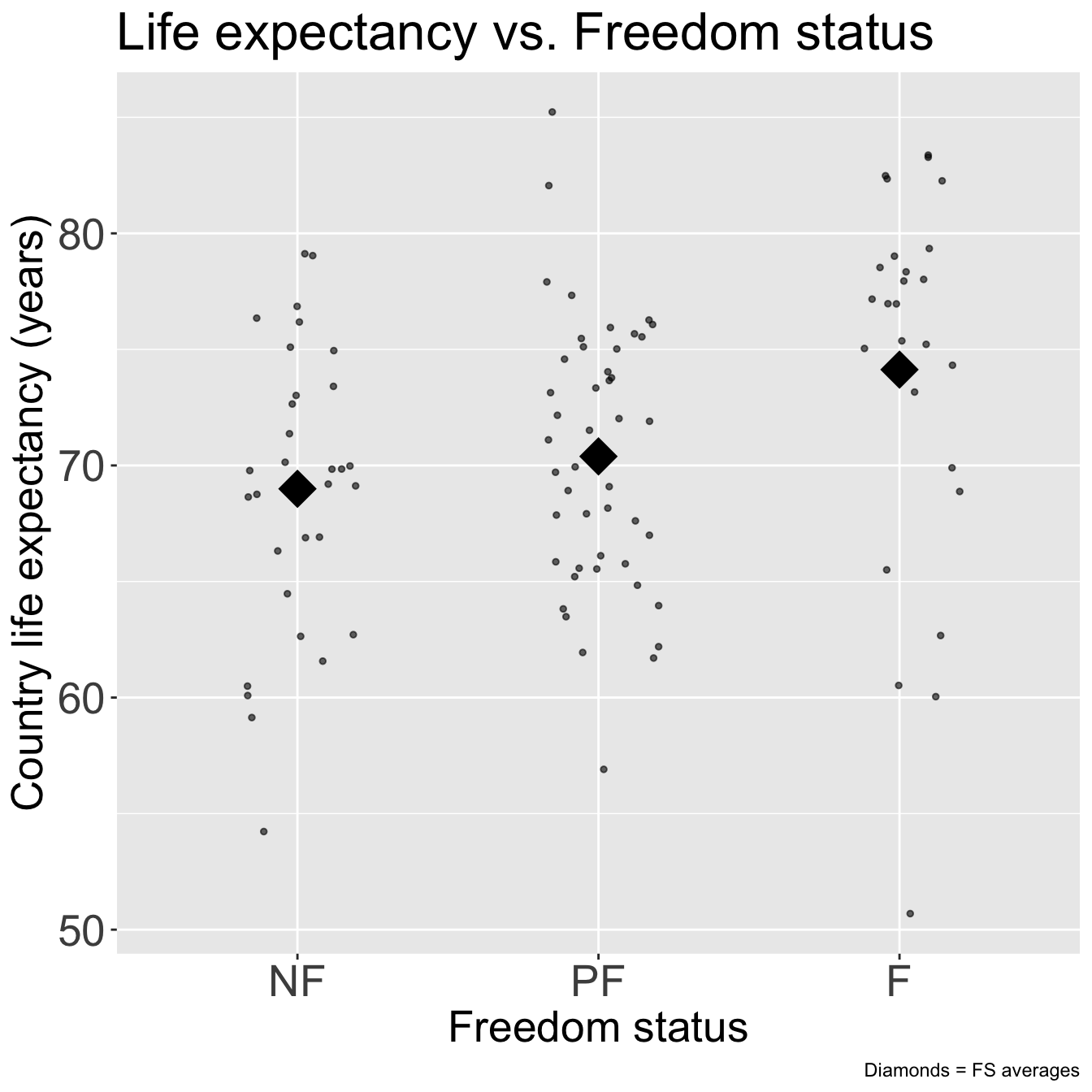
We can partially do this with visualizations
Helps us see the data we throw it into regression that makes assumptions (like our LINE assumptions)
ggpairs() can be a quick way to do it
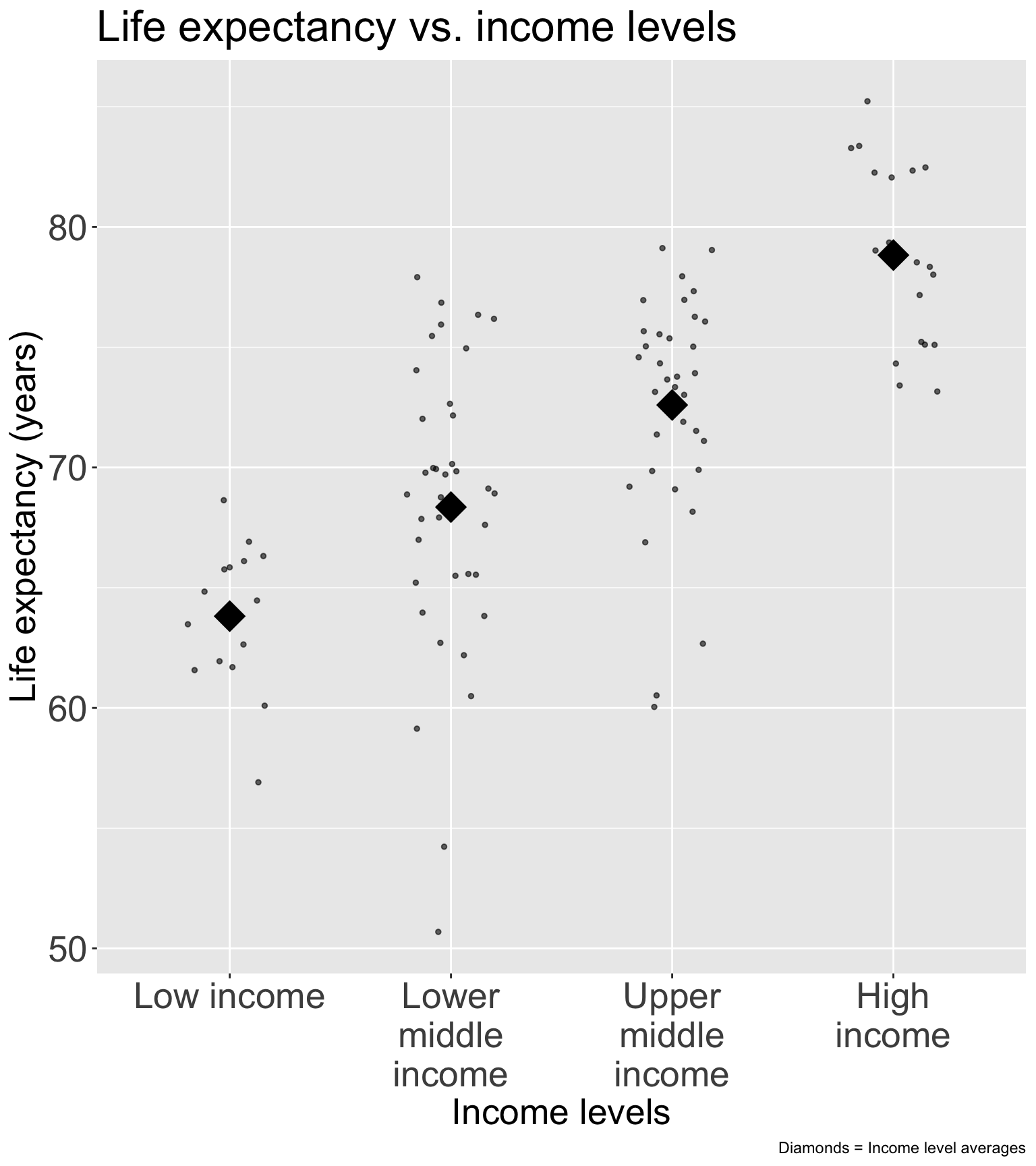
ggplot() can make each plot
+ geom_boxplot() to make boxplots by groups for categorical covariates+ geom_jitter() + stat_summary() to make non-overlaping points with group means for categorical covariates+ geom_point() to make scatterplots for continuous covariatesWe need to run simple linear regression
Let’s think back to our Gapminder dataset
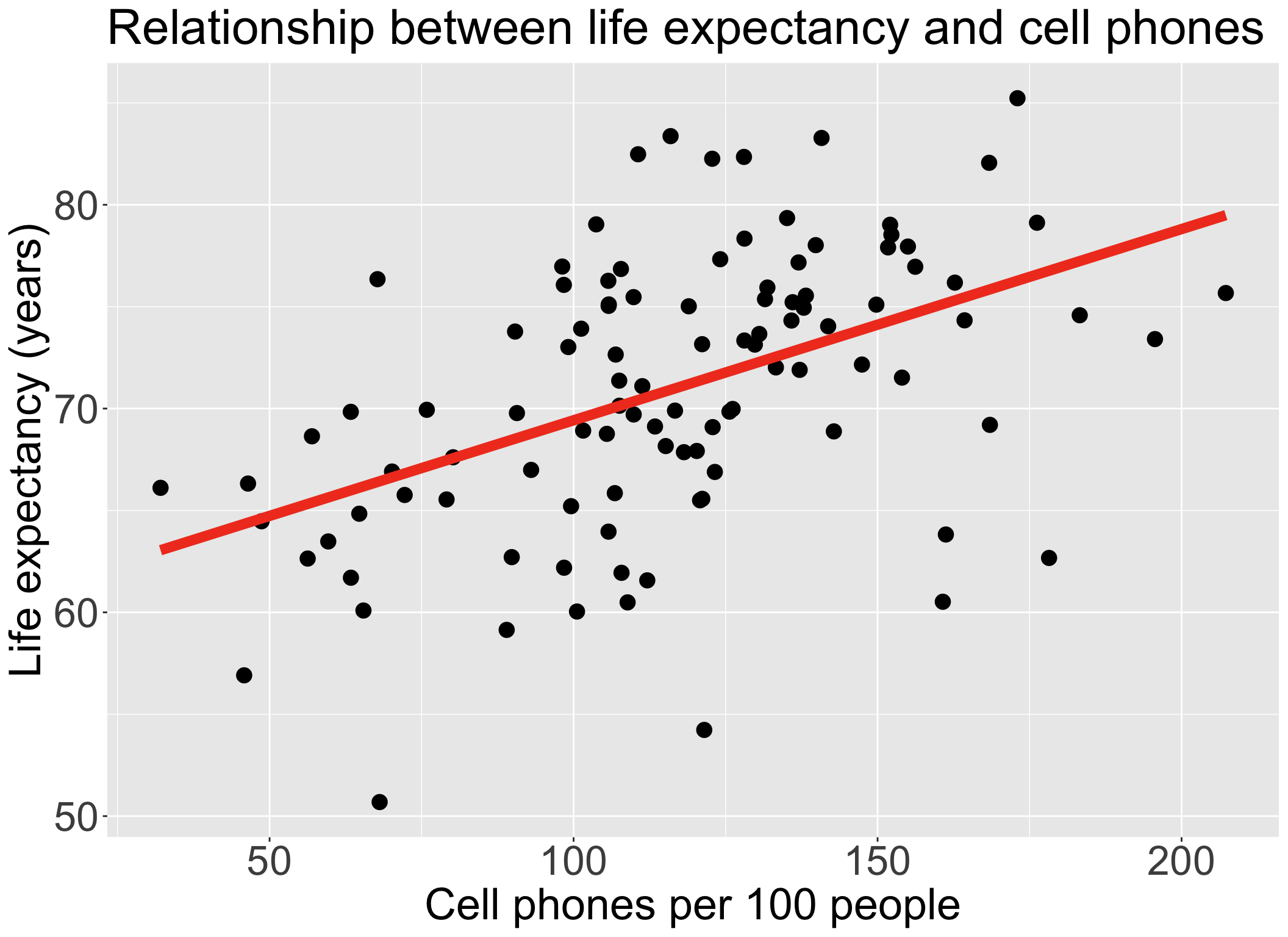
Always good to start with our main relationship: life expectancy vs. cell phones
lm() for this relationship

| term | estimate | std.error | statistic | p.value |
|---|---|---|---|---|
| (Intercept) | 60.04 | 2.06 | 29.21 | 0.00 |
| cell_phones_100 | 0.09 | 0.02 | 5.55 | 0.00 |
ggplot(gapm, aes(x = freedom_status, y = life_exp)) +
geom_jitter(size = 1, alpha = .6, width = 0.2) +
stat_summary(fun = mean, geom = "point", size = 8, shape = 18) +
labs(x = "Freedom status",
y = "Country life expectancy (years)",
title = "Life expectancy vs. Freedom status",
caption = "Diamonds = FS averages") +
theme(axis.title = element_text(size = 20),
axis.text = element_text(size = 20),
title = element_text(size = 20))
| term | df | sumsq | meansq | statistic | p.value |
|---|---|---|---|---|---|
| freedom_status | 2.00 | 415.94 | 207.97 | 4.89 | 0.01 |
| Residuals | 102.00 | 4,341.91 | 42.57 | NA | NA |
Recall from Lesson 5 (and Lesson 10):
anova() with one model name will compare the model (model_FS) to the intercept modeladd1() to add each variable one at a time and separatelyadd1()Single term additions
Model:
life_exp ~ 1
Df Sum of Sq RSS AIC F value Pr(>F)
<none> 4757.8 402.43
cell_phones_100 1 1094.10 3663.7 376.99 30.7588 2.271e-07 ***
freedom_status 2 415.94 4341.9 396.82 4.8856 0.009414 **
income_level_4 3 2285.53 2472.3 339.69 31.1230 2.484e-14 ***
basic_sani 1 2478.07 2279.8 327.18 111.9586 < 2.2e-16 ***
vax_rate 1 711.18 4046.7 387.43 18.1016 4.624e-05 ***
co2_emissions 1 79.27 4678.6 402.66 1.7451 0.189420
happiness_score 1 2269.61 2488.2 336.36 93.9503 3.569e-16 ***
---
Signif. codes: 0 '***' 0.001 '**' 0.01 '*' 0.05 '.' 0.1 ' ' 1
Identify candidates for your first multivariable model by performing an F-test on each covariate’s SLR
Candidates for first multivariable model
From the previous p-values from the F-test on each covariate’s SLR
Single term additions
Model:
life_exp ~ 1
Df Sum of Sq RSS AIC F value Pr(>F)
<none> 4757.8 402.43
cell_phones_100 1 1094.10 3663.7 376.99 30.7588 2.271e-07 ***
freedom_status 2 415.94 4341.9 396.82 4.8856 0.009414 **
income_level_4 3 2285.53 2472.3 339.69 31.1230 2.484e-14 ***
basic_sani 1 2478.07 2279.8 327.18 111.9586 < 2.2e-16 ***
vax_rate 1 711.18 4046.7 387.43 18.1016 4.624e-05 ***
co2_emissions 1 79.27 4678.6 402.66 1.7451 0.189420
happiness_score 1 2269.61 2488.2 336.36 93.9503 3.569e-16 ***
---
Signif. codes: 0 '***' 0.001 '**' 0.01 '*' 0.05 '.' 0.1 ' ' 1
init_model = gapm2 %>%
lm(formula =
life_exp ~ cell_phones_100 +
freedom_status +
income_level_4 +
basic_sani +
vax_rate +
co2_emissions +
happiness_score)
tbl_regression(
init_model,
label = list(
cell_phones_100 ~ "Cell phones per 100 people",
freedom_status ~ "Freedom status",
income_level_4 ~ "Income level",
basic_sani ~ "Basic sanitation (%)",
vax_rate ~ "Vaccination rate (%)",
co2_emissions ~ "CO2 emissions",
happiness_score ~ "Happiness score"
)) %>%
as_gt() %>% tab_options(table.font.size = 26) | Characteristic | Beta | 95% CI | p-value |
|---|---|---|---|
| Cell phones per 100 people | 0.00 | -0.03, 0.04 | 0.8 |
| Freedom status | |||
| NF | — | — | |
| PF | 0.88 | -1.1, 2.8 | 0.4 |
| F | -0.61 | -3.2, 2.0 | 0.6 |
| Income level | |||
| Low income | — | — | |
| Lower middle income | -1.3 | -4.6, 2.0 | 0.4 |
| Upper middle income | -0.76 | -5.1, 3.6 | 0.7 |
| High income | 3.7 | -1.8, 9.1 | 0.2 |
| Basic sanitation (%) | 0.14 | 0.08, 0.19 | <0.001 |
| Vaccination rate (%) | 0.04 | -0.07, 0.15 | 0.5 |
| CO2 emissions | 0.00 | 0.00, 0.00 | 0.3 |
| Happiness score | 0.15 | 0.04, 0.26 | 0.011 |
| Abbreviation: CI = Confidence Interval | |||
One variable at a time, we run the multivariable model with and without a variable
General rule: We can remove a variable if…
drop1(): If we put in our initial model, the function will remove each covariate and perform the respective F-test to test if the coefficients are 0 (null) or not (alternative).Single term deletions
Model:
life_exp ~ cell_phones_100 + freedom_status + income_level_4 +
basic_sani + vax_rate + co2_emissions + happiness_score
Df Sum of Sq RSS AIC F value Pr(>F)
<none> 1604.5 308.29
cell_phones_100 1 1.06 1605.5 306.36 0.0618 0.804149
freedom_status 2 32.94 1637.4 306.43 0.9650 0.384708
income_level_4 3 220.87 1825.3 315.83 4.3134 0.006769 **
basic_sani 1 441.50 2046.0 331.81 25.8660 1.864e-06 ***
vax_rate 1 9.30 1613.8 306.90 0.5451 0.462149
co2_emissions 1 15.46 1619.9 307.30 0.9057 0.343700
happiness_score 1 115.99 1720.5 313.62 6.7952 0.010629 *
---
Signif. codes: 0 '***' 0.001 '**' 0.01 '*' 0.05 '.' 0.1 ' ' 1
Let’s consider an example of a hypothesis test from drop1() for income_level_4
Null \(H_0\)
\(\beta_8= \beta_9 = \beta_{10}=0\)
Alternative \(H_1\)
\(\beta_8\neq0\) and/or \(\beta_9\neq0\) and/or \(\beta_{10}\neq0\)
Null / Smaller / Reduced model
\[\begin{aligned} LE = & \beta_0 + \beta_1 \text{CP} + \beta_2 I(\text{FS} = \text{PF}) + \\ & \beta_3 I(\text{FS} = \text{F}) + \beta_4 \text{BS} + \beta_5 \text{VR} + \\ & \beta_6 \text{CO2} + \beta_7 \text{HS} + \epsilon \end{aligned}\]
Alternative / Larger / Full model
\[\begin{aligned} LE = & \beta_0 + \beta_1 \text{CP} + \beta_2 I(\text{FS} = \text{PF}) + \\ & \beta_3 I(\text{FS} = \text{F}) + \beta_4 \text{BS} + \beta_5 \text{VR} + \\ & \beta_6 \text{CO2} + \beta_7 \text{HS} + \beta_8 I(\text{IL} = \text{lower middle}) + \\ & \beta_9 I(\text{IL} = \text{upper middle}) + \beta_{10} I(\text{IL} = \text{upper}) + \epsilon \end{aligned}\]
drop1(), we can see that the p-value for dropping income_level_4 is 0.006, which is < 0.05, so there is sufficient evidence that the coefficients are not 0Our F-test in drop1() concluded that we should drop a variable (e.g. freedom status)
Generic form: If we are only considering \(X_1\) and \(X_2\), then we need to run the following two models:
Fitted model 1 / reduced model (mod1): \(\widehat{Y} = \widehat\beta_0 + \widehat\beta_1X_1\)
Fitted model 2 / Full model (mod2): \(\widehat{Y} = \widehat\beta_0 + \widehat\beta_1X_1 +\widehat\beta_2X_2\)
Calculation for % change in coefficient
\[ \Delta\% = 100\% \cdot\frac{\lvert \widehat\beta_{1, \text{mod1}} - \widehat\beta_{1, \text{mod2}} \rvert }{\widehat\beta_{1, \text{mod2}}} = 100\% \cdot \frac{\lvert \widehat\beta_{1, \text{red}} - \widehat\beta_{1, \text{full}} \rvert }{\widehat\beta_{1, \text{full}}} \]
| term | df.residual | rss | df | sumsq | statistic | p.value |
|---|---|---|---|---|---|---|
| life_exp ~ cell_phones_100 + freedom_status + income_level_4 + basic_sani + vax_rate + co2_emissions + happiness_score | 94.000 | 1,604.465 | NA | NA | NA | NA |
| life_exp ~ cell_phones_100 + basic_sani + vax_rate + co2_emissions + happiness_score + income_level_4 | 96.000 | 1,637.409 | −2.000 | −32.944 | 0.965 | 0.385 |
\[ \Delta\% = 100\% \cdot \frac{\lvert \widehat\beta_{CP, full} - \widehat\beta_{CP, red} \rvert}{\widehat\beta_{CP, full}} = 100\% \cdot \frac{\lvert 0.004 - 0.0057\rvert}{0.004} = 41.97\% \]
| term | df.residual | rss | df | sumsq | statistic | p.value |
|---|---|---|---|---|---|---|
| life_exp ~ cell_phones_100 + freedom_status + income_level_4 + basic_sani + vax_rate + co2_emissions + happiness_score | 94.000 | 1,604.465 | NA | NA | NA | NA |
| life_exp ~ cell_phones_100 + freedom_status + income_level_4 + basic_sani + co2_emissions + happiness_score | 95.000 | 1,613.770 | −1.000 | −9.305 | 0.545 | 0.462 |
\[ \Delta\% = 100\% \cdot \frac{\lvert \widehat\beta_{CP, full} - \widehat\beta_{CP, red} \rvert}{\widehat\beta_{CP, full}} = 100\% \cdot \frac{\lvert 0.004 - 0.006\rvert}{0.004} = 49.72\% \]
| term | df.residual | rss | df | sumsq | statistic | p.value |
|---|---|---|---|---|---|---|
| life_exp ~ cell_phones_100 + freedom_status + income_level_4 + basic_sani + vax_rate + co2_emissions + happiness_score | 94.000 | 1,604.465 | NA | NA | NA | NA |
| life_exp ~ cell_phones_100 + freedom_status + income_level_4 + basic_sani + vax_rate + happiness_score | 95.000 | 1,619.924 | −1.000 | −15.459 | 0.906 | 0.344 |
\[ \Delta\% = 100\% \cdot \frac{\lvert \widehat\beta_{CP, full} - \widehat\beta_{CP, red} \rvert}{\widehat\beta_{CP, full}} = 100\% \cdot \frac{\lvert 0.004 - 0.0039\rvert}{0.004} = 3.35\% \]
At the end of this step, we have a preliminary main effects model
Where the variables are excluded that met the following criteria:
In our example, the preliminary main effects model (end of Step 3) has one less variable than the initial model (end of Step 2)
Preliminary main effects model includes:
cell_phones_100freedom_statusincome_level_4basic_sanivax_ratehappiness_scorePre-step: Exploratory data analysis
Step 1: Simple linear regressions / analysis
Look at each covariate with outcome
Perform SLR for each covariate
Step 2: Preliminary variable selection
From SLR, decide which variables go into the initial model
Use F-test to see if each covariate (on its own) explains enough variation in outcome
End with initial model
Step 3: Assess change in coefficients
From the initial model at end of step 2, we take a variable out of the model if:
P-value > 0.05 for the F-test of its own coefficients
Change in coefficient (\(\Delta\%\)) of our explanatory variable is < 10%
End with preliminary main effects model
Understand the overall steps for purposeful selection as a model building strategy
Apply purposeful selection to a dataset using R
We assume the linear regression model is linear for each continuous variable
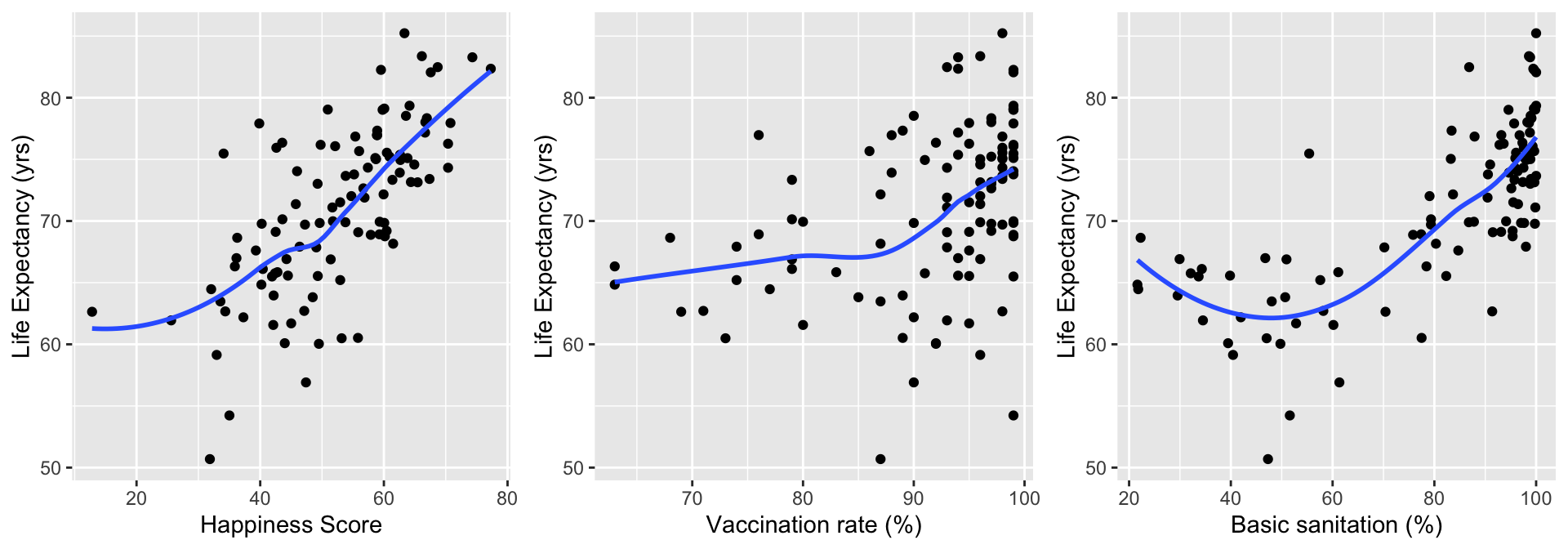
We need to assess linearity for continuous variables in the model
Three methods/approaches to address the violation of linearity assumption:
Approach will depend on the covariate!!
For our class, only implement Approach 1 or 2
Model at the end of Step 4 is the main effects model
Can also identify extreme observations
Again, just want to flag these values
Can influence the assessment of linearity when using fractional polynomials or spline functions
Helps us decide if the continuous variable can stay as is in the model
In Gapminder dataset, we have 5 continuous variables:
Plot each of these agains the outcome, life expectancy
HS = ggplot(data = gapm2, aes(y = life_exp, x = happiness_score)) +
geom_point() +
geom_smooth(se=F) + labs(x = "Happiness Score", y = "Life Expectancy (yrs)")
VR = ggplot(data = gapm2, aes(y = life_exp, x = vax_rate)) +
geom_point() +
geom_smooth(se=F) + labs(x = "Vaccination rate (%)", y = "Life Expectancy (yrs)")
BS = ggplot(data = gapm2, aes(y = life_exp, x = basic_sani)) +
geom_point() +
geom_smooth(se=F) + labs(x = "Basic sanitation (%)", y = "Life Expectancy (yrs)")
grid.arrange(HS, VR, BS, nrow=1)Three methods/approaches to address the violation of linearity assumption:
Categorize continuous variables
Percentiles, quartiles, quantiles
Meaningful thresholds
Disadvantages:
Takes some time to create new variables, especially with multiple continuous covariates
Start with quartiles, but might be more appropriate to use different splits
Advantage: graphical and visually helps
For income, I would use Gapminder’s income level groups
Experts in the field have developed these income groups

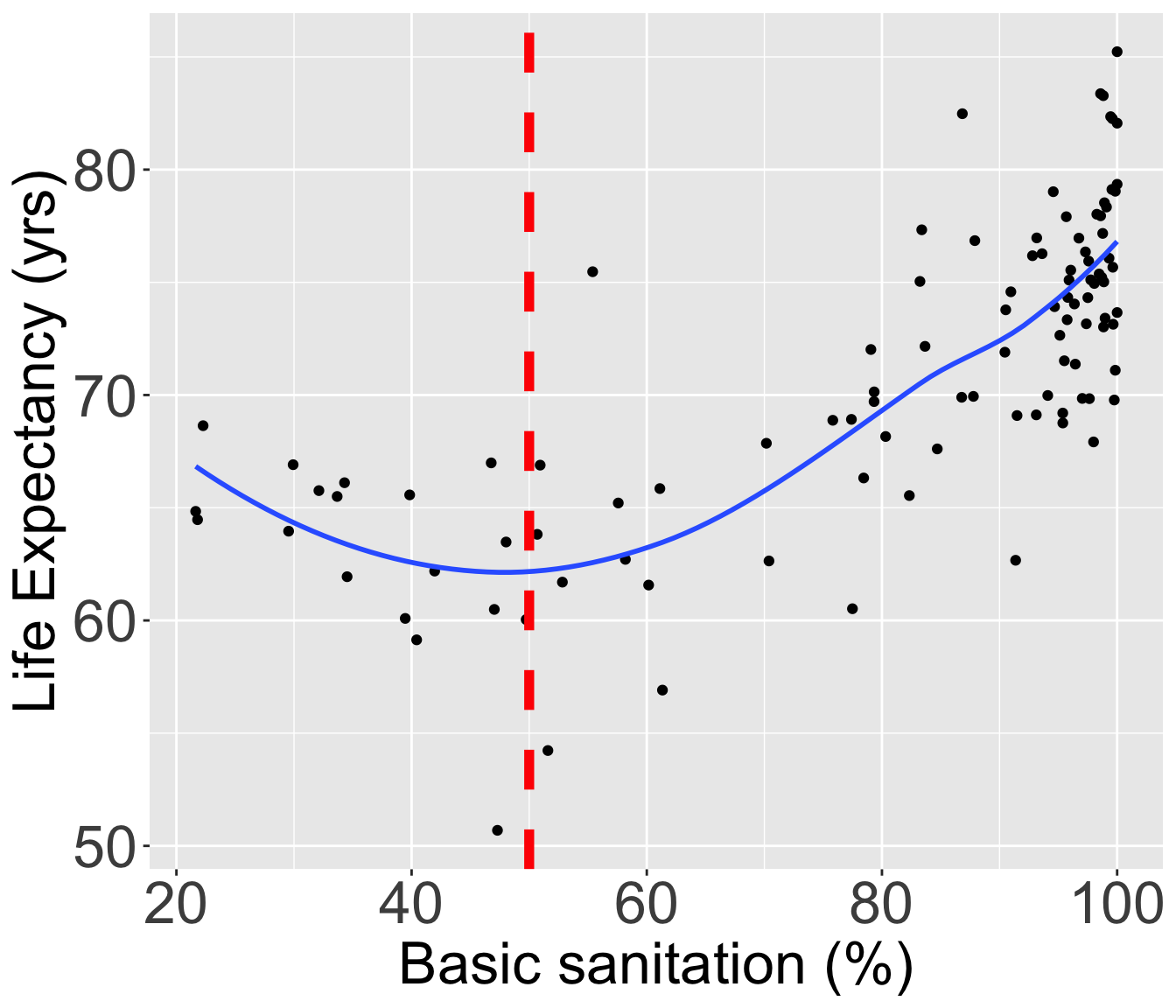
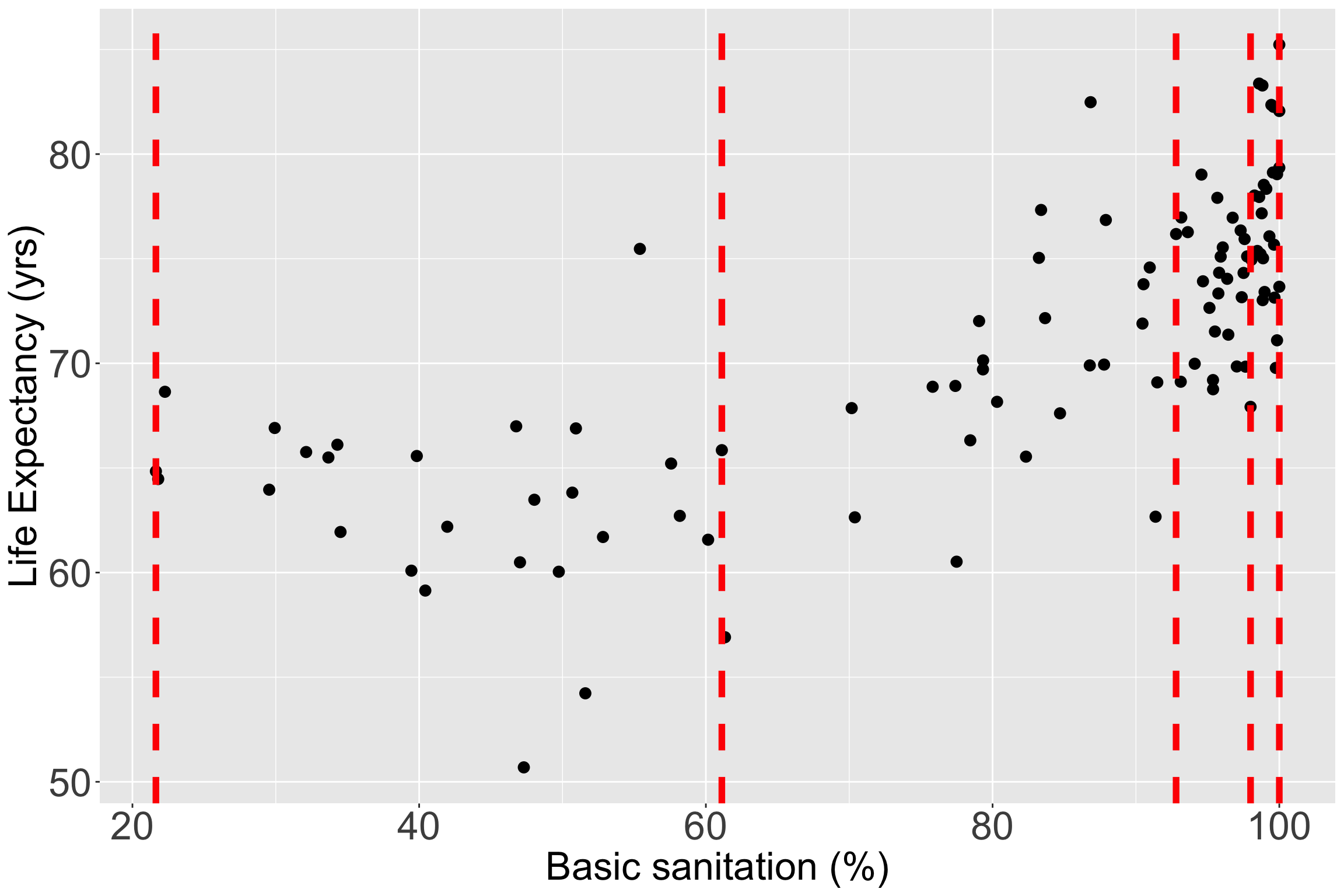
Let’s still try it out with basic sanitation
I have plotted the quartile lines of basic sanitation with red lines
vline_coordinates= data.frame(Quantile_Name=names(quantile(gapm2$basic_sani)),
quantile_values=as.numeric(quantile(gapm2$basic_sani)))
ggplot(data = gapm2, aes(y = life_exp, x = basic_sani)) +
geom_point(size = 3) +
#geom_smooth(se=F) +
labs(x = "Basic sanitation (%)", y = "Life Expectancy (yrs)") +
geom_vline(data = vline_coordinates, aes(xintercept = quantile_values),
color = "red", linetype = "dashed", size = 2) +
theme(axis.title = element_text(size = 25),
axis.text = element_text(size = 25),
title = element_text(size = 25))
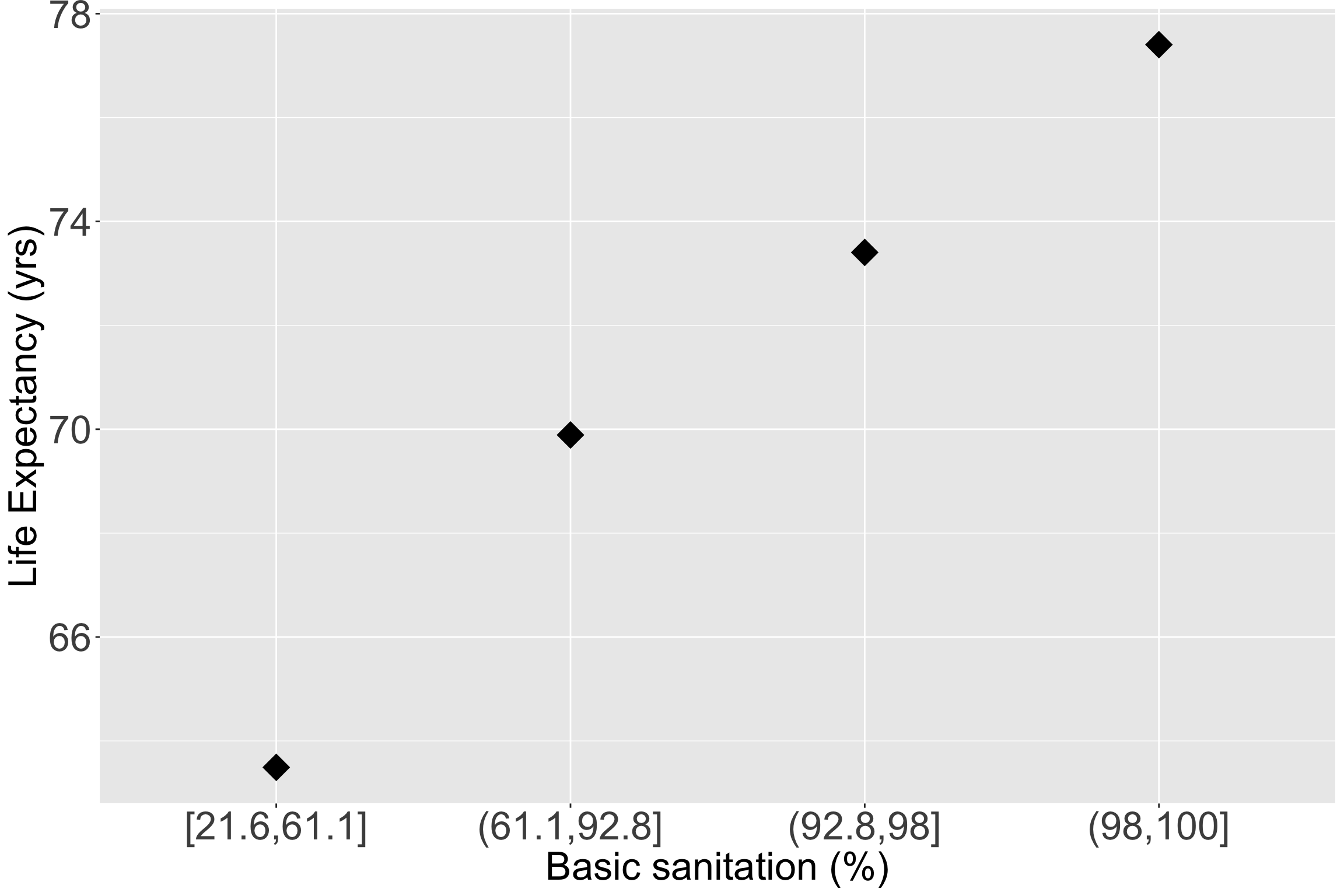
ggplot(data = gapm2, aes(y = life_exp, x = BS_q)) +
# geom_point(size = 3, aes(y = life_exp, x = co2_emissions)) +
stat_summary(fun = mean, geom = "point", size = 8, shape = 18) +
labs(x = "Basic sanitation (%)", y = "Life Expectancy (yrs)") +
theme(axis.title = element_text(size = 25),
axis.text = element_text(size = 25),
title = element_text(size = 25))
| Characteristic | Beta | 95% CI | p-value |
|---|---|---|---|
| Cell phones per 100 people | 0.01 | -0.02, 0.04 | 0.7 |
| Basic sanitation (%) | |||
| [21.6,61.1] | — | — | |
| (61.1,92.8] | 4.5 | 2.0, 7.0 | <0.001 |
| (92.8,98] | 7.0 | 4.2, 9.8 | <0.001 |
| (98,100] | 9.0 | 5.8, 12 | <0.001 |
| Freedom status | |||
| NF | — | — | |
| PF | 1.2 | -0.72, 3.2 | 0.2 |
| F | -0.35 | -2.9, 2.2 | 0.8 |
| Income level | |||
| Low income | — | — | |
| Lower middle income | -0.25 | -3.4, 2.9 | 0.9 |
| Upper middle income | -0.11 | -4.2, 4.0 | >0.9 |
| High income | 3.5 | -1.8, 8.8 | 0.2 |
| Vaccination rate (%) | 0.03 | -0.08, 0.14 | 0.6 |
| Happiness score | 0.14 | 0.03, 0.25 | 0.014 |
| Abbreviation: CI = Confidence Interval | |||
Main concepts and transformations presented in Lesson 7 SLR: Model Evaluation and Diagnostics (slide 33 on)
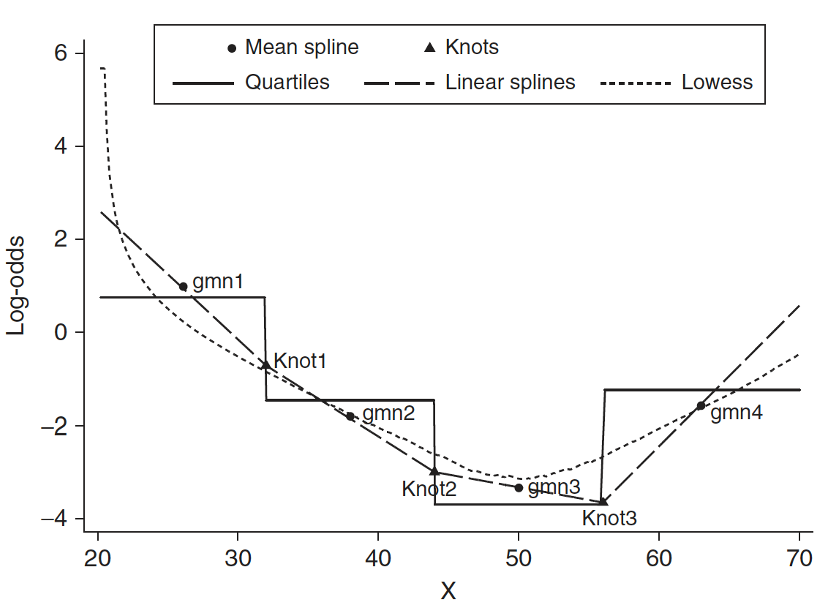
Idea: test many transformations of a continuous covariate
Recall Tukey’s transformation (power) ladder
R’s gladder() to see the transformations| Power p | -3 | -2 | -1 | -1/2 | 0 | 1/2 | 1 | 2 | 3 |
|---|---|---|---|---|---|---|---|---|---|
| \(\frac{1}{x^3}\) | \(\frac{1}{x^2}\) | \(\frac{1}{x}\) | \(\frac{1}{\sqrt{x}}\) | \(\log(x)\) | \(\sqrt{x}\) | \(x\) | \(x^2\) | \(x^3\) |
We can run through each and test different models, or use the approach from Lesson 7
There is also a package we can use!
| df.initial | select | alpha | df.final | power1 | power2 | |
|---|---|---|---|---|---|---|
| basic_sani | 4 | 1 | 0.05 | 4 | 0 | 0.5 |
| income_level_4Lower middle income | 1 | 1 | 0.05 | 1 | 1 | . |
| income_level_4Upper middle income | 1 | 1 | 0.05 | 1 | 1 | . |
| income_level_4High income | 1 | 1 | 0.05 | 1 | 1 | . |
| happiness_score | 1 | 1 | 0.05 | 1 | 1 | . |
| freedom_statusPF | 1 | 1 | 0.05 | 1 | 1 | . |
| freedom_statusF | 1 | 1 | 0.05 | 1 | 1 | . |
| vax_rate | 1 | 1 | 0.05 | 1 | 1 | . |
| cell_phones_100 | 1 | 1 | 0.05 | 1 | 1 | . |
| df.initial | select | alpha | df.final | power1 | power2 | |
|---|---|---|---|---|---|---|
| basic_sani | 4 | 1 | 0.05 | 4 | 0 | 0.5 |
| income_level_4Lower middle income | 1 | 1 | 0.05 | 1 | 1 | . |
| income_level_4Upper middle income | 1 | 1 | 0.05 | 1 | 1 | . |
| income_level_4High income | 1 | 1 | 0.05 | 1 | 1 | . |
| happiness_score | 1 | 1 | 0.05 | 1 | 1 | . |
| freedom_statusPF | 1 | 1 | 0.05 | 1 | 1 | . |
| freedom_statusF | 1 | 1 | 0.05 | 1 | 1 | . |
| vax_rate | 1 | 1 | 0.05 | 1 | 1 | . |
| cell_phones_100 | 1 | 1 | 0.05 | 1 | 1 | . |
fp() does NOT test for linearity assumption, just tells you best fit


Need to specify knots for spline functions
If you think this is cool, I highly suggest you look into Functional Data Analysis (FDA) or Functional Regression
In R there are a few options to incorporate splines
pspline( ): More information
smoothHR(): More information
We concluded that we will use:
Note
This is also a good step to decide if you would like to score a categorical variable (Lesson 5)
| Characteristic | Beta | 95% CI | p-value |
|---|---|---|---|
| Cell phones per 100 people | 0.01 | -0.02, 0.04 | 0.7 |
| Basic sanitation (%) | |||
| [21.6,61.1] | — | — | |
| (61.1,92.8] | 4.5 | 2.0, 7.0 | <0.001 |
| (92.8,98] | 7.0 | 4.2, 9.8 | <0.001 |
| (98,100] | 9.0 | 5.8, 12 | <0.001 |
| Freedom status | |||
| NF | — | — | |
| PF | 1.2 | -0.72, 3.2 | 0.2 |
| F | -0.35 | -2.9, 2.2 | 0.8 |
| Income level | |||
| Low income | — | — | |
| Lower middle income | -0.25 | -3.4, 2.9 | 0.9 |
| Upper middle income | -0.11 | -4.2, 4.0 | >0.9 |
| High income | 3.5 | -1.8, 8.8 | 0.2 |
| Vaccination rate (%) | 0.03 | -0.08, 0.14 | 0.6 |
| Happiness score | 0.14 | 0.03, 0.25 | 0.014 |
| Abbreviation: CI = Confidence Interval | |||
Add the interaction variables, one at a time, to the main effects model, and assess the significance using a F-test
We test with \(\alpha = 0.10\)
Follow the F-test procedure in Lesson 10 (MLR: Using the F-test)
Use the hypothesis tests for the specific variable combo:
Binary & continuous variable (Lesson 11, LOB 2)
Testing a single coefficient for the interaction term using F-test comparing full model to reduced model
Multi-level & continuous variables (Lesson 11, LOB 3)
Testing group of coefficients for the interaction terms using F-test comparing full to reduced model
Binary & multi-level variable (Lesson 12, LOB 4)
Testing group of coefficients for the interaction terms using F-test comparing full to reduced model
Two continuous variables (Lesson 12, LOB 5)
Testing a single coefficient for the interaction term using F-test comparing full to reduced model
add1() function to compare a full model (interactions with CP) and reduced model (main effects model)Single term additions
Model:
life_exp ~ cell_phones_100 + BS_q + freedom_status + income_level_4 +
vax_rate + happiness_score
Df Sum of Sq RSS AIC F value Pr(>F)
<none> 1513.0 304.13
cell_phones_100:BS_q 3 23.295 1489.7 308.50 0.4691 0.7046
cell_phones_100:freedom_status 2 69.314 1443.7 303.21 2.1845 0.1184
cell_phones_100:income_level_4 3 82.787 1430.2 304.22 1.7365 0.1652
cell_phones_100:vax_rate 1 41.315 1471.7 303.22 2.5827 0.1115
cell_phones_100:happiness_score 1 0.949 1512.1 306.06 0.0577 0.8106
No significant interactions with cell phones per 100 people (p-value > 0.1), so we would not include any interactions with that variable
Think about it: does that track with what we saw in our interactions lecture?
add1() for income_level_4Null \(H_0\)
\(\beta_8= \beta_9 = \beta_{10}=0\)
Alternative \(H_1\)
\(\beta_{10}\neq0\) and/or \(\beta_{11}\neq0\) and/or \(\beta_{12}\neq0\)
Null / Smaller / Reduced model
\[\begin{aligned} LE = & \beta_0 + \beta_1 \text{CP} + \beta_2 I(\text{FS} = \text{PF}) + \\ & \beta_3 I(\text{FS} = \text{F}) + \beta_4 \text{BS} + \beta_5 \text{VR} + \\ & \beta_6 \text{HS} + \beta_7 I(\text{IL} = \text{lower middle}) + \\ & \beta_8 I(\text{IL} = \text{upper middle}) + \\ & \beta_{9} I(\text{IL} = \text{upper}) + \epsilon \end{aligned}\]
Alternative / Larger / Full model
\[\begin{aligned} LE = & \beta_0 + \beta_1 \text{CP} + \beta_2 I(\text{FS} = \text{PF}) + \beta_3 I(\text{FS} = \text{F}) + \\ & \beta_4 \text{BS} + \beta_5 \text{VR} + \beta_6 \text{HS} + \beta_7 I(\text{IL} = \text{lower middle}) + \\ & \beta_8 I(\text{IL} = \text{upper middle}) + \beta_{9} I(\text{IL} = \text{upper}) + \\ & \beta_{10} \text{CP} \cdot I(\text{IL} = \text{lower middle}) + \\ & \beta_{11} \text{CP} \cdot I(\text{IL} = \text{upper middle}) + \\ & \beta_{12} \text{CP} \cdot I(\text{IL} = \text{upper}) + \epsilon \end{aligned}\]
add1(), we can see that the p-value for dropping income_level_4 is 0.165, which is > 0.1, so we do not reject the null, aka no interaction
Methods for diagnostics will be discussed next class
Combination of diagnostics and model fit statistics!
Looked at model fit statistics in last lesson
Look at diagnostics in Lesson 15: MLR Diagnostics
Our final model contains
| Model | Adjusted_R_sq | AIC | BIC |
|---|---|---|---|
| Final model | 0.644 | 604.108 | 638.609 |
glance() in broom package)Remember the preliminary main effects model (at end of Step 3): same as final model but basic sanitation was not categorized
We can compare model fit statistics of the preliminary main effects model and the final model
fm_glance = glance(final_model) %>% mutate(Model = "Final model") %>%
select(Model, `Adj R-squared` = adj.r.squared, AIC, BIC)
pmem_glance = glance(prelim_me_model) %>%
mutate(Model = "Preliminary main effects model") %>%
select(Model, `Adj R-squared` = adj.r.squared, AIC, BIC)
rbind(fm_glance, pmem_glance) %>% gt() %>%
tab_options(table.font.size = 35) %>% fmt_number(decimals = 3)| Model | Adj R-squared | AIC | BIC |
|---|---|---|---|
| Final model | 0.644 | 604.108 | 638.609 |
| Preliminary main effects model | 0.627 | 608.269 | 640.116 |
Remember, adjusted \(R^2\), AIC, and BIC penalize models for more coefficients
Final model has better model fit statistics (higher adjusted \(R^2\), lower AIC and BIC)
Lesson 14: Purposeful Selection