Poster Help Session

Nicky Wakim

2026-03-09

Some lab 4 notes

  • I added some code to the instructions to order the labels in your forest plot!
  • For interactions, the only possible interaction you should include should be your subquestion!!
    • Multiple interaction is a little too complicated right now
  • If you have an interaction, you should not include it in your forest plot (more to come)
    • Best to include the multivariable visualization you made in Lab 3
    • Describe how the effect modifier has changed the effect of your main variable
    • Make sure you are interpreting your coefficients correctly if you have an interaction!!

Get into groups of 2-4

  • No more than 4!
  • Introduce yourself and your research question
  • Share you html documents with each other (email, airdrop, etc.)

Purposeful Selection

  • Did everyone follow the steps correctly? Please review the decision rules among yourselves
  • Parts that seemed especially difficult
    • Change in coefficient estimate

Some notes

  • I will NOT be counting exact bullet points
    • If it says 2-3, anything less than 4 is okay
    • If it says 5-6, it shouldn’t be 1 and it shouldn’t be >10
  • Do NOT make bullet points really long!
  • I tried the QMD poster, and it is REALLY hard to troubleshoot
    • I highly suggest making your poster in powerpoint!

Background

  • Length: 5-8 bullets
  • Purpose: Introduce the research question and why it is important to study
  • This section is non-technical.
    • By reading just the introduction and conclusion, someone without a technical background should have an idea of what they study was about, why it is important, and what the main results are
  • You may start with your bullets from Lab 1, but you should edit it and make sure it flows into your report well!
  • Should contain some references

Methods

  • Length: 8-10 bullets
  • Purpose: Describe the analyses that were conducted and methods used to select variables and check diagnostics
  • Some important methods to discuss (You may divide these into your sections, not necessarily with these names)
    • General approach to the dataset
    • Variables and variable creation
    • Model building: we performed purposeful selection
    • Final model
    • Model diagnostics

Methods for life expectancy

  • Data were collected from Gapminder and World Bank with 197 countries in 2011
  • We performed a complete case analysis on 105 countries
  • We generated a categorized variable for basic sanitation and income level
    • Basic sanitation used quartiles
    • Income levels used the specified groupings by Gapminder
  • We used purposeful model selection, a combination of field expertise and statistical methods, to determine the final model
  • We performed linear regression on our outcome, life expectancy, with a main effect for cell phones per 100 people while adjusting for confounders \[\widehat{\text{LE}} = \widehat{\beta}_0 + \widehat{\beta}_1 \text{FLR} + \text{other confounders}\]
    • We adjusted for: income levels, basic sanitation, vaccination rate, freedom status, and happiness score
  • We investigated model assumptions and diagnostics using standardized residuals, leverage, Cook’s distance, and variance inflation factors (VIFs)
  • We used R version 4.5.1 to analyze data

Results: What should be in your results?

  1. Table 1 (table summary in Lesson 2)

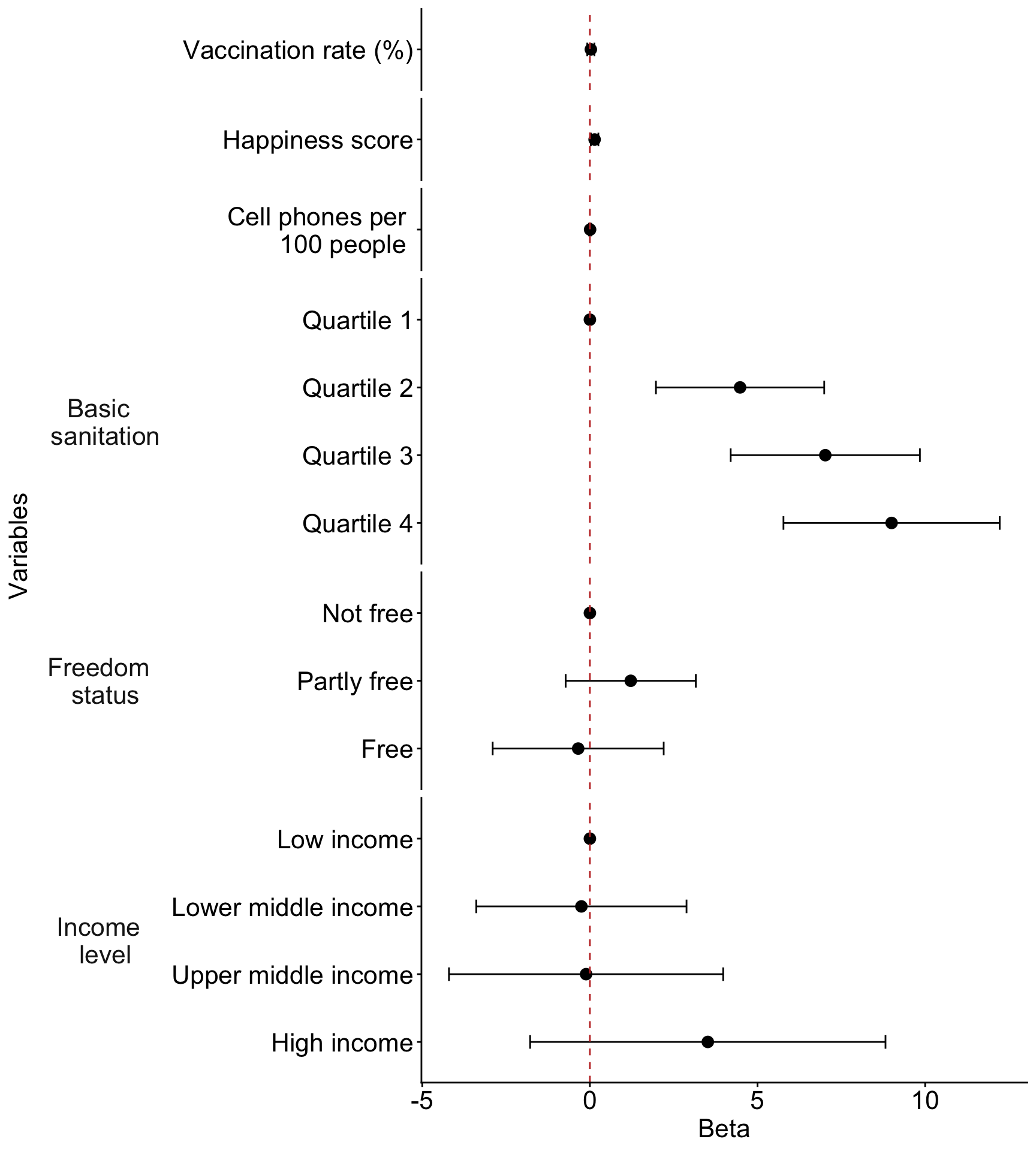
  2. Regression table or Forest plot

  3. One additional figure or table to help understand your question

  4. Interpretation(s) of important coefficient estimates

1. Table 1 (table summary in Lesson 2)

library(gtsummary)

gapm2_vars = gapm2 %>% 
  select(cell_phones_100, 
         vax_rate, 
         freedom_status, 
         income_level_4, 
         basic_sani,
         happiness_score)

tbl_summary(
  gapm2_vars, 
  label = list(
    cell_phones_100 ~ "Cell phones per 100 people", 
    basic_sani ~ "Basic sanitation (%)",
    freedom_status ~ "Freedom status",
    income_level_4 ~ "Income level",
    vax_rate ~ "Vaccination rate (%)",
    happiness_score ~ "Happiness score"
    ), 
  statistic = list(all_continuous() ~ "{mean} ({sd})")
  )
Characteristic N = 1051
Cell phones per 100 people 117 (35)
Vaccination rate (%) 91 (9)
Freedom status
    Not free 31 (30%)
    Partly free 46 (44%)
    Free 28 (27%)
Income level
    Low income 15 (14%)
    Lower middle income 37 (35%)
    Upper middle income 34 (32%)
    High income 19 (18%)
Basic sanitation (%) 80 (24)
Happiness score 52 (12)
1 Mean (SD); n (%)

2. Regression table or Forest plot

tbl_regression(
  final_model, 
  label = list(
    cell_phones_100 ~ "Cell phones per 100 people", 
    BS_q ~ "Basic sanitation (%)",
    freedom_status ~ "Freedom status",
    income_level_4 ~ "Income level",
    vax_rate ~ "Vaccination rate (%)",
    happiness_score ~ "Happiness score"
    )) %>% 
  as_gt() %>% 
  tab_options(table.font.size = 25) %>%
  cols_width(label ~ px(250))
Characteristic Beta 95% CI p-value
Cell phones per 100 people 0.01 -0.02, 0.04 0.7
Basic sanitation (%)


    Quartile 1
    Quartile 2 4.5 2.0, 7.0 <0.001
    Quartile 3 7.0 4.2, 9.8 <0.001
    Quartile 4 9.0 5.8, 12 <0.001
Freedom status


    Not free
    Partly free 1.2 -0.72, 3.2 0.2
    Free -0.35 -2.9, 2.2 0.8
Income level


    Low income
    Lower middle income -0.25 -3.4, 2.9 0.9
    Upper middle income -0.11 -4.2, 4.0 >0.9
    High income 3.5 -1.8, 8.8 0.2
Vaccination rate (%) 0.03 -0.08, 0.14 0.6
Happiness score 0.14 0.03, 0.25 0.014
Abbreviation: CI = Confidence Interval

2. Regression table or Forest plot

  • This is a fun one to investigate!
  • Stick to the regression table if you are having trouble with this!
Code for forest plot
library(broom.helpers)

model_tidy = tidy_and_attach(final_model, conf.int=T) %>%
  tidy_remove_intercept() %>%
  tidy_add_reference_rows() %>% tidy_add_estimate_to_reference_rows() %>%
  tidy_add_term_labels() %>%
  mutate(label = fct_rev(fct_inorder(label))) %>%
  mutate(var_label = case_match(var_label, 
                               "BS_q" ~ "Basic sanitation",
                               "freedom_status" ~ "Freedom status",
                               "income_level_4" ~ "Income level",
                               "vax_rate" ~ " ",
                               "happiness_score" ~ "  ",
                               "cell_phones_100" ~ "    ",
                               .default = var_label
                         )) %>%
  mutate(label = case_match(label, 
                               "vax_rate" ~ "Vaccination rate (%)",
                               "happiness_score" ~ "Happiness score",
                               "cell_phones_100" ~ "Cell phones per 100 people",
                               .default = label
                         ))

ggplot(data=model_tidy, aes(y=label, x=estimate, xmin=conf.low, xmax=conf.high)) + 
  facet_grid(rows = vars(var_label), scales = "free",
             space='free_y', switch = "y") + 
  geom_point(size = 3) +  geom_errorbarh(height=.2) + 
  geom_vline(xintercept=0, color='#C2352F', linetype='dashed', alpha=1) +
  theme_classic() +
  labs(x = "Beta", y = "Variables") +
  theme(axis.title = element_text(size = 16), axis.text = element_text(size = 16), 
        title = element_text(size = 16), strip.placement = "outside", 
        strip.text.y.left = element_text(size = 16, angle = 0), 
        strip.background = element_blank())
Reporting results

  • Length: 5-8 bullets
  • Purpose: Interpret the results of your analyses and explain what they mean in the context


  • Let’s just say basic sanitation was my main variable
  • In my results, I would say something like:
    • In general, countries in higher quartiles of basic sanitation have higher life expectancy adjusting for all other variables in the final model
    • For example, based on the estimated coefficients in the forest plot:
      • Countries in the 4th quartile of basic sanitation have an expected life expectancy that is 9 years higher than countries in the 1st quartile of basic sanitation (95% CI: 5.77, 12.22).
      • Similar interpretations can be made for coefficients of the 2nd and 3rd quartiles of basic sanitation

Important note if you have interactions

  • There is extra care to reporting results from interactions

  • Please make sure you are interpreting your coefficients correctly!!

  • If you have an interaction, you cannot interpret the main effects without considering the interaction term

  • You can exclude the interaction coefficients from your forest plot

Example of main effects interpretation with an interaction

  • For example, if we have an interaction between importance of weight and political ID, our model might look like: \[\begin{aligned} \widehat{\text{IAT}} = &\widehat{\beta}_0 + \widehat{\beta}_1 I(\text{imp} = \text{Slightly}) + \widehat{\beta}_2 I(\text{imp} = \text{Moderately}) + \widehat{\beta}_3 I(\text{imp} = \text{Very}) + \\ &\widehat{\beta}_4 I(\text{imp} = \text{Extremely}) + \widehat{\beta}_5 I(\text{pol} = \text{Strongly liberal}) + \widehat{\beta}_6 I(\text{pol} = \text{Moderately liberal}) + \\ & \widehat{\beta}_7 I(\text{pol} = \text{Slightly liberal}) + \widehat{\beta}_8 I(\text{pol} = \text{Slightly conservative}) + \\ & \widehat{\beta}_9 I(\text{pol} = \text{Moderately conservative}) + \widehat{\beta}_{10} I(\text{pol} = \text{Strongly conservative}) + \\ & ... \text{confounders} ... + \\ & \widehat{\beta}_{11} I(\text{imp} = \text{Slightly}) \cdot I(\text{pol} = \text{Strongly liberal}) + \\ &\widehat{\beta}_{12} I(\text{imp} = \text{Slightly}) \cdot I(\text{pol} = \text{Moderately liberal}) + \\ & \widehat{\beta}_{13} I(\text{imp} = \text{Slightly}) \cdot I(\text{pol} = \text{Slightly liberal}) + \\ &\widehat{\beta}_{14} I(\text{imp} = \text{Slightly}) \cdot I(\text{pol} = \text{Slightly conservative}) + \\ & \widehat{\beta}_{15} I(\text{imp} = \text{Slightly}) \cdot I(\text{pol} = \text{Moderately conservative}) + \\ & \widehat{\beta}_{16} I(\text{imp} = \text{Slightly}) \cdot I(\text{pol} = \text{Strongly conservative}) \\ \end{aligned}\]