Lesson 8: SLR: Model Diagnostics

Nicky Wakim

2025-02-03

Learning Objectives

  1. Use visualizations and cut off points to flag potentially influential points using residuals, leverage, and Cook’s distance

  2. Handle influential points and assumption violations by checking data errors, reassessing the model, and making data transformations.

  3. Implement a model with data transformations and determine if it improves the model fit.

Process of regression data analysis

Model Selection

  • Building a model

  • Selecting variables

  • Prediction vs interpretation

  • Comparing potential models

Model Fitting

  • Find best fit line

  • Using OLS in this class

  • Parameter estimation

  • Categorical covariates

  • Interactions

Model Evaluation

  • Evaluation of model fit
  • Testing model assumptions
  • Residuals
  • Transformations
  • Influential points
  • Multicollinearity

Model Use (Inference)

  • Inference for coefficients
  • Hypothesis testing for coefficients
  • Inference for expected \(Y\) given \(X\)
  • Prediction of new \(Y\) given \(X\)

Let’s remind ourselves of the model that we have been working with

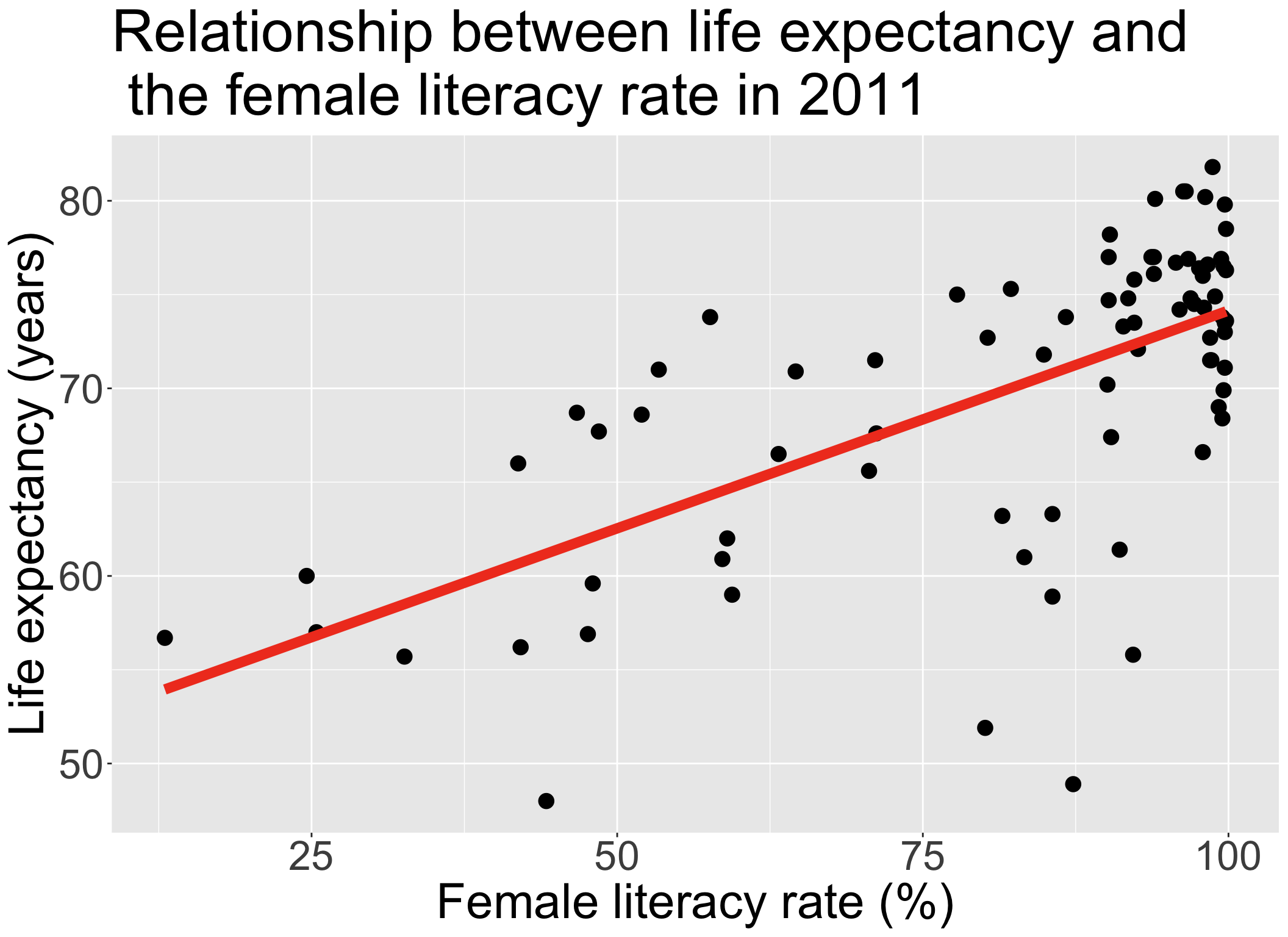
  • We have been looking at the association between life expectancy and female literacy rate

  • We used OLS to find the coefficient estimates of our best-fit line

\[Y = \beta_0 + \beta_1 X + \epsilon\]

term estimate std.error statistic p.value
(Intercept) 50.93 2.66 19.14 0.00
FemaleLiteracyRate 0.23 0.03 7.38 0.00
\[\begin{aligned} \widehat{Y} &= \widehat\beta_0 + \widehat\beta_1 \cdot X\\ \widehat{\text{life expectancy}} &= 50.9 + 0.232 \cdot \text{female literacy rate} \end{aligned}\]

Our residuals will help us a lot in our diagnostics!


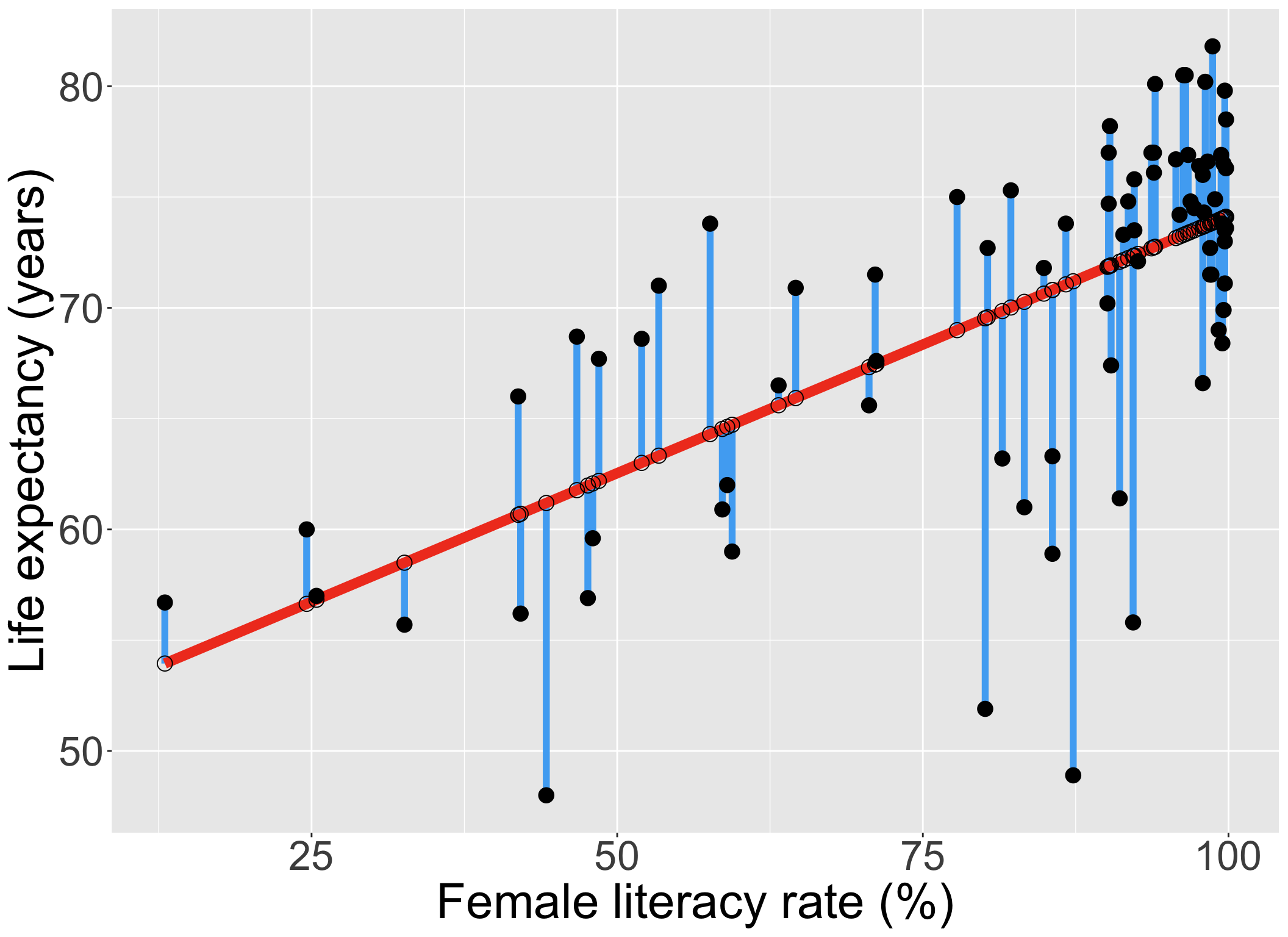
  • The residuals \(\widehat\epsilon_i\) are the vertical distances between

    • the observed data \((X_i, Y_i)\)
    • the fitted values (regression line) \(\widehat{Y}_i = \widehat\beta_0 + \widehat\beta_1 X_i\)

\[ \widehat\epsilon_i =Y_i - \widehat{Y}_i \text{,   for } i=1, 2, ..., n \]
augment(): getting extra information on the fitted model

  • Run model1 through augment() (model1 is input)

    • So we assigned model1 as the output of the lm() function (model1 is output)
  • Will give us values about each observation in the context of the fitted regression model

    • cook’s distance (.cooksd), fitted value (.fitted, \(\widehat{Y}_i\)), leverage (.hat), residual (.resid), standardized residuals (.std.resid)
aug1 <- augment(model1) 
glimpse(aug1)
Rows: 80
Columns: 8
$ LifeExpectancyYrs  <dbl> 56.7, 76.7, 60.9, 76.9, 76.0, 73.8, 71.0, 76.9, 58.…
$ FemaleLiteracyRate <dbl> 13.0, 95.7, 58.6, 99.4, 97.9, 99.5, 53.4, 96.7, 85.…
$ .fitted            <dbl> 53.94643, 73.14897, 64.53453, 74.00809, 73.65980, 7…
$ .resid             <dbl> 2.7535654, 3.5510294, -3.6345319, 2.8919074, 2.3402…
$ .hat               <dbl> 0.13628996, 0.01768176, 0.02645854, 0.02077123, 0.0…
$ .sigma             <dbl> 6.172684, 6.168414, 6.167643, 6.172935, 6.176043, 6…
$ .cooksd            <dbl> 1.835891e-02, 3.062372e-03, 4.887448e-03, 2.400993e…
$ .std.resid         <dbl> 0.48238134, 0.58332052, -0.59972251, 0.47579667, 0.…

RDocumentation on the augment() function.

Revisiting our LINE assumptions

[L] Linearity of relationship between variables

Check if there is a linear relationship between the mean response (Y) and the explanatory variable (X)

[I] Independence of the \(Y\) values

Check that the observations are independent

[N] Normality of the \(Y\)’s given \(X\) (residuals)

Check that the responses (at each level X) are normally distributed

  • Usually measured through the residuals

[E] Equality of variance of the residuals (homoscedasticity)

Check that the variance (or standard deviation) of the responses is equal for all levels of X

  • Usually measured through the residuals

Learning Objectives

  1. Use visualizations and cut off points to flag potentially influential points using residuals, leverage, and Cook’s distance
  1. Handle influential points and assumption violations by checking data errors, reassessing the model, and making data transformations.

  2. Implement a model with data transformations and determine if it improves the model fit.

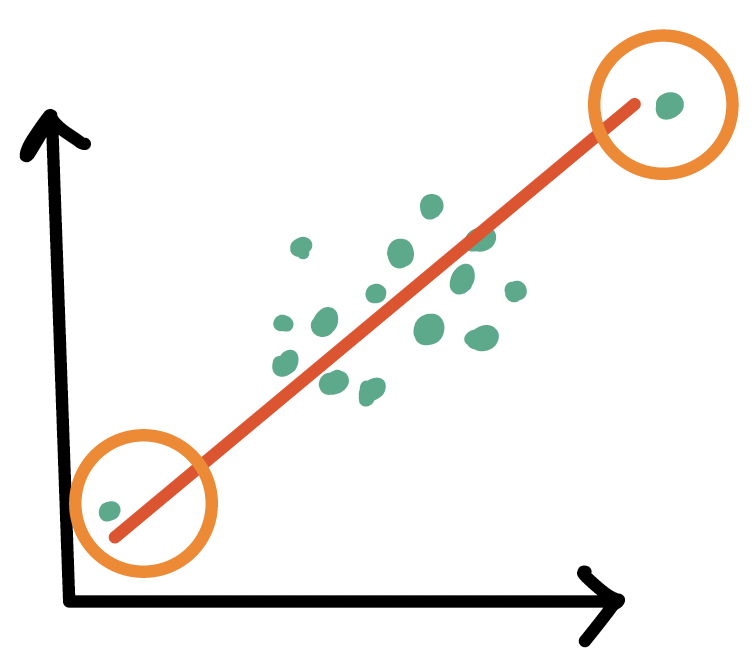
Types of influential points

Outliers

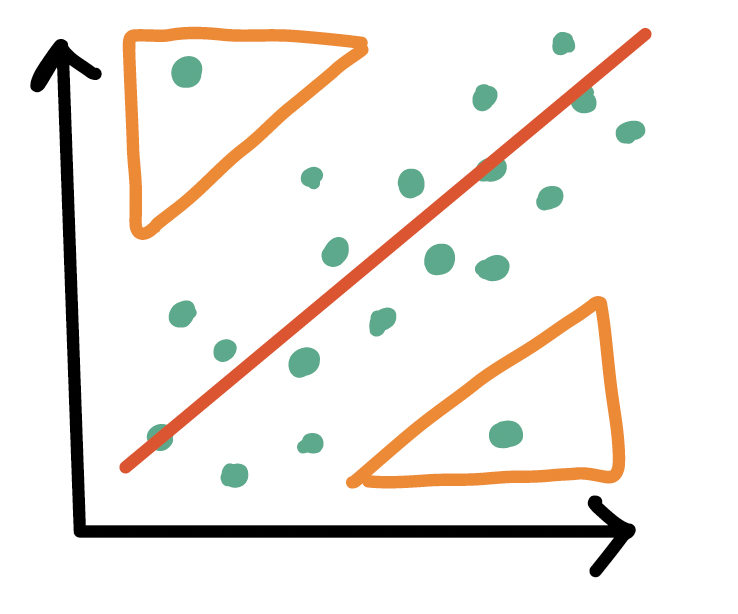
  • An observation (\(X_i, Y_i\)) whose response \(Y_i\) does not follow the general trend of the rest of the data


High leverage observations

  • An observation (\(X_i, Y_i\)) whose predictor \(X_i\) has an extreme value
  • \(X_i\) can be an extremely high or low value compared to the rest of the observations
Tools to measure influential points

  • Internally standardized residual (outlier)


  • Leverage (high leverage point)


  • Cook’s distance (overall influence, both)

Poll Everywhere Question 1

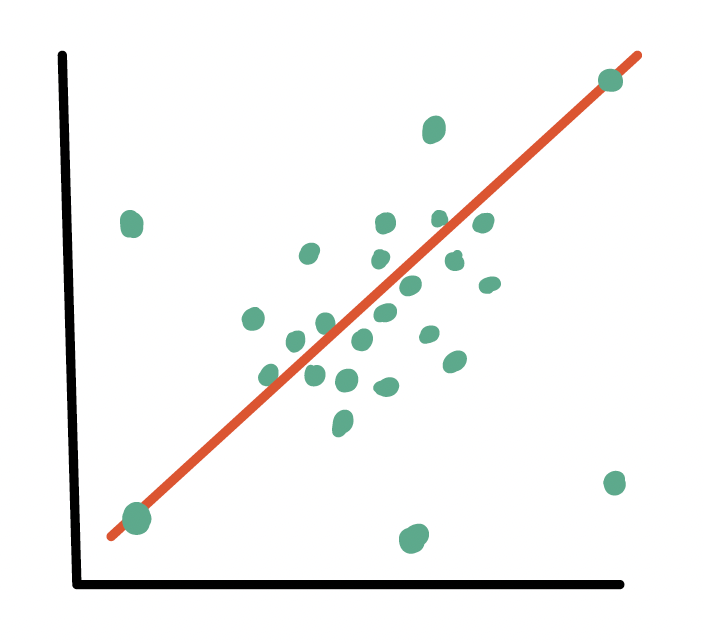
Outliers

  • An observation (\(X_i, Y_i\)) whose response \(Y_i\) does not follow the general trend of the rest of the data


  • How do we determine if a point is an outlier?

    • Scatterplot of \(Y\) vs. \(X\)
    • Followed by evaluation of its residual (and standardized residual)
      • Typically use the internally standardized residual (aka studentized residual)
Identifying outliers

Internally standardized residual

\[ r_i = \frac{\widehat\epsilon_i}{\sqrt{\widehat\sigma^2(1-h_{ii})}} \]

  • We flag an observation if the standardized residual is “large”

    • Different sources will define “large” differently

    • PennState site uses \(|r_i| > 3\)

    • autoplot() shows the 3 observations with the highest standardized residuals

    • Other sources use \(|r_i| > 2\), which is a little more conservative
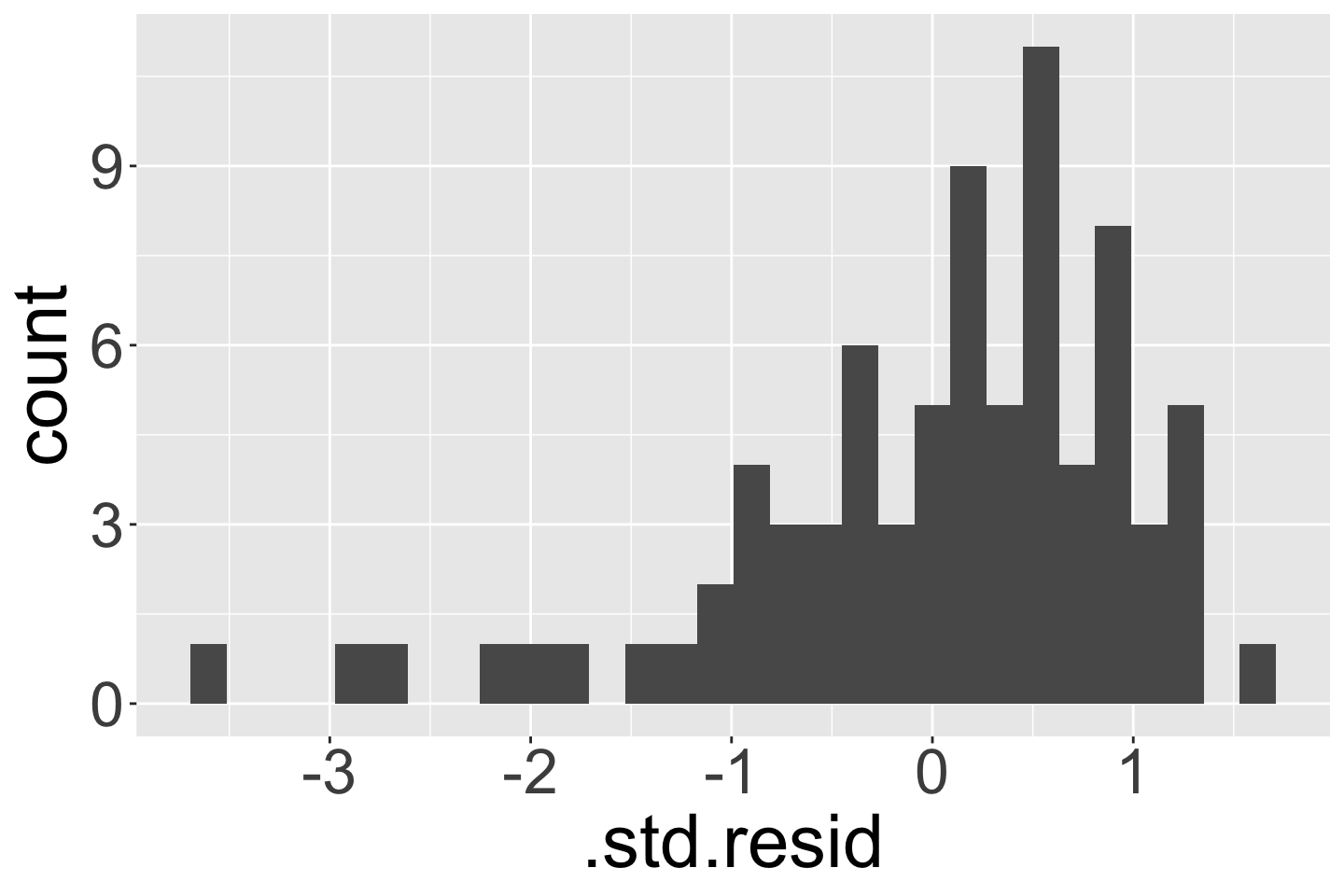
 

ggplot(data = aug1) + 
  geom_histogram(aes(x = .std.resid))

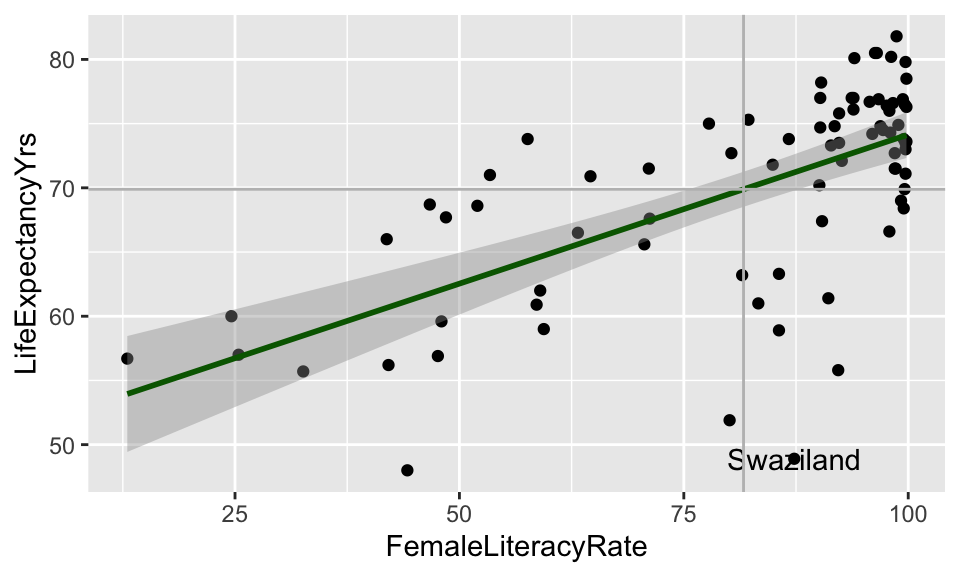
Countries that are outliers (\(|r_i| > 3\))

  • We can identify the countries that are outliers
aug1 %>% 
  filter(abs(.std.resid) > 3)
# A tibble: 1 × 24
  country  LifeExpectancyYrs FemaleLiteracyRate .std.resid .fitted .resid   .hat
  <chr>                <dbl>              <dbl>      <dbl>   <dbl>  <dbl>  <dbl>
1 Swazila…              48.9               87.3      -3.65    71.2  -22.3 0.0133
# ℹ 17 more variables: .sigma <dbl>, .cooksd <dbl>, CO2emissions <dbl>,
#   ElectricityUsePP <dbl>, FoodSupplykcPPD <dbl>, IncomePP <dbl>,
#   population <dbl>, WaterSourcePrct <dbl>, geo <chr>, four_regions <chr>,
#   eight_regions <chr>, six_regions <chr>, members_oecd_g77 <chr>,
#   Latitude <dbl>, Longitude <dbl>, `World bank region` <chr>,
#   `World bank, 4 income groups 2017` <chr>

Visual: Countries that are outliers (\(|r_i| > 3\))

Label only countries with large internally standardized residuals:

ggplot(aug1, aes(x = FemaleLiteracyRate, y = LifeExpectancyYrs,
                 label = country)) +
  geom_point() +
  geom_smooth(method = "lm", color = "darkgreen") +
  geom_text(aes(label = ifelse(abs(.std.resid) > 3, as.character(country), ''))) +
  geom_vline(xintercept = mean(aug1$FemaleLiteracyRate), color = "grey") +
  geom_hline(yintercept = mean(aug1$LifeExpectancyYrs), color = "grey")
What does the model look like without outliers?

Sensitivity analysis removing countries that are outliers

aug1_no_out <- aug1 %>% filter(abs(.std.resid) <= 3) 

model1_no_out <- aug1_no_out %>% 
  lm(formula = LifeExpectancyYrs ~ FemaleLiteracyRate)
tidy(model1_no_out) %>% gt() %>% # Without outliers
 tab_options(table.font.size = 40) %>% fmt_number(decimals = 3)
term estimate std.error statistic p.value
(Intercept) 50.937 2.438 20.896 0.000
FemaleLiteracyRate 0.236 0.029 8.164 0.000
tidy(model1) %>% gt() %>% # With outliers
 tab_options(table.font.size = 40) %>% fmt_number(decimals = 3)
term estimate std.error statistic p.value
(Intercept) 50.928 2.660 19.143 0.000
FemaleLiteracyRate 0.232 0.031 7.377 0.000

High leverage observations

  • An observation (\(X_i, Y_i\)) whose response \(X_i\) is considered “extreme” compared to the other values of \(X\)


  • How do we determine if a point has high leverage?

    • Scatterplot of \(Y\) vs. \(X\)
    • Calculating the leverage of each observation

Leverage \(h_i\)

Leverage

Measure of the distance between the x value (\(X_i\)) for the data point (\(i\)) and the mean of the x values (\(\overline{X}\)) for all \(n\) data points

  • Values of leverage are: \(0 \leq h_i \leq 1\)
  • We flag an observation if the leverage is “high”
    • Different sources will define “high” differently

    • Some textbooks use \(h_i > 4/n\) where \(n\) = sample size

    • Some people suggest \(h_i > 6/n\)

    • PennState site uses \(h_i > 3p/n\) where \(p\) = number of regression coefficients

Countries with high leverage (\(h_i > 4/n\))

  • We can look at the countries that have high leverage
aug1 = aug1 %>% relocate(.hat, .after = FemaleLiteracyRate)

aug1 %>% filter(.hat > 4/80) %>% arrange(desc(.hat))
# A tibble: 6 × 24
  country  LifeExpectancyYrs FemaleLiteracyRate   .hat .std.resid .fitted .resid
  <chr>                <dbl>              <dbl>  <dbl>      <dbl>   <dbl>  <dbl>
1 Afghani…              56.7               13   0.136      0.482     53.9  2.75 
2 Mali                  60                 24.6 0.0980     0.576     56.6  3.36 
3 Chad                  57                 25.4 0.0956     0.0298    56.8  0.174
4 Sierra …              55.7               32.6 0.0757    -0.474     58.5 -2.80 
5 Gambia                66                 41.9 0.0540     0.894     60.7  5.34 
6 Guinea-…              56.2               42.1 0.0536    -0.754     60.7 -4.50 
# ℹ 17 more variables: .sigma <dbl>, .cooksd <dbl>, CO2emissions <dbl>,
#   ElectricityUsePP <dbl>, FoodSupplykcPPD <dbl>, IncomePP <dbl>,
#   population <dbl>, WaterSourcePrct <dbl>, geo <chr>, four_regions <chr>,
#   eight_regions <chr>, six_regions <chr>, members_oecd_g77 <chr>,
#   Latitude <dbl>, Longitude <dbl>, `World bank region` <chr>,
#   `World bank, 4 income groups 2017` <chr>

Poll Everywhere Question 2

Visual: Countries with high leverage (\(h_i > 4/n\))

Label only countries with large leverage:

ggplot(aug1, aes(x = FemaleLiteracyRate, y = LifeExpectancyYrs,
                 label = country)) +
  geom_point() +
  geom_smooth(method = "lm", color = "darkgreen") +
  geom_text(aes(label = ifelse(.hat > 4/80, as.character(country), ''))) +
  geom_vline(xintercept = mean(aug1$FemaleLiteracyRate), color = "grey") +
  geom_hline(yintercept = mean(aug1$LifeExpectancyYrs), color = "grey")
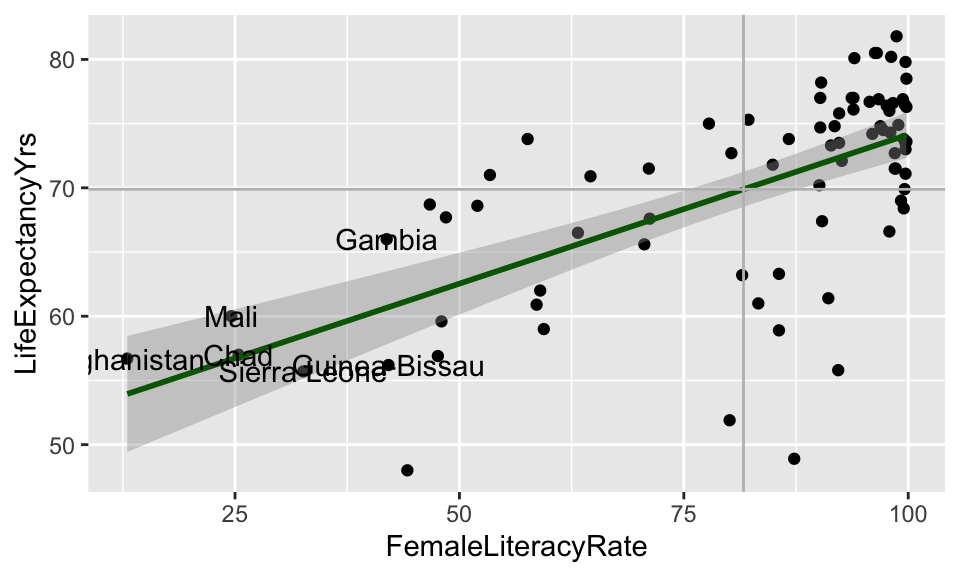
What does the model look like without the high leverage points?

Sensitivity analysis removing countries with high leverage

aug1_lowlev <- aug1 %>% filter(.hat <= 4/80)

model1_lowlev <- aug1_lowlev %>% 
  lm(formula = LifeExpectancyYrs ~ FemaleLiteracyRate)
tidy(model1_lowlev) %>% gt() %>% # Without high-leverage points
 tab_options(table.font.size = 40) %>% fmt_number(decimals = 3)
term estimate std.error statistic p.value
(Intercept) 49.563 3.888 12.746 0.000
FemaleLiteracyRate 0.247 0.044 5.562 0.000
tidy(model1) %>% gt() %>% # With high leverage points
 tab_options(table.font.size = 40) %>% fmt_number(decimals = 3)
term estimate std.error statistic p.value
(Intercept) 50.928 2.660 19.143 0.000
FemaleLiteracyRate 0.232 0.031 7.377 0.000

Cook’s distance

  • Measures the overall influence of an observation


  • Attempts to measure how much influence a single observation has over the fitted model

    • Measures how all fitted values change when the \(ith\) observation is removed from the model

    • Combines leverage and outlier information

Identifying points with high Cook’s distance

The Cook’s distance for the \(i^{th}\) observation is

\[d_i = \frac{h_i}{2(1-h_i)} \cdot r_i^2\] where \(h_i\) is the leverage and \(r_i\) is the studentized residual

  • Another rule for Cook’s distance that is not strict:
    • Investigate observations that have \(d_i > 1\)
  • Cook’s distance values are already in the augment tibble: .cooksd
aug1 = aug1 %>% relocate(.cooksd, .after = FemaleLiteracyRate)
aug1 %>% arrange(desc(.cooksd))
# A tibble: 80 × 24
   country        LifeExpectancyYrs FemaleLiteracyRate .cooksd   .hat .std.resid
   <chr>                      <dbl>              <dbl>   <dbl>  <dbl>      <dbl>
 1 Central Afric…              48                 44.2  0.126  0.0493     -2.20 
 2 Swaziland                   48.9               87.3  0.0903 0.0133     -3.65 
 3 South Africa                55.8               92.2  0.0577 0.0154     -2.71 
 4 Zimbabwe                    51.9               80.1  0.0531 0.0126     -2.89 
 5 Morocco                     73.8               57.6  0.0350 0.0277      1.57 
 6 Nepal                       68.7               46.7  0.0311 0.0446      1.15 
 7 Bangladesh                  71                 53.4  0.0280 0.0335      1.27 
 8 Botswana                    58.9               85.6  0.0249 0.0129     -1.95 
 9 Equatorial Gu…              61.4               91.1  0.0231 0.0148     -1.75 
10 Gambia                      66                 41.9  0.0228 0.0540      0.894
# ℹ 70 more rows
# ℹ 18 more variables: .fitted <dbl>, .resid <dbl>, .sigma <dbl>,
#   CO2emissions <dbl>, ElectricityUsePP <dbl>, FoodSupplykcPPD <dbl>,
#   IncomePP <dbl>, population <dbl>, WaterSourcePrct <dbl>, geo <chr>,
#   four_regions <chr>, eight_regions <chr>, six_regions <chr>,
#   members_oecd_g77 <chr>, Latitude <dbl>, Longitude <dbl>,
#   `World bank region` <chr>, `World bank, 4 income groups 2017` <chr>

Plotting Cook’s Distance

  • plot(model) shows figures similar to autoplot()
    • 4th plot is Cook’s distance (not available in autoplot())
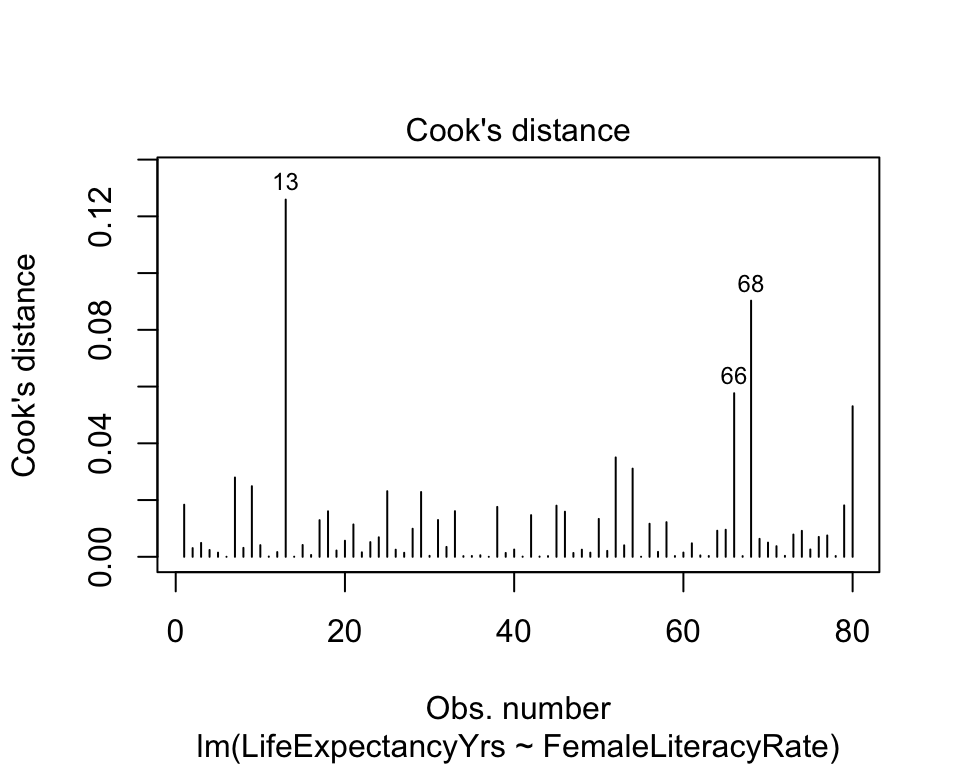
plot(model1, which = 4)

What does the model look like without the high Cook’s distance points?

Sensitivity analysis removing countries with high Cook’s distance

aug1_lowcd <- aug1 %>% filter(.cooksd <= 0.04)
model1_lowcd <- aug1_lowcd %>% lm(formula = LifeExpectancyYrs ~ FemaleLiteracyRate)
tidy(model1_lowcd) %>% gt() %>% # Without high Cook's distance points
 tab_options(table.font.size = 40) %>% fmt_number(decimals = 3)
term estimate std.error statistic p.value
(Intercept) 52.388 2.078 25.208 0.000
FemaleLiteracyRate 0.226 0.024 9.208 0.000
tidy(model1) %>% gt() %>% # With high Cook's distance points
 tab_options(table.font.size = 40) %>% fmt_number(decimals = 3)
term estimate std.error statistic p.value
(Intercept) 50.928 2.660 19.143 0.000
FemaleLiteracyRate 0.232 0.031 7.377 0.000

Summary of how we identify influential points

  • Use scatterplot of \(Y\) vs. \(X\) to see if any points fall outside of range we expect

  • Use standardized residuals, leverage, and Cook’s distance to further identify those points

  • Look at the models run with and without the identified points to check for drastic changes

    • Look at QQ plot and residuals to see if assumptions hold without those points

    • Look at coefficient estimates to see if they change in sign and large magnitude


  • Next: how to handle? It’s a little wishy washy

Learning Objectives

  1. Use visualizations and cut off points to flag potentially influential points using residuals, leverage, and Cook’s distance
  1. Handle influential points and assumption violations by checking data errors, reassessing the model, and making data transformations.
  1. Implement a model with data transformations and determine if it improves the model fit.

How do we deal with influential points?

  • If an observation is influential, we perform a sensitivity analysis:

    • We took out the influential points we identified then reran the model
    • Often, you’ll see that the “influential points” have not drastically changed your estimates
      • A change in sign (for example: positive slope to negative slope)
      • A really large increase (think more than 2x the original value)
  • If an observation is influential, we check data errors:

    • Was there a data entry or collection problem?

    • If you have reason to believe that the observation does not hold within the population (or gives you cause to redefine your population)

  • If an observation is influential, we check our model:

    • Did you leave out any important predictors?

    • Should you consider adding some interaction terms?

    • Is there any nonlinearity that needs to be modeled?

Important note on influential observations

  • It’s always weird to be using numbers to help you diagnose an issue, but the issue kinda gets unresolved


  • Basically, deleting an observation should be justified outside of the numbers!

    • If it’s an honest data point, then it’s giving us important information!


Checking our model

  • An observation may be influential if the model is not correctly specified

    • We may also see issues with the LINE assumptions
  • What are our options to specify the model “correctly?”

    • See if we need to add predictors to our model

      • Nicky’s thought for our life expectancy example
    • Try a transformation if there is an issue with linearity or normality

    • Try a transformation if there is unequal variance

    • Try a weighted least squares approach if unequal variance (might be lesson at end of course)

    • Try a robust estimation procedure if we have a lot of outlier issues (outside scope of class)

Learning Objectives

  1. Use visualizations and cut off points to flag potentially influential points using residuals, leverage, and Cook’s distance

  2. Handle influential points and assumption violations by checking data errors, reassessing the model, and making data transformations.

  1. Implement a model with data transformations and determine if it improves the model fit.

Transformations

  • When we have issues with our LINE (mostly linearity, normality, or equality of variance) assumptions

    • We can use transformations to improve the fit of the model
  • Transformations can…

    • Make the relationship more linear

    • Make the residuals more normal

    • “Stabilize” the variance so that it is more constant

    • It can also bring in or reduce outliers

  • We can transform the dependent (\(Y\)) variable and/or the independent (\(X\)) variable

    • Usually we want to try transforming the \(X\) first


  • Requires trial and error!!
  • Major drawback: interpreting the model becomes harder!

Common transformations

  • Tukey’s transformation (power) ladder

    • Use R’s gladder() command from the describedata package
Power p -3 -2 -1 -1/2 0 1/2 1 2 3
\(\frac{1}{x^3}\) \(\frac{1}{x^2}\) \(\frac{1}{x}\) \(\frac{1}{\sqrt{x}}\) \(\log(x)\) \(\sqrt{x}\) \(x\) \(x^2\) \(x^3\)
  • How to use the power ladder for the general distribution shape

    • If data are skewed left, we need to compress smaller values towards the rest of the data

      • Go “up” ladder to transformations with power > 1
    • If data are skewed right, we need to compress larger values towards the rest of the data

      • Go “down” ladder to transformations with power < 1
  • How to use the power ladder for heteroscedasticity

    • If higher \(X\) values have more spread

      • Compress larger values towards the rest of the data

      • Go “down” ladder to transformations with power < 1

    • If lower \(X\) values have more spread

      • Compress smaller values towards the rest of the data

      • Go “up” ladder to transformations with power > 1

Poll Everywhere Question 3

Transform independent variable?

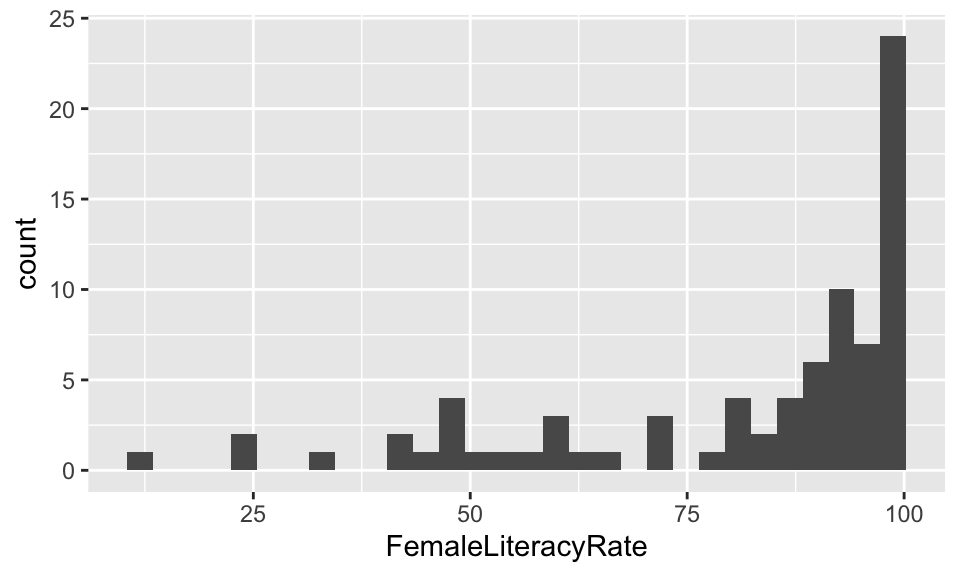
ggplot(gapm, 
       aes(x = FemaleLiteracyRate)) +
  geom_histogram()

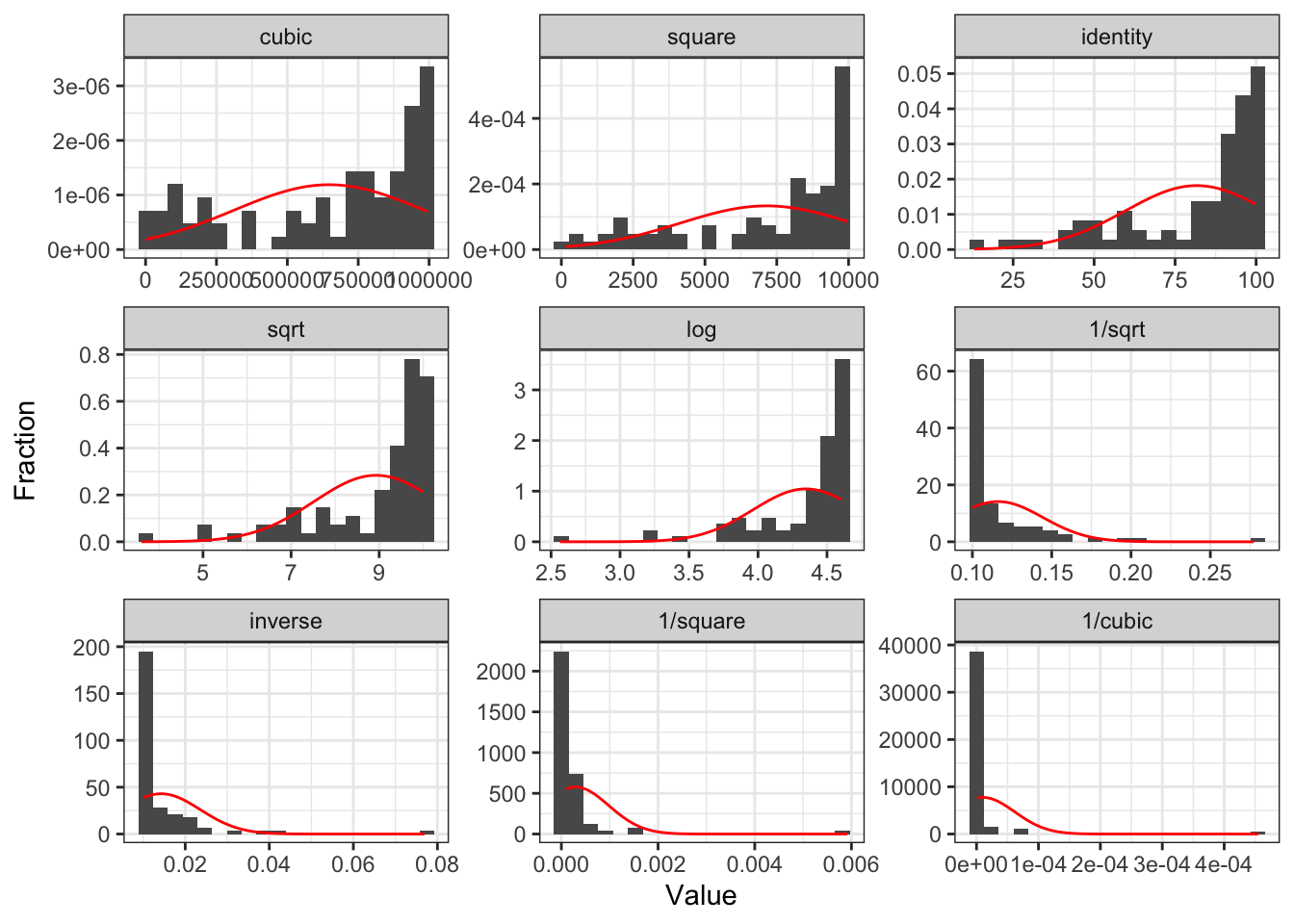
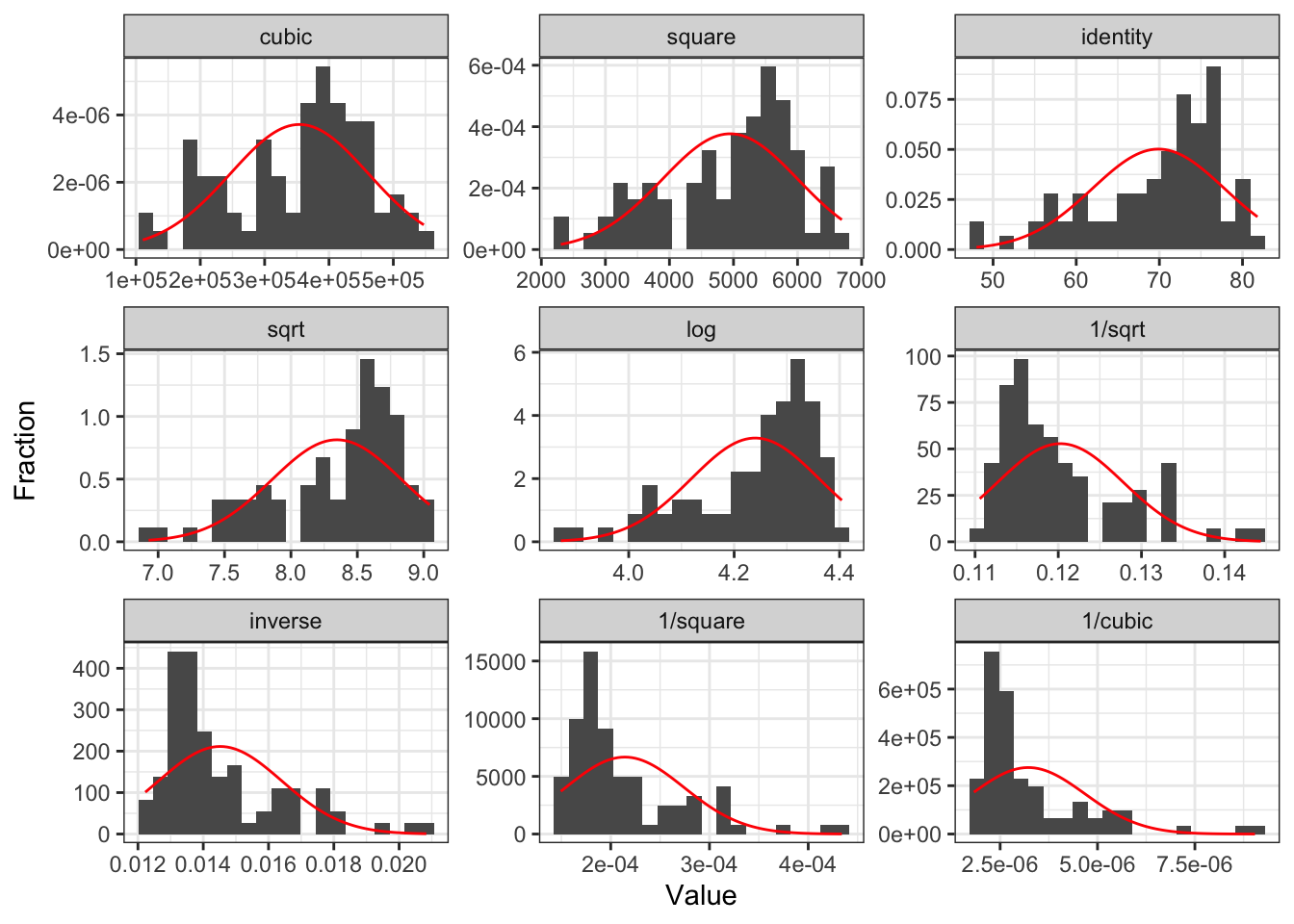
  • Looks like more spread on the left side
  • Use powers greater than 1
    • \(FLR^2\) and \(FLR^3\)

gladder() of female literacy rate

gladder(gapm$FemaleLiteracyRate)

Transform dependent variable?

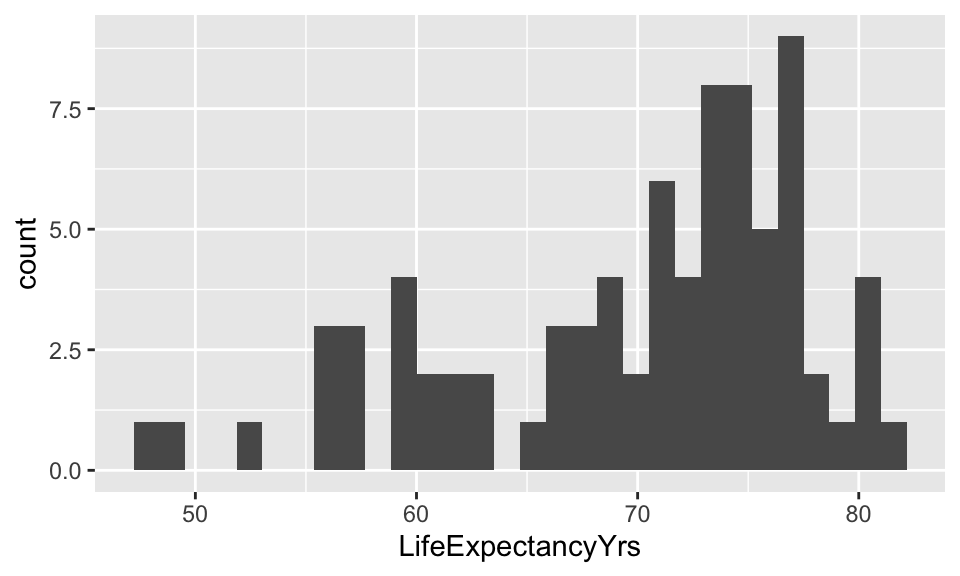
ggplot(gapm, 
       aes(x = LifeExpectancyYrs)) +
  geom_histogram()

  • Looks like more spread on the left side as well
  • Use powers greater than 1
    • \(LE^2\) and \(LE^3\)

gladder() of life expectancy

gladder(gapm$LifeExpectancyYrs)

Tips

  • Recall, assessing our LINE assumptions are not on \(Y\) alone!! (it’s \(Y|X\))

    • We can use gladder() to get a sense of what our transformations will do to the data, but we need to check with our residuals again!!
  • Transformations usually work better if all values are positive (or negative)

  • If observation has a 0, then we cannot perform certain transformations

  • Log function only defined for positive values

    • We might take the \(log(X+1)\) if \(X\) includes a 0 value
  • When we make cubic or square transformations, we MUST include the original \(X\) in the model

    • We do not do this for \(Y\) though

Add quadratic and cubic transformations to dataset

  • Helpful to make a new variable with the transformation in your dataset
gapm <- gapm %>% 
  mutate(LE_2 = LifeExpectancyYrs^2,
         LE_3 = LifeExpectancyYrs^3,
         FLR_2 = FemaleLiteracyRate^2,
         FLR_3 = FemaleLiteracyRate^3)

colnames(gapm)
 [1] "country"                          "CO2emissions"                    
 [3] "ElectricityUsePP"                 "FoodSupplykcPPD"                 
 [5] "IncomePP"                         "LifeExpectancyYrs"               
 [7] "FemaleLiteracyRate"               "population"                      
 [9] "WaterSourcePrct"                  "geo"                             
[11] "four_regions"                     "eight_regions"                   
[13] "six_regions"                      "members_oecd_g77"                
[15] "Latitude"                         "Longitude"                       
[17] "World bank region"                "World bank, 4 income groups 2017"
[19] "LE_2"                             "LE_3"                            
[21] "FLR_2"                            "FLR_3"                           

We are going to compare a few different models with transformations

We are going to call life expectancy \(LE\) and female literacy rate \(FLR\)

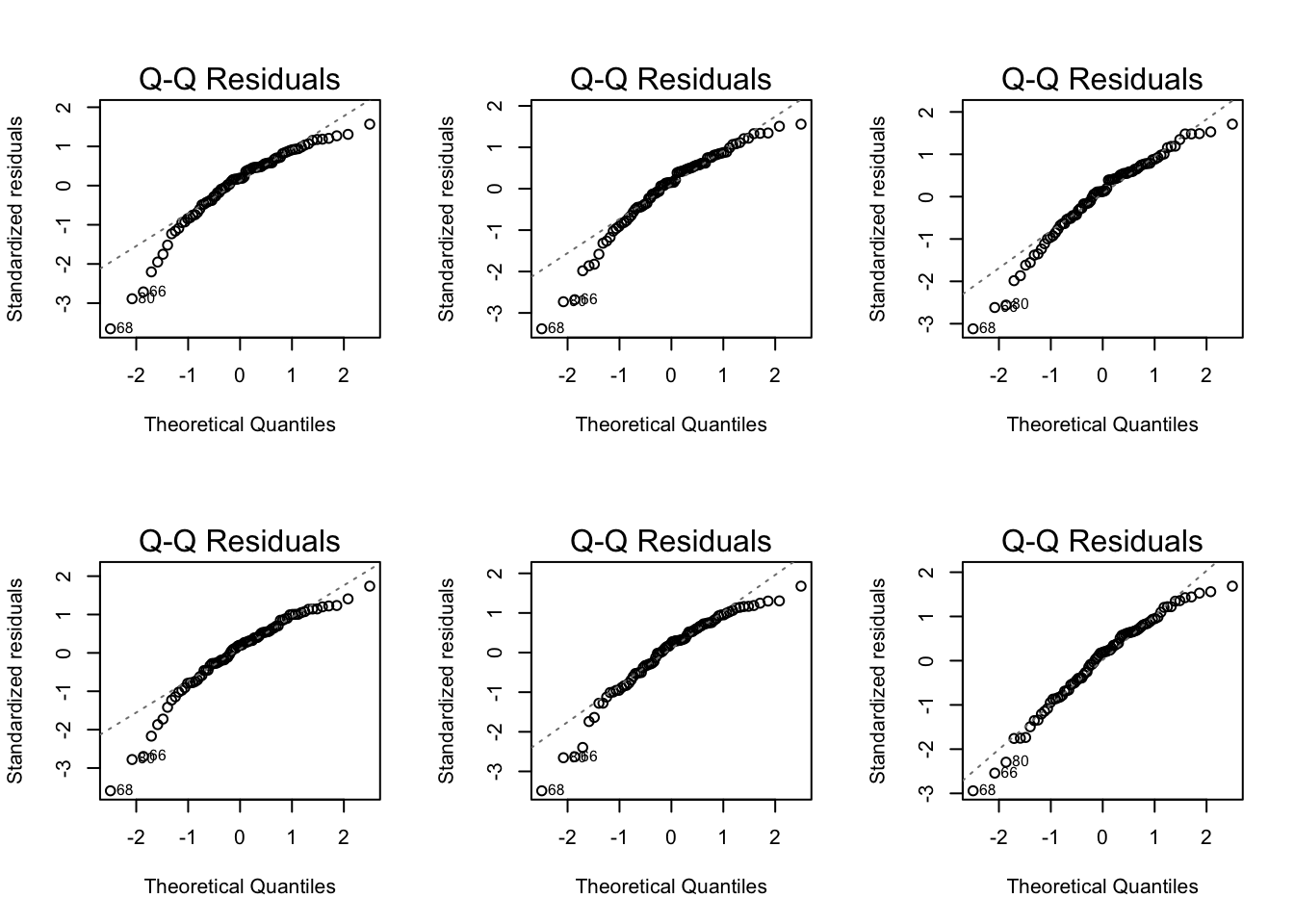
  • Model 1: \(LE = \beta_0 + \beta_1 FLR + \epsilon\)
  • Model 2: \(LE^2 = \beta_0 + \beta_1 FLR + \epsilon\)
  • Model 3: \(LE^3 = \beta_0 + \beta_1 FLR + \epsilon\)
  • Model 4: \(LE = \beta_0 + \beta_1 FLR + \beta_2 FLR^2 +\epsilon\)
  • Model 5: \(LE = \beta_0 + \beta_1 FLR + \beta_2 FLR^2 +\beta_3 FLR^3 +\epsilon\)
  • Model 6: \(LE^3 = \beta_0 + \beta_1 FLR + \beta_2 FLR^2 +\beta_3 FLR^3 +\epsilon\)

Poll Everywhere Question 4

Compare Scatterplots: does linearity improve?
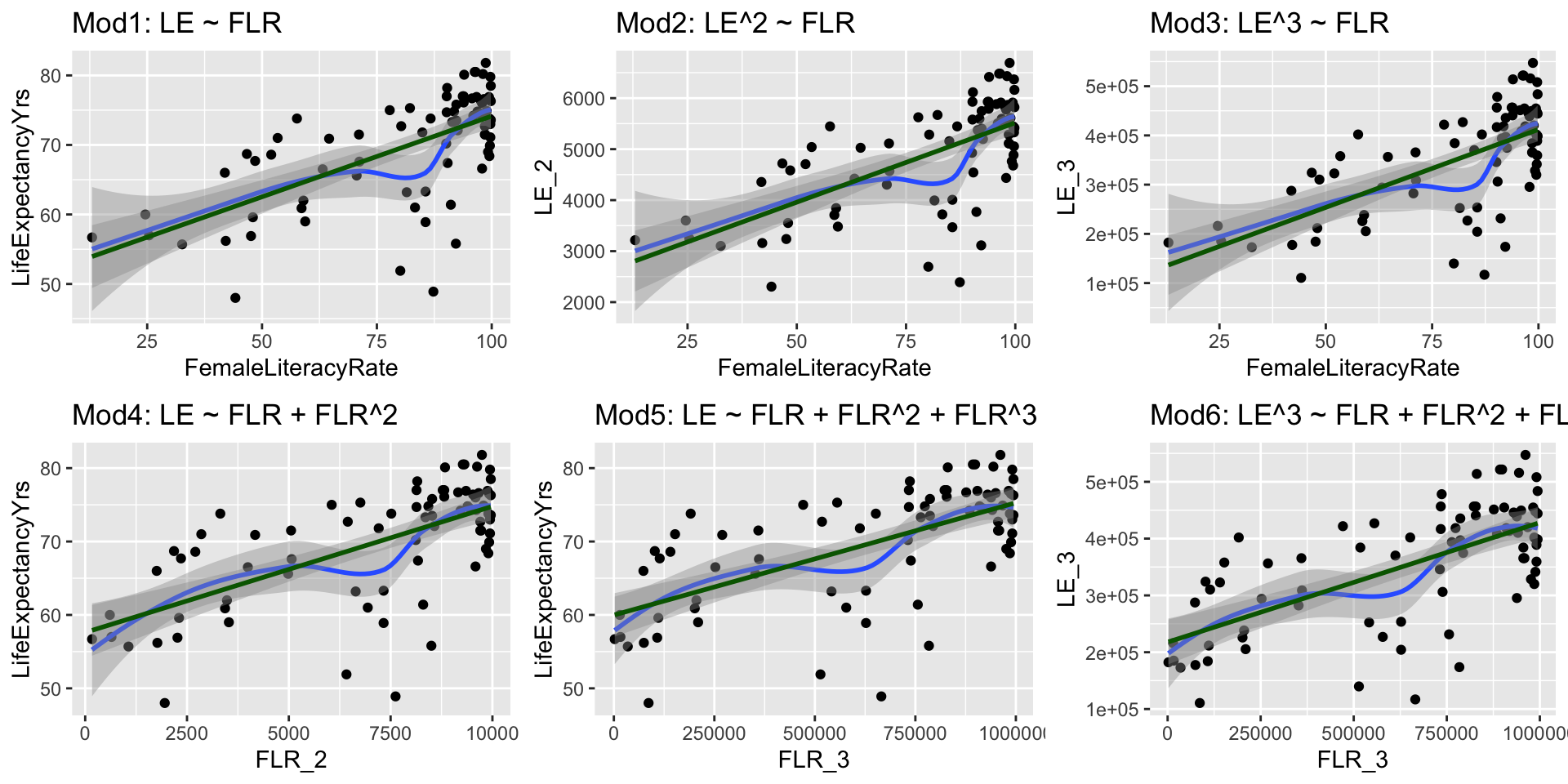
Run models with transformations: examples

Model 2: \(LE^2 = \beta_0 + \beta_1 FLR + \epsilon\)

model2 <- lm(LE_2 ~ FemaleLiteracyRate,
             data = gapm)
term estimate std.error statistic p.value
(Intercept) 2,401.272 352.070 6.820 0.000
FemaleLiteracyRate 31.174 4.166 7.484 0.000

Model 6: \(LE^3 = \beta_0 + \beta_1 FLR + \beta_2 FLR^2 +\beta_3 FLR^3 +\epsilon\)

model6 <- lm(LE_3 ~ 
               FemaleLiteracyRate + FLR_2 + FLR_3,
             data = gapm)
term estimate std.error statistic p.value
(Intercept) 67,691.796 149,056.945 0.454 0.651
FemaleLiteracyRate 8,092.133 8,473.154 0.955 0.343
FLR_2 −128.596 147.876 −0.870 0.387
FLR_3 0.840 0.794 1.059 0.293

Normal Q-Q plots comparison

Residual plots comparison
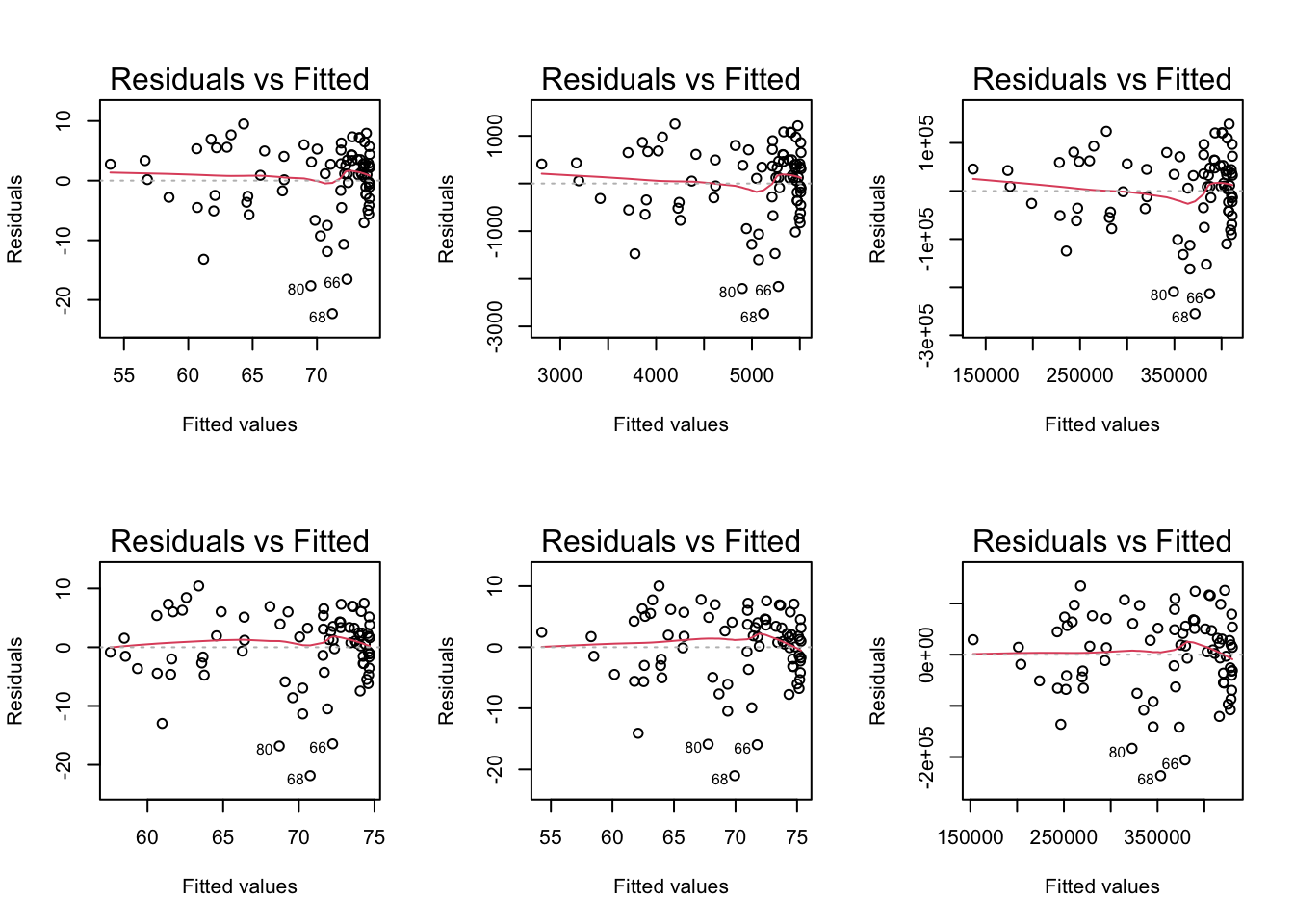
Summary of transformations

  • If the model without the transformation is blatantly violating a LINE assumption

    • Then a transformation is a good idea
    • If transformations do not help, then keep it untransformed


  • If the model without a transformation is not following the LINE assumptions very well, but is mostly okay

    • Then try to avoid a transformation
    • Think about what predictors might need to be added
    • Especially if you keep seeing the same points as influential


  • If interpretability is important in your final work, then transformations are not a great solution

Reference: all run models

Model 2: \(LE^2 = \beta_0 + \beta_1 FLR + \epsilon\)

model2 <- lm(LE_2 ~ FemaleLiteracyRate,
             data = gapm)
tidy(model2) %>% gt()
term estimate std.error statistic p.value
(Intercept) 2401.27207 352.069818 6.820443 1.726640e-09
FemaleLiteracyRate 31.17351 4.165624 7.483514 9.352191e-11

Model 3: \(LE^3 \sim FLR\)

model3 <- lm(LE_3 ~ FemaleLiteracyRate,
             data = gapm)
tidy(model3) %>% gt()
term estimate std.error statistic p.value
(Intercept) 95453.189 35631.6898 2.678885 9.005716e-03
FemaleLiteracyRate 3166.481 421.5875 7.510853 8.285324e-11

Model 4: \(LE \sim FLR + FLR^2\)

model4 <- lm(LifeExpectancyYrs ~ 
               FemaleLiteracyRate + FLR_2,
             data = gapm)
tidy(model4) %>% gt()
term estimate std.error statistic p.value
(Intercept) 57.030875456 6.282845592 9.07723652 8.512585e-14
FemaleLiteracyRate 0.019348795 0.201021963 0.09625215 9.235704e-01
FLR_2 0.001578649 0.001472592 1.07202008 2.870595e-01

Model 5: \(LE \sim FLR + FLR^2 + FLR^3\)

model5 <- lm(LifeExpectancyYrs ~ 
               FemaleLiteracyRate + FLR_2 + FLR_3,
             data = gapm)
tidy(model5) %>% gt()
term estimate std.error statistic p.value
(Intercept) 4.732796e+01 1.117939e+01 4.2335001 6.373341e-05
FemaleLiteracyRate 6.517986e-01 6.354934e-01 1.0256576 3.083065e-01
FLR_2 -9.952763e-03 1.109080e-02 -0.8973895 3.723451e-01
FLR_3 6.245016e-05 5.953283e-05 1.0490038 2.975008e-01

Model 6: \(LE^3 \sim FLR + FLR^2 + FLR^3\)

model6 <- lm(LE_3 ~ 
               FemaleLiteracyRate + FLR_2 + FLR_3,
             data = gapm)
tidy(model6) %>% gt()
term estimate std.error statistic p.value
(Intercept) 67691.7963283 1.490569e+05 0.4541338 0.6510268
FemaleLiteracyRate 8092.1325988 8.473154e+03 0.9550320 0.3425895
FLR_2 -128.5960879 1.478757e+02 -0.8696230 0.3872447
FLR_3 0.8404736 7.937625e-01 1.0588477 0.2930229