Lesson 14: Purposeful model selection

Nicky Wakim

2025-02-26

Learning Objectives

  1. Understand the overall steps for purposeful selection as a model building strategy

  2. Apply purposeful selection to a dataset using R

  3. Use different approaches to assess the linear scale of continuous variables in logistic regression

Regression analysis process

Model Selection

  • Building a model

  • Selecting variables

  • Prediction vs interpretation

  • Comparing potential models

Model Fitting

  • Find best fit line

  • Using OLS in this class

  • Parameter estimation

  • Categorical covariates

  • Interactions

Model Evaluation

  • Evaluation of model fit
  • Testing model assumptions
  • Residuals
  • Transformations
  • Influential points
  • Multicollinearity

Model Use (Inference)

  • Inference for coefficients
  • Hypothesis testing for coefficients
  • Inference for expected \(Y\) given \(X\)
  • Prediction of new \(Y\) given \(X\)

Learning Objectives

  1. Understand the overall steps for purposeful selection as a model building strategy
  1. Apply purposeful selection to a dataset using R

  2. Use different approaches to assess the linear scale of continuous variables in logistic regression


“Successful modeling of a complex data set is part science, part statistical methods, and part experience and common sense.”


Hosmer, Lemeshow, and Sturdivant Textbook, pg. 101

Overall Process

  1. Exploratory data analysis

  2. Check unadjusted associations in simple linear regression

  3. Enter all covariates in model that meet some threshold

    • One textbook suggest \(p<0.2\) or \(p<0.25\): great for modest sized datasets
    • PLEASE keep in mind sample size in your study
    • Can also use magnitude of association rather than, or along with, p-value
  4. Remove those that no longer reach some threshold

    • Compare magnitude of associations to unadjusted version (univariable)
  5. Check scaling of continuous and coding of categorical covariates

  6. Check for interactions

  7. Assess model fit

    • Model assumptions, diagnostics, overall fit

Process with snappier step names

Pre-step:


Step 1:


Step 2:


Step 3:


Step 4:


Step 5:


Step 6:

Exploratory data analysis (EDA)


Simple linear regressions / analysis


Preliminary variable selection


Assess change in coefficients


Assess scale for continuous variables


Check for interactions


Assess model fit

Learning Objectives

  1. Understand the overall steps for purposeful selection as a model building strategy
  1. Apply purposeful selection to a dataset using R
  1. Use different approaches to assess the linear scale of continuous variables in logistic regression

Pre-step: Exploratory data analysis

  • The following slides are all reference until we get to Step 1
  • We have covered exploratory data analysis in other classes and have completed it in our previous labs

Pre-step: Exploratory data analysis

  • Things we have been doing over the quarter in class and in our project

  • I will not discuss some of the methods mentioned in our lab and data management class

    • I am only going to introduce additional exploratory functions


A few things we can do:

  • Check the data
  • Study your variables
  • Missing data?
  • Explore simple relationships and assumptions

Pre-step: Exploratory data analysis: Check the data

  • Get to know the potential values for the data

    • Categories

    • Units

  • Then make sure the summary of values makes sense

    • If minimum or maximum look outside appropriate range
    • For example: a negative value for a measurement that is inherently positive (like population or income)

https://www.gapminder.org/data/documentation/

https://www.gapminder.org/data/documentation/

Pre-step: Exploratory data analysis: Check the data

  • Look at a summary for the raw data

  • Typical use:

library(skimr)
skim(gapm)

Pre-step: Exploratory data analysis: Check the data

  • Look at a summary for the raw data

  • Typical use:

library(skimr)
skim(gapm)
  • Some skim() help

  • Note that skim(gapm) looks different because I had to create factors

  • I am breaking down the skim() function into the categorical and continuous variables only because I want to show them on the slides

skim(gapm_sub1) %>% yank("factor")

Variable type: factor

skim_variable n_missing complete_rate ordered n_unique top_counts
four_regions 0 1.00 FALSE 4 Asi: 57, Afr: 54, Eur: 49, Ame: 35
income_levels1 1 0.99 FALSE 4 Hig: 56, Upp: 55, Low: 52, Low: 31
income_levels2 1 0.99 FALSE 2 Hig: 111, Low: 83

Pre-step: Exploratory data analysis: Check the data

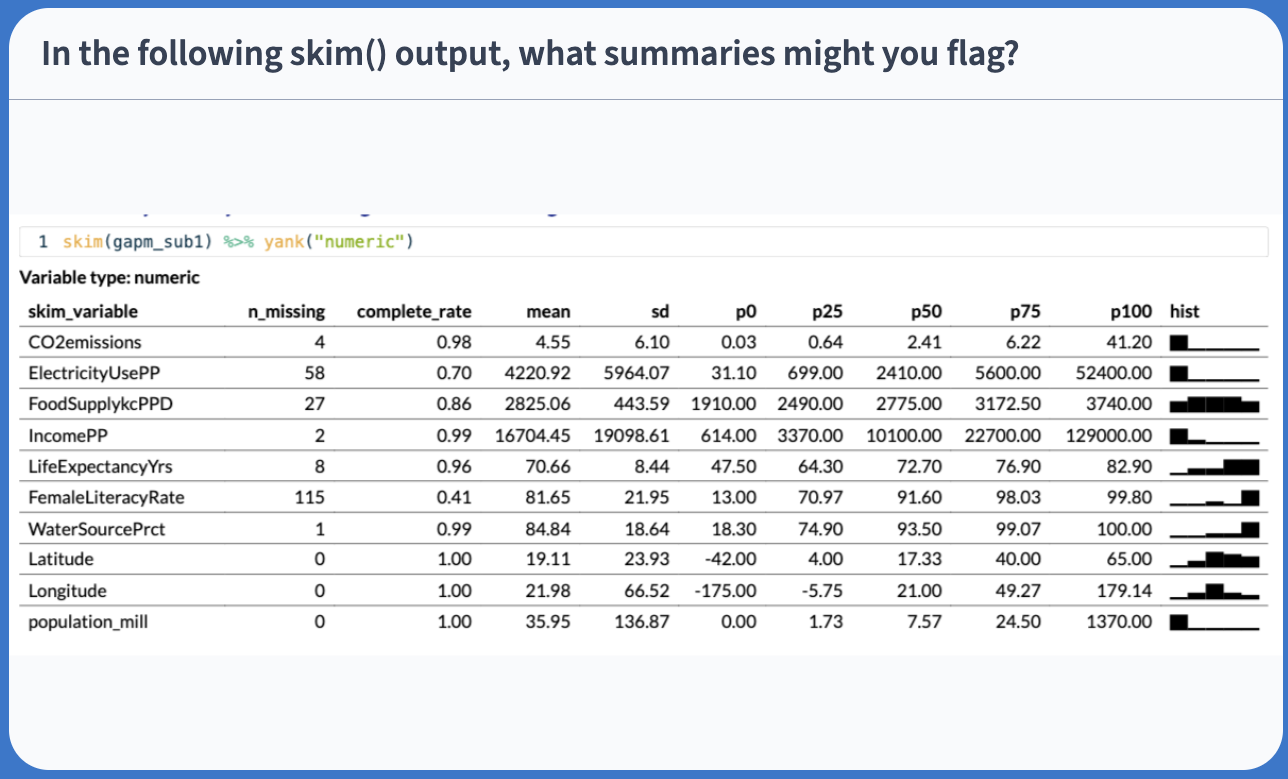
skim(gapm_sub1) %>% yank("numeric")

Variable type: numeric

skim_variable n_missing complete_rate mean sd p0 p25 p50 p75 p100 hist
CO2emissions 4 0.98 4.55 6.10 0.03 0.64 2.41 6.22 41.20 ▇▁▁▁▁
ElectricityUsePP 58 0.70 4220.92 5964.07 31.10 699.00 2410.00 5600.00 52400.00 ▇▁▁▁▁
FoodSupplykcPPD 27 0.86 2825.06 443.59 1910.00 2490.00 2775.00 3172.50 3740.00 ▅▇▇▇▅
IncomePP 2 0.99 16704.45 19098.61 614.00 3370.00 10100.00 22700.00 129000.00 ▇▂▁▁▁
LifeExpectancyYrs 8 0.96 70.66 8.44 47.50 64.30 72.70 76.90 82.90 ▁▃▃▇▇
FemaleLiteracyRate 115 0.41 81.65 21.95 13.00 70.97 91.60 98.03 99.80 ▁▁▂▁▇
WaterSourcePrct 1 0.99 84.84 18.64 18.30 74.90 93.50 99.07 100.00 ▁▁▂▂▇
Latitude 0 1.00 19.11 23.93 -42.00 4.00 17.33 40.00 65.00 ▁▃▇▆▅
Longitude 0 1.00 21.98 66.52 -175.00 -5.75 21.00 49.27 179.14 ▁▃▇▃▂
population_mill 0 1.00 35.95 136.87 0.00 1.73 7.57 24.50 1370.00 ▇▁▁▁▁

Poll Everywhere Question 1

Pre-step: Exploratory data analysis: Study your variables
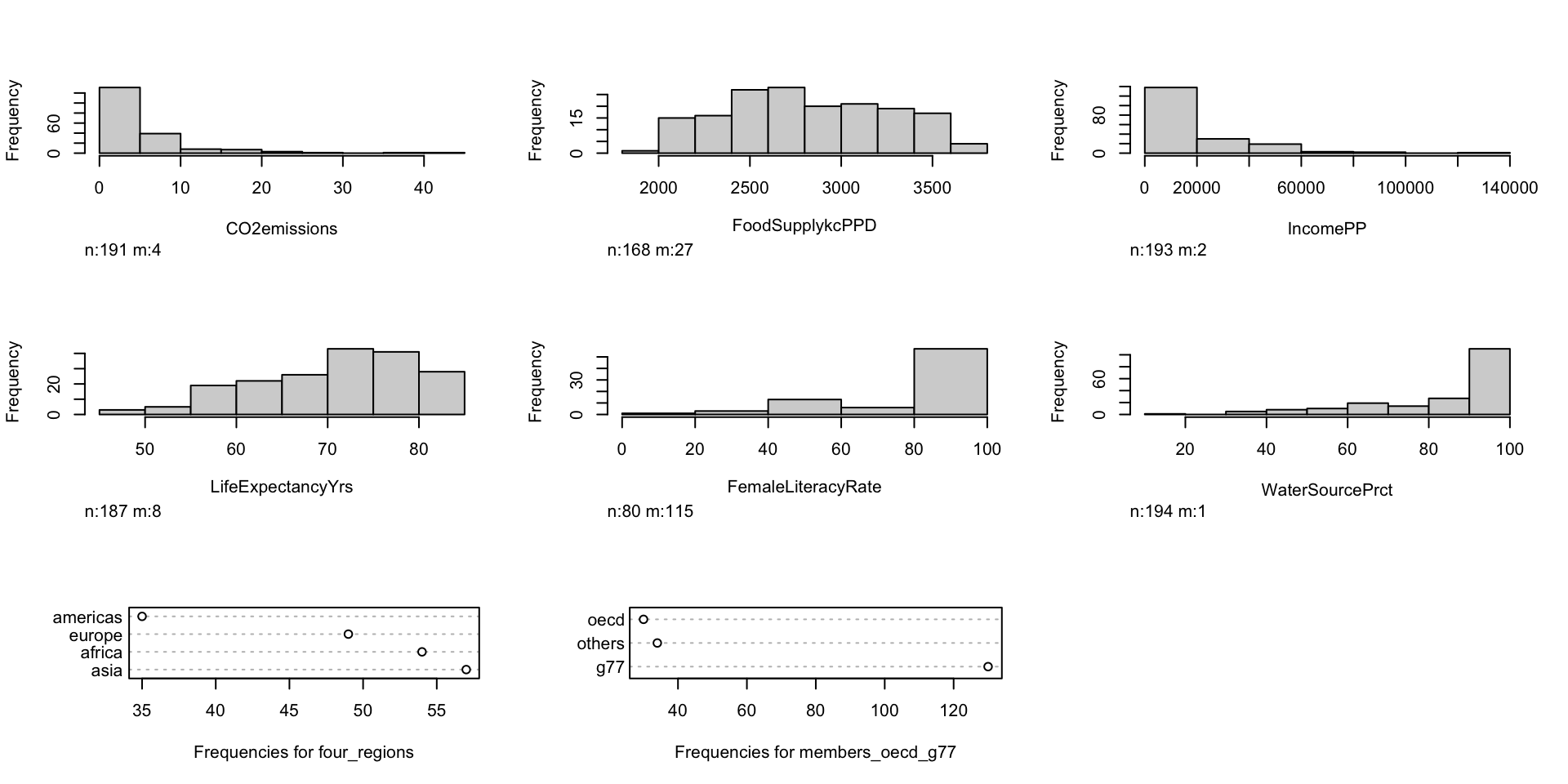
  • Started this a little bit in previous slide (skim()), but you may want to look at things like:

    • Sample size
    • Counts of missing data
    • Means and standard deviations
    • IQRs
    • Medians
    • Minimums and maximums
  • Can also look at visuals

    • Continuous variables: histograms (in `skimr() a little)
    • Categorical variables: frequency plots

Pre-step: Exploratory data analysis: Study your variables

library(Hmisc)
hist.data.frame(gapm %>% select(-Longitude, -Latitude, -eight_regions, -six_regions, -geo, -`World bank, 4 income groups 2017`, -country, -population, -`World bank region`, -ElectricityUsePP))

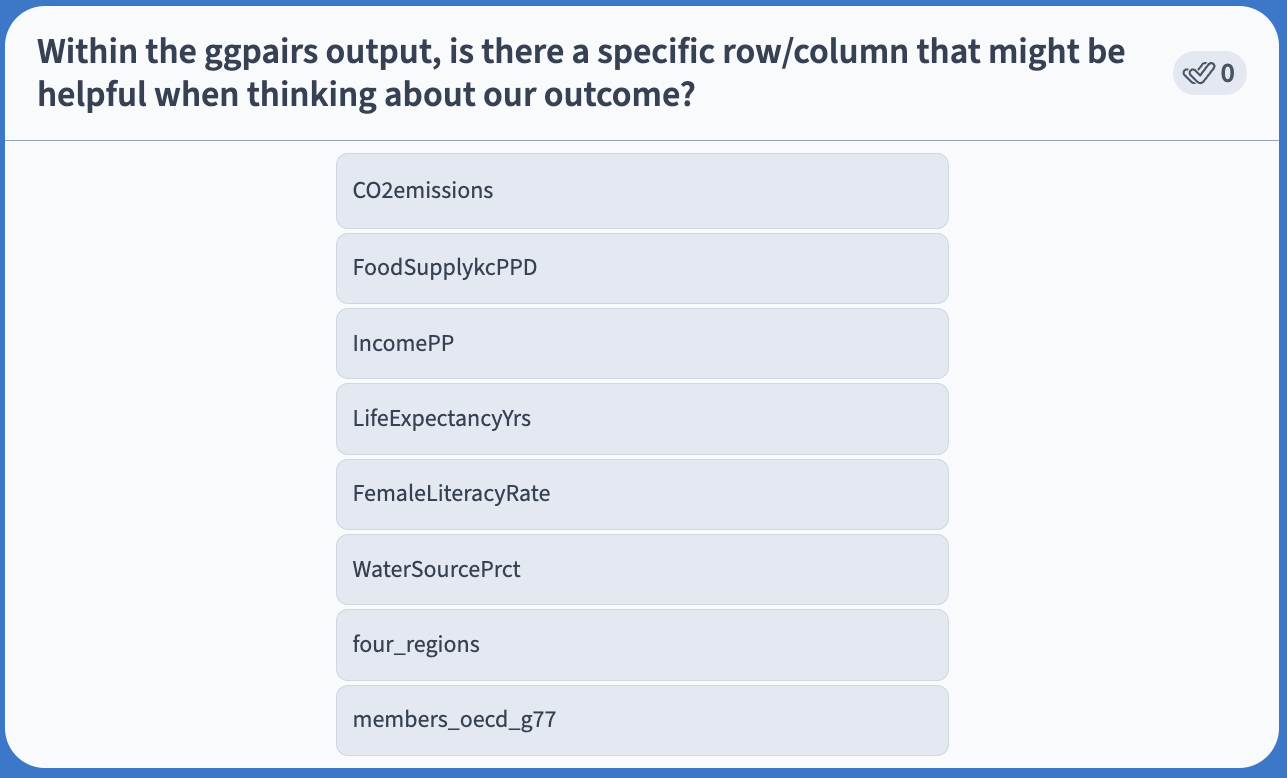
Poll Everywhere Question 2

Question: What function might you use to visualize or summarize the frequencies of categorical variables?

Pre-step: Exploratory data analysis: Missing data

  • Why are there missing data?
  • Which variables and observations should be excluded because of missing data?
  • Will I impute missing data?


  • Unfortunately, we don’t have time to discuss missing data more thoroughly
  • I will try to cover this topic more thoroughly in BSTA 513


  • For the Gapminder dataset, we chose to use complete cases

Pre-step / Step 1 : Explore simple relationships and assumptions
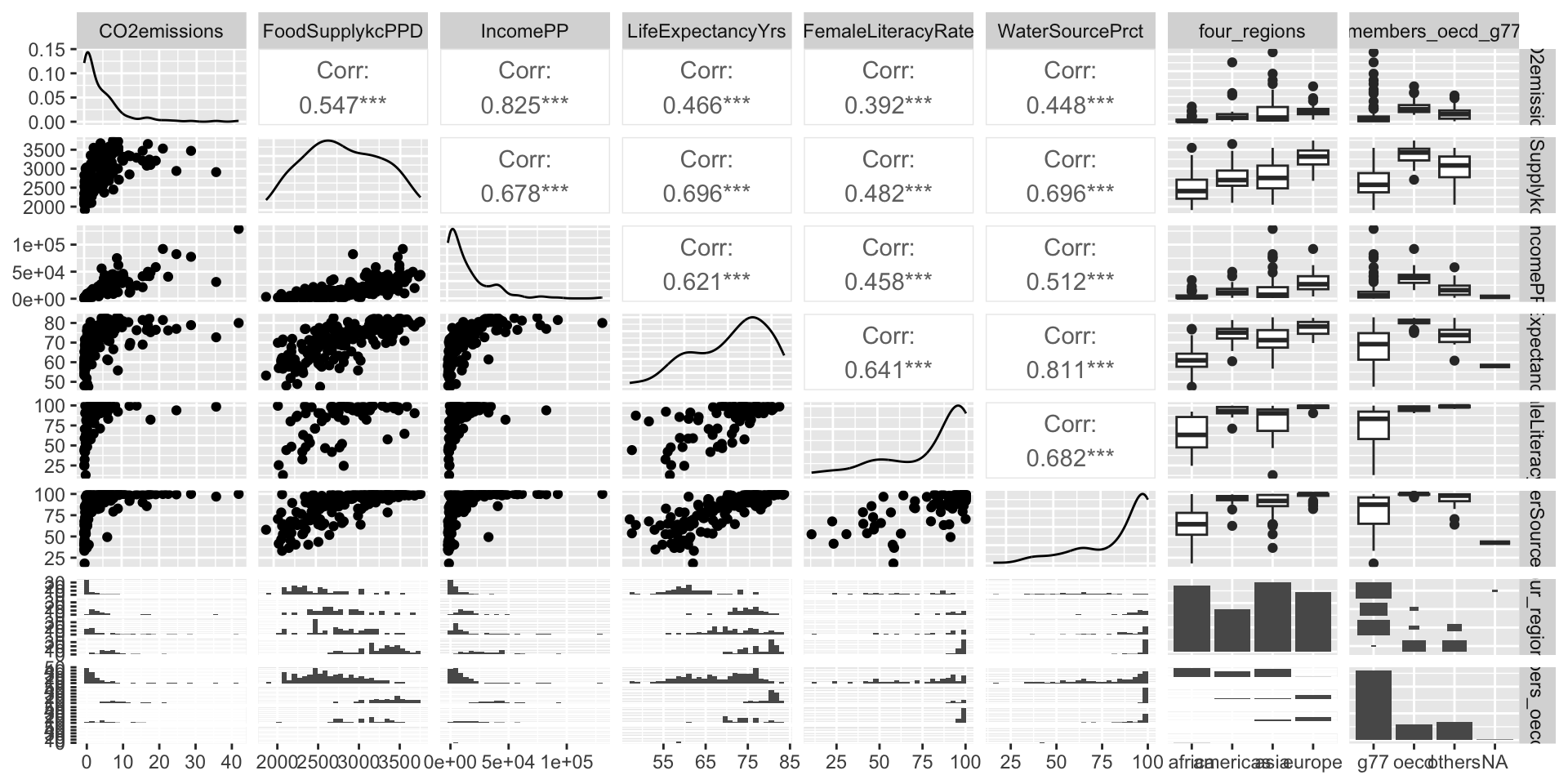
gapm2 %>% ggpairs() # gapm2 is a new dataset with some variables selected

Poll Everywhere Question 3

Step 1: Simple linear regressions / analysis

  • For each covariate, we want to see how it relates to the outcome (without adjusting for other covariates)

  • We can partially do this with visualizations

    • Helps us see the data we throw it into regression that makes assumptions (like our LINE assumptions)

    • ggpairs() can be a quick way to do it

    • ggplot() can make each plot

      • + geom_boxplot() to make boxplots by groups for categorical covariates
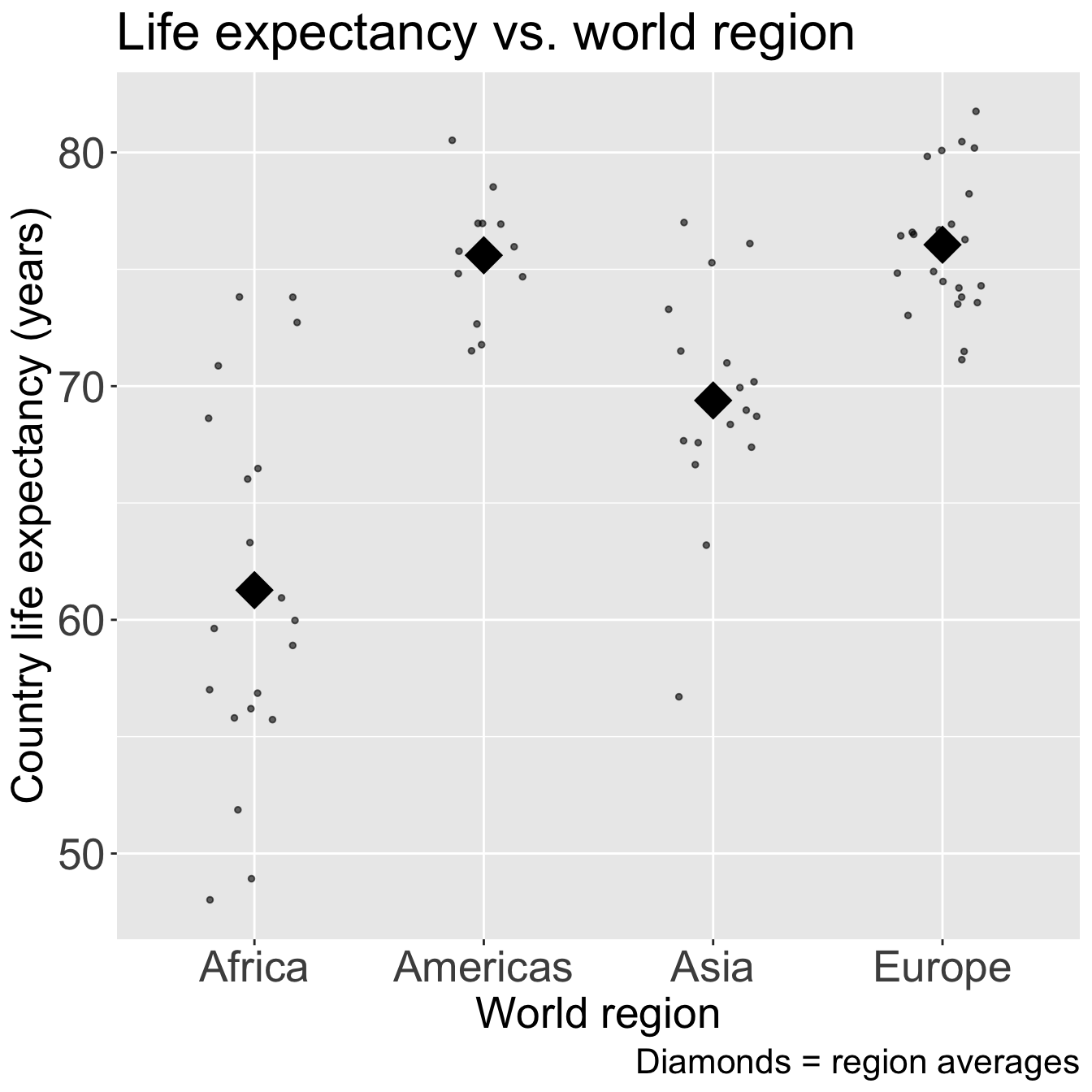
      • + geom_jitter() + stat_summary() to make non-overlaping points with group means for categorical covariates
      • + geom_point() to make scatterplots for continuous covariates
  • We need to run simple linear regression

    • We’re calling regression with multi-level categories “simple” even though there are multiple coefficients

Step 1: Simple linear regressions / analysis

  • Let’s think back to our Gapminder dataset

  • Always good to start with our main relationship: life expectancy vs. female literacy rate

    • Throwback to Lesson 3 SLR when we first visualized and ran lm() for this relationship
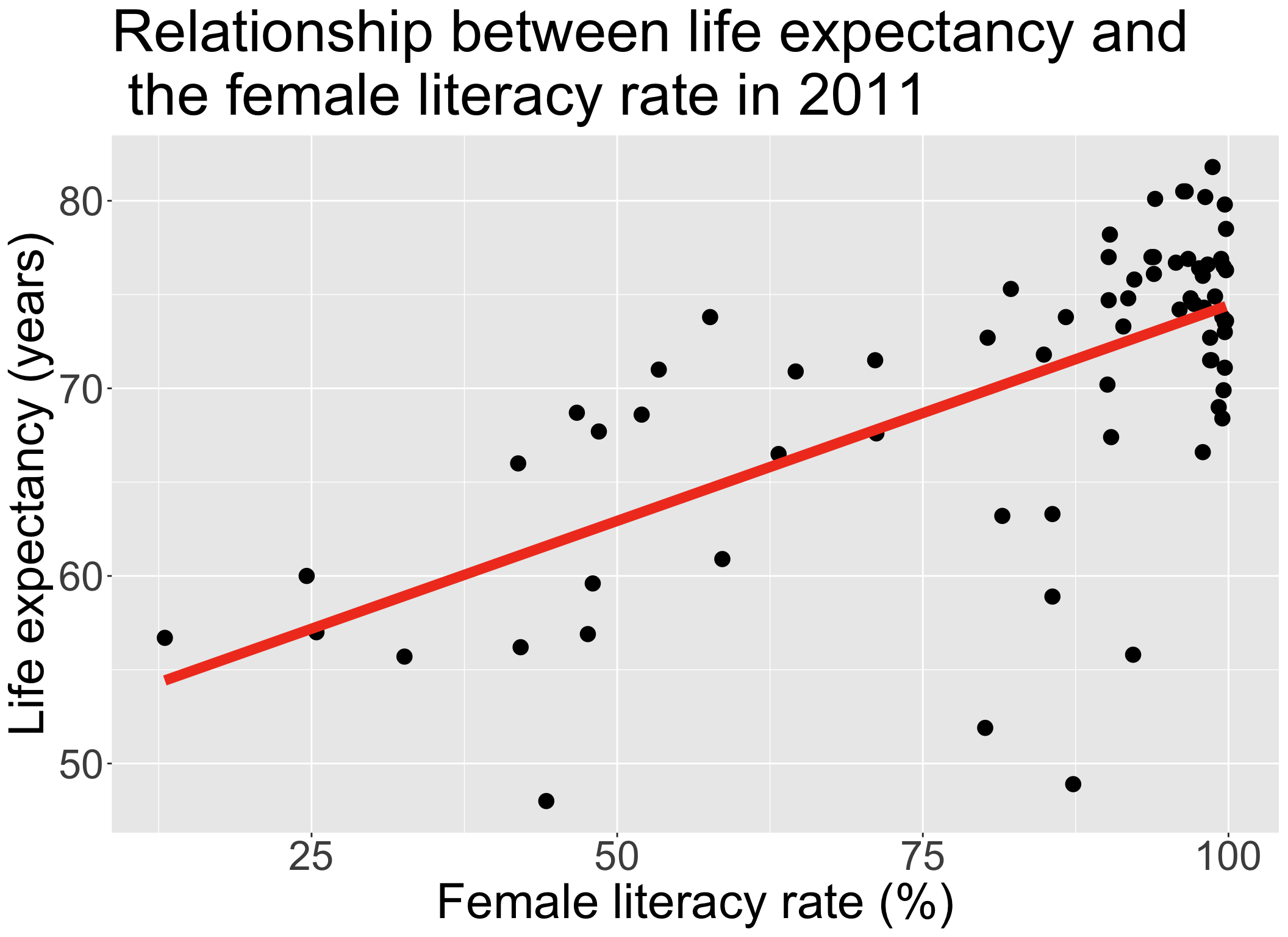
model_FLR = lm(LifeExpectancyYrs ~ FemaleLiteracyRate, data = gapm_sub)


term estimate std.error statistic p.value
(Intercept) 51.438 2.739 18.782 0.000
FemaleLiteracyRate 0.230 0.032 7.141 0.000

Poll Everywhere Question 4

Step 1: Simple linear regressions / analysis

  • Let’s do this with one other variable before I show you a streamlined version of SLR
model_WR = lm(LifeExpectancyYrs ~ four_regions, data = gapm_sub)


Code
ggplot(gapm_sub, aes(x = four_regions, y = LifeExpectancyYrs)) +
  geom_jitter(size = 1, alpha = .6, width = 0.2) +
  stat_summary(fun = mean, geom = "point", size = 8, shape = 18) +
  labs(x = "World region", 
       y = "Country life expectancy (years)",
       title = "Life expectancy vs. world region",
       caption = "Diamonds = region averages") +
  theme(axis.title = element_text(size = 20), 
        axis.text = element_text(size = 20), 
        title = element_text(size = 20))
anova(model_WR) %>% tidy() %>% gt() %>%
   tab_options(table.font.size = 40) %>%
   fmt_number(decimals = 3)
term df sumsq meansq statistic p.value
four_regions 3.000 2,743.042 914.347 33.680 0.000
Residuals 68.000 1,846.077 27.148 NA NA


  • Recall from Lesson 5 (SLR: More inference + Evaluation):

    • anova() with one model name will compare the model (model_WR) to the intercept model

Step 1: Simple linear regressions / analysis

  • If we do a good job visualizing the relationship between our outcome and each covariate, then we can proceed to a streamlined version of the F-test for each relationship
  • Run add1() to add each variable one at a time and separately
  • Output will include hypothesis test (using F-test) if coefficient(s) is 0 or not
intercept_model = gapm2 %>% lm(formula = LifeExpectancyYrs ~ 1)
add1(intercept_model, scope = ~ FemaleLiteracyRate + CO2emissions + IncomePP + four_regions +
       WaterSourcePrct + FoodSupplykcPPD + members_oecd_g77, test = "F")
Single term additions

Model:
LifeExpectancyYrs ~ 1
                   Df Sum of Sq    RSS    AIC  F value    Pr(>F)    
<none>                          4589.1 301.14                       
FemaleLiteracyRate  1   1934.24 2654.9 263.74  50.9994 6.895e-10 ***
CO2emissions        1    452.31 4136.8 295.67   7.6536  0.007241 ** 
IncomePP            1   1220.34 3368.8 280.89  25.3576 3.557e-06 ***
four_regions        3   2743.04 1846.1 241.58  33.6799 1.858e-13 ***
WaterSourcePrct     1   2988.20 1600.9 227.32 130.6592 < 2.2e-16 ***
FoodSupplykcPPD     1   1893.44 2695.7 264.84  49.1679 1.188e-09 ***
members_oecd_g77    2   1103.71 3485.4 285.34  10.9250 7.553e-05 ***
---
Signif. codes:  0 '***' 0.001 '**' 0.01 '*' 0.05 '.' 0.1 ' ' 1

Step 2: Preliminary variable selection

  • Identify candidates for your first multivariable model by performing an F-test on each covariate’s SLR

    • Using p-values from previous slide
    • If the p-value of the test is less than 0.25, then consider the variable a candidate


  • Candidates for first multivariable model

    • All clinically important variables (regardless of p-value)
    • Variables with univariate test with p-value < 0.25


  • With more experience, you won’t need to rely on these strict rules as much

Step 2: Preliminary variable selection

  • From the previous p-values from the F-test on each covariate’s SLR

    • Decision: we keep all the covariates since they all have a p-value < 0.25
add1(intercept_model, scope = ~ FemaleLiteracyRate + CO2emissions + IncomePP + four_regions +
       WaterSourcePrct + FoodSupplykcPPD + members_oecd_g77, test = "F")
Single term additions

Model:
LifeExpectancyYrs ~ 1
                   Df Sum of Sq    RSS    AIC  F value    Pr(>F)    
<none>                          4589.1 301.14                       
FemaleLiteracyRate  1   1934.24 2654.9 263.74  50.9994 6.895e-10 ***
CO2emissions        1    452.31 4136.8 295.67   7.6536  0.007241 ** 
IncomePP            1   1220.34 3368.8 280.89  25.3576 3.557e-06 ***
four_regions        3   2743.04 1846.1 241.58  33.6799 1.858e-13 ***
WaterSourcePrct     1   2988.20 1600.9 227.32 130.6592 < 2.2e-16 ***
FoodSupplykcPPD     1   1893.44 2695.7 264.84  49.1679 1.188e-09 ***
members_oecd_g77    2   1103.71 3485.4 285.34  10.9250 7.553e-05 ***
---
Signif. codes:  0 '***' 0.001 '**' 0.01 '*' 0.05 '.' 0.1 ' ' 1

Step 2: Preliminary variable selection

  • Fit an initial model including any independent variable with p-value < 0.25 and clinically important variables
init_model = lm(LifeExpectancyYrs ~
                  FemaleLiteracyRate + 
                  CO2emissions + 
                  IncomePP +
                  four_regions + 
                  WaterSourcePrct + 
                  FoodSupplykcPPD + 
                  members_oecd_g77, 
                data = gapm2)

tbl_regression(
  init_model, 
  label = list(
    FemaleLiteracyRate ~ "Female literacy rate (%)", 
    CO2emissions ~ "CO2 emissions", 
    IncomePP ~ "Income  (GDP per capita)", 
    four_regions ~ "World region",
    WaterSourcePrct ~ "Access to omproved water (%)",
    FoodSupplykcPPD ~ "Food supply (kcal PPD)",
    members_oecd_g77 ~ "Intergovernmental group"
    )) %>% 
  as_gt() %>% 
  tab_options(table.font.size = 26) 
Characteristic Beta 95% CI1 p-value
Female literacy rate (%) 0.00 -0.07, 0.07 >0.9
CO2 emissions -0.29 -0.55, -0.02 0.037
Income (GDP per capita) 0.00 0.00, 0.00 0.019
World region


    Africa
    Americas 9.9 5.9, 14 <0.001
    Asia 5.8 2.6, 9.0 <0.001
    Europe 7.1 1.7, 13 0.010
Access to omproved water (%) 0.14 0.01, 0.27 0.041
Food supply (kcal PPD) 0.01 0.00, 0.01 0.015
Intergovernmental group


    g77
    oecd -0.33 -5.4, 4.8 0.9
    others 0.33 -4.3, 4.9 0.9
1 CI = Confidence Interval

Step 3: Assess change in coefficient

  • This is where we start identifying covariates that we might remove


  • I would start by using the p-value to guide me towards specific variables

    • Female literacy rate, but that’s our main covariate
    • Intergovernmental group?
    • Maybe water source percent?


  • Some people will say you can use the p-value alone

    • I like to double check that those variables do not have a large effect on the other coefficients
Characteristic Beta 95% CI1 p-value
Female literacy rate (%) 0.00 -0.07, 0.07 >0.9
CO2 emissions -0.29 -0.55, -0.02 0.037
Income (GDP per capita) 0.00 0.00, 0.00 0.019
World region


    Africa
    Americas 9.9 5.9, 14 <0.001
    Asia 5.8 2.6, 9.0 <0.001
    Europe 7.1 1.7, 13 0.010
Access to omproved water (%) 0.14 0.01, 0.27 0.041
Food supply (kcal PPD) 0.01 0.00, 0.01 0.015
Intergovernmental group


    g77
    oecd -0.33 -5.4, 4.8 0.9
    others 0.33 -4.3, 4.9 0.9
1 CI = Confidence Interval

Step 3: Assess change in coefficient

  • Very similar to the process we used when looking at confounders


  • One variable at a time, we run the multivariable model with and without a variable

    • We look at the p-value of the F-test for the coefficients of said variable
    • We look at the percent change for the coefficient (\(\Delta\%\)) of our explanatory variable (FLR in our example)


  • General rule: We can remove a variable if…

    • p-value > 0.05 for the F-test of its own coefficients
    • AND change in coefficient (\(\Delta\%\)) of our explanatory variable is < 10%

F-test on dropping each covariate

  • Function drop1(): If we put in our initial model, the function will remove each covariate and perform the respective F-test to test if the coefficients are 0 (null) or not (alternative).
drop1(init_model, test="F")
Single term deletions

Model:
LifeExpectancyYrs ~ FemaleLiteracyRate + CO2emissions + IncomePP + 
    four_regions + WaterSourcePrct + FoodSupplykcPPD + members_oecd_g77
                   Df Sum of Sq     RSS    AIC F value    Pr(>F)    
<none>                           999.20 211.38                      
FemaleLiteracyRate  1      0.06  999.26 209.38  0.0034   0.95391    
CO2emissions        1     74.63 1073.83 214.57  4.5559   0.03683 *  
IncomePP            1     95.40 1094.60 215.95  5.8240   0.01883 *  
four_regions        3    410.14 1409.34 230.14  8.3462 9.822e-05 ***
WaterSourcePrct     1     71.74 1070.94 214.37  4.3799   0.04053 *  
FoodSupplykcPPD     1    102.06 1101.26 216.38  6.2305   0.01528 *  
members_oecd_g77    2      1.79 1000.99 207.51  0.0546   0.94696    
---
Signif. codes:  0 '***' 0.001 '**' 0.01 '*' 0.05 '.' 0.1 ' ' 1

Testing for percent change ( \(\Delta\%\)) in a coefficient

  • Let’s say we have \(X_1\) and \(X_2\), and we specifically want to see if \(X_2\) is a confounder for \(X_1\) (the explanatory variable or variable of interest)

  • If we are only considering \(X_1\) and \(X_2\), then we need to run the following two models:

    • Fitted model 1 / reduced model (mod1): \(\widehat{Y} = \widehat\beta_0 + \widehat\beta_1X_1\)

      • We call the above \(\widehat\beta_1\) the reduced model coefficient: \(\widehat\beta_{1, \text{mod1}}\) or \(\widehat\beta_{1, \text{red}}\)
    • Fitted model 2 / Full model (mod2): \(\widehat{Y} = \widehat\beta_0 + \widehat\beta_1X_1 +\widehat\beta_2X_2\)

      • We call this \(\widehat\beta_1\) the full model coefficient: \(\widehat\beta_{1, \text{mod2}}\) or \(\widehat\beta_{1, \text{full}}\)

Calculation for % change in coefficient

\[ \Delta\% = 100\% \cdot\frac{\widehat\beta_{1, \text{mod1}} - \widehat\beta_{1, \text{mod2}}}{\widehat\beta_{1, \text{mod2}}} = 100\% \cdot \frac{\widehat\beta_{1, \text{red}} - \widehat\beta_{1, \text{full}}}{\widehat\beta_{1, \text{full}}} \]

Step 3: Assess change in coefficient

  • Let’s try this out on members_oecd_g77
Display the ANOVA table with F-statistic and p-value
model_full = init_model
model_red = lm(LifeExpectancyYrs ~ FemaleLiteracyRate + CO2emissions + IncomePP +
               four_regions + WaterSourcePrct + FoodSupplykcPPD, 
                 data = gapm2)
anova(model_full, model_red) %>% tidy() %>% 
  gt() %>% tab_options(table.font.size = 35) %>% fmt_number(decimals = 3)
term df.residual rss df sumsq statistic p.value
LifeExpectancyYrs ~ FemaleLiteracyRate + CO2emissions + IncomePP + four_regions + WaterSourcePrct + FoodSupplykcPPD + members_oecd_g77 61.000 999.201 NA NA NA NA
LifeExpectancyYrs ~ FemaleLiteracyRate + CO2emissions + IncomePP + four_regions + WaterSourcePrct + FoodSupplykcPPD 63.000 1,000.988 −2.000 −1.787 0.055 0.947
  • \(\widehat\beta_{FLR, full} = 0.002\), \(\widehat\beta_{FLR, red} = 0.0036\)

\[ \Delta\% = 100\% \cdot \frac{\widehat\beta_{FLR, full} - \widehat\beta_{FLR, red}}{\widehat\beta_{FLR, full}} = 100\% \cdot \frac{0.002 - 0.0036}{0.002} = -74.41\% \]

  • Based off the percent change, I would keep this in the model

Step 3: Assess change in coefficient (Reference only)

  • Let’s try this out on water source percent (even though the p-value was < 0.05)
Display the ANOVA table with F-statistic and p-value
model_full = init_model
model_red = lm(LifeExpectancyYrs ~ FemaleLiteracyRate + CO2emissions + IncomePP +
               four_regions + members_oecd_g77 + FoodSupplykcPPD, 
                 data = gapm2)
anova(model_full, model_red) %>% tidy() %>% 
  gt() %>% tab_options(table.font.size = 35) %>% fmt_number(decimals = 3)
term df.residual rss df sumsq statistic p.value
LifeExpectancyYrs ~ FemaleLiteracyRate + CO2emissions + IncomePP + four_regions + WaterSourcePrct + FoodSupplykcPPD + members_oecd_g77 61.000 999.201 NA NA NA NA
LifeExpectancyYrs ~ FemaleLiteracyRate + CO2emissions + IncomePP + four_regions + members_oecd_g77 + FoodSupplykcPPD 62.000 1,070.944 −1.000 −71.744 4.380 0.041
  • \(\widehat\beta_{FLR, full} = 0.002\), \(\widehat\beta_{FLR, red} = 0.034\)

\[ \Delta\% = 100\% \cdot \frac{\widehat\beta_{FLR, full} - \widehat\beta_{FLR, red}}{\widehat\beta_{FLR, full}} = 100\% \cdot \frac{0.002 - 0.034}{0.002} = -1561.06\% \]

  • Based off the percent change (and p-value), I would keep this in the model

Poll Everywhere Question 5

Step 3: Assess change in coefficient: Summary

  • At the end of this step, we have a preliminary main effects model

  • Where the variables are excluded that met the following criteria:

    • P-value > 0.05 for the F-test of its own coefficients
    • Change in coefficient (\(\Delta\%\)) of our explanatory variable is < 10%
  • In our example, the preliminary main effects model (end of Step 3) was the same as the initial model (end of Step 2)

  • Preliminary main effects model includes:

    • FemaleLiteracyRate
    • CO2emissions
    • IncomePP
    • four_regions
    • members_oecd_g77
    • FoodSupplykcPPD
    • WaterSupplePct

Recap of Steps 1-3

  • Pre-step: Exploratory data analysis

  • Step 1: Simple linear regressions / analysis

    • Look at each covariate with outcome

    • Perform SLR for each covariate

  • Step 2: Preliminary variable selection

    • From SLR, decide which variables go into the initial model

    • Use F-test to see if each covariate (on its own) explains enough variation in outcome

    • End with initial model

  • Step 3: Assess change in coefficients

    • From the initial model at end of step 2, we take a variable out of the model if:

      • P-value > 0.05 for the F-test of its own coefficients

      • Change in coefficient (\(\Delta\%\)) of our explanatory variable is < 10%

    • End with preliminary main effects model

Learning Objectives

  1. Understand the overall steps for purposeful selection as a model building strategy

  2. Apply purposeful selection to a dataset using R

  1. Use different approaches to assess the linear scale of continuous variables in logistic regression

Step 4: Assess scale for continuous variables

  • We assume the linear regression model is linear for each continuous variable

  • We need to assess linearity for continuous variables in the model

    • Do this through smoothed scatterplots that we introduced in Lesson 6 (SLR Diagnostics)
    • Residual plots (can be used in SLR) does not help us in MLR
    • Each term in MLR model needs to have linearity with outcome
  • Three methods/approaches to address the violation of linearity assumption:

    • Approach 1: Categorize continuous variable
    • Approach 2: Fractional Polynomials
    • Approach 3: Spline functions
  • Approach will depend on the covariate!!

  • For our class, only implement Approach 1 or 2

  • Model at the end of Step 4 is the main effects model

Step 4: Assess scale for continuous variables: Smoothed scatterplots
  • Smoother scatterplots only check linearity, not addressing linearity issues


  • Can also identify extreme observations

    • Again, just want to flag these values

    • Can influence the assessment of linearity when using fractional polynomials or spline functions


  • Helps us decide if the continuous variable can stay as is in the model

    • Problem: if not linear, then we need to represent the variable in a new way (Approaches 1-3)

Step 4: Assess scale for continuous variables: Smoothed scatterplots

  • In Gapminder dataset, we have 5 continuous variables:

    • CO2 Emissions
    • Food Supply
    • Income
    • Female Literacy Rate
    • Water source percent
  • Plot each of these agains the outcome, life expectancy

Step 4: Assess scale for continuous variables: Smoothed scatterplots

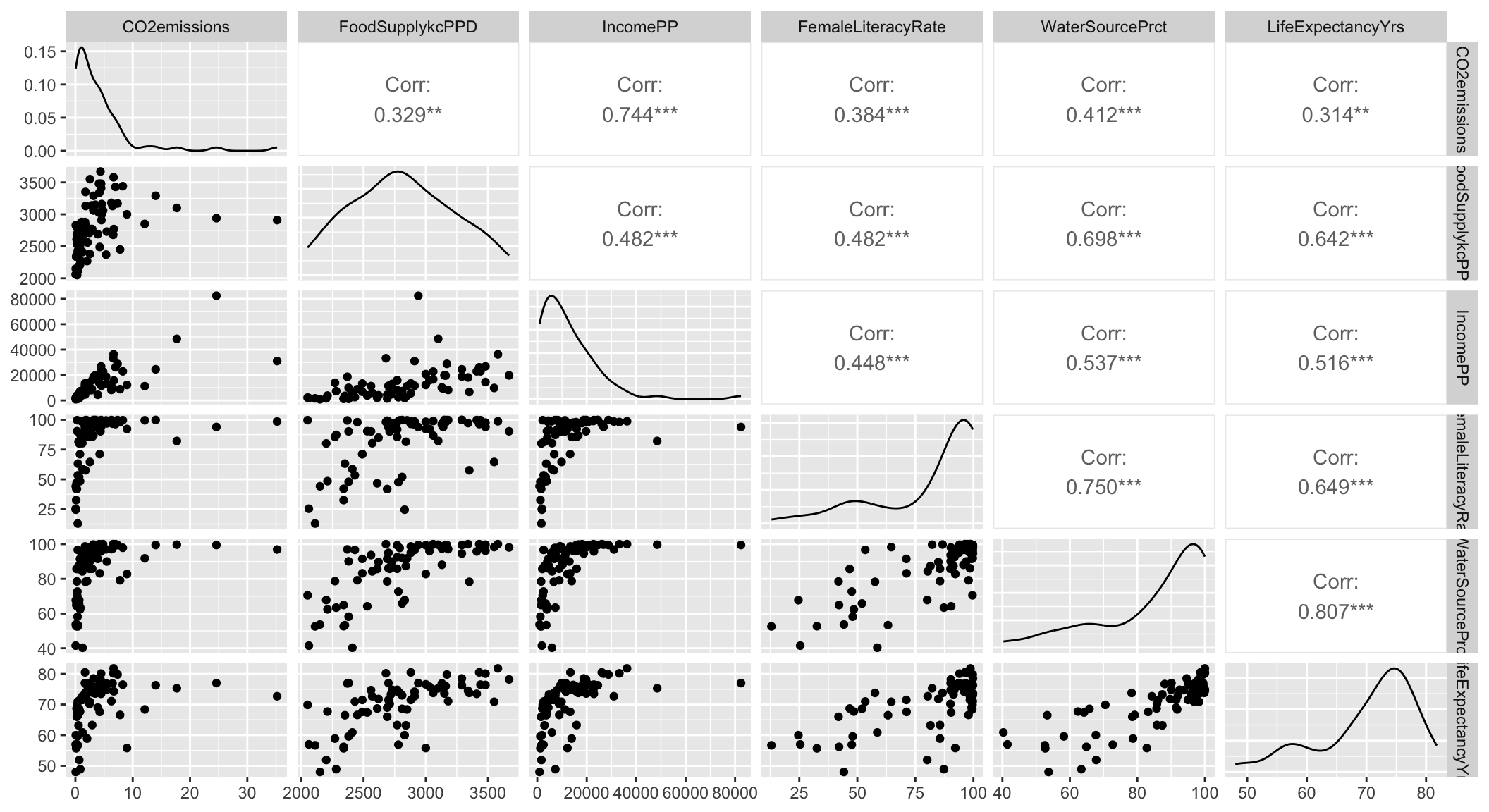
We can quickly look at ggpairs() to identify variables
gapm2 %>% select(where(is.numeric)) %>% 
  relocate(LifeExpectancyYrs, .after = last_col()) %>% ggpairs()

Step 4: Assess scale for continuous variables: Smoothed scatterplots

Take a look at C02, Food Supply, and Income
CO2 = ggplot(data = gapm2, aes(y = LifeExpectancyYrs, x = CO2emissions)) + 
  geom_point() +
  geom_smooth(se=F) + labs(x = "CO2 Emissions (kt)", y = "Life Expectancy (yrs)")

FS = ggplot(data = gapm2, aes(y = LifeExpectancyYrs, x = FoodSupplykcPPD)) + 
  geom_point() +
  geom_smooth(se=F) + labs(x = "Food Supply (kcal PPD)", y = "Life Expectancy (yrs)")

Income = ggplot(data = gapm2, aes(y = LifeExpectancyYrs, x = IncomePP)) + 
  geom_point() +
  geom_smooth(se=F) + labs(x = "Income (GDP per capita)", y = "Life Expectancy (yrs)")

grid.arrange(CO2, FS, Income, nrow=1)
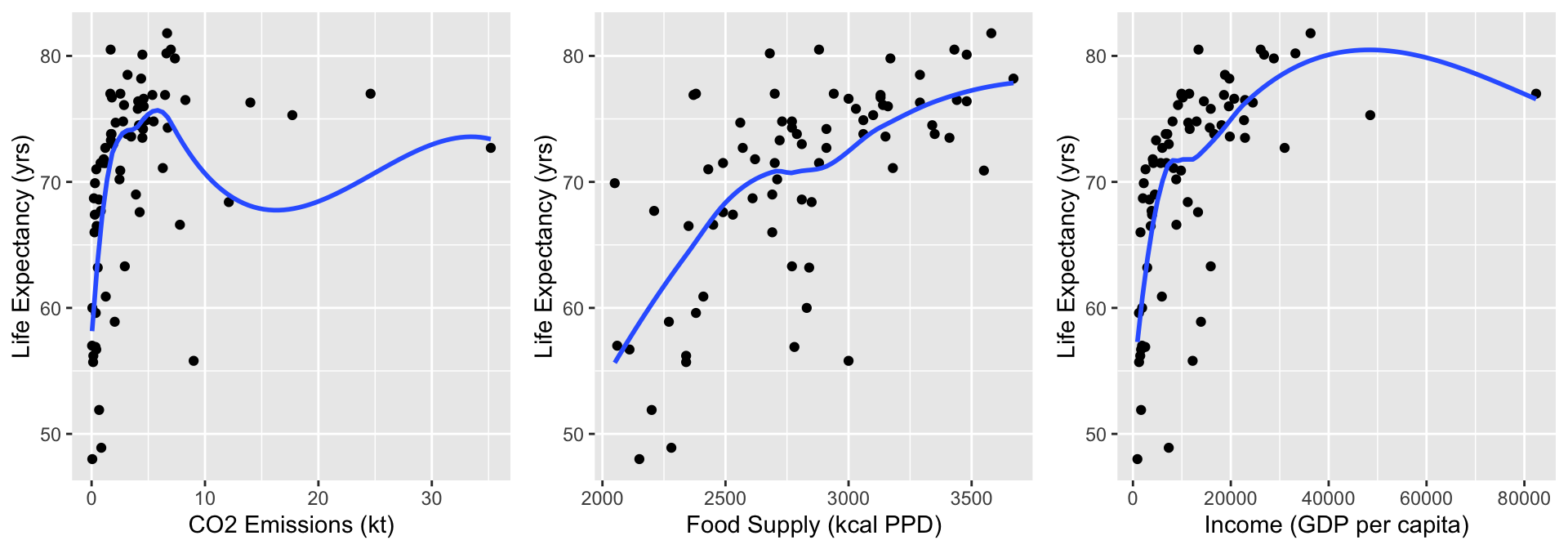
  • Food Supply looks admissible
  • CO2 Emissions and Income do not look very linear, but I want to zoom into the area of the plots that have most of the data

Step 4: Assess scale for continuous variables: Smoothed scatterplots

Zoom into areas on plots with more data
CO2 = ggplot(data = gapm2, aes(y = LifeExpectancyYrs, x = CO2emissions)) + 
  geom_point() + xlim(0,10) +
  geom_smooth(se=F) + labs(x = "CO2 Emissions (kt)", y = "Life Expectancy (yrs)")

FS = ggplot(data = gapm2, aes(y = LifeExpectancyYrs, x = FoodSupplykcPPD)) + 
  geom_point() +
  geom_smooth(se=F) + labs(x = "Food Supply (kcal PPD)", y = "Life Expectancy (yrs)")

Income = ggplot(data = gapm2, aes(y = LifeExpectancyYrs, x = IncomePP)) + 
  geom_point() + xlim(0,40000) +
  geom_smooth(se=F) + labs(x = "Income (GDP per capita)", y = "Life Expectancy (yrs)")

grid.arrange(CO2, FS, Income, nrow=1)
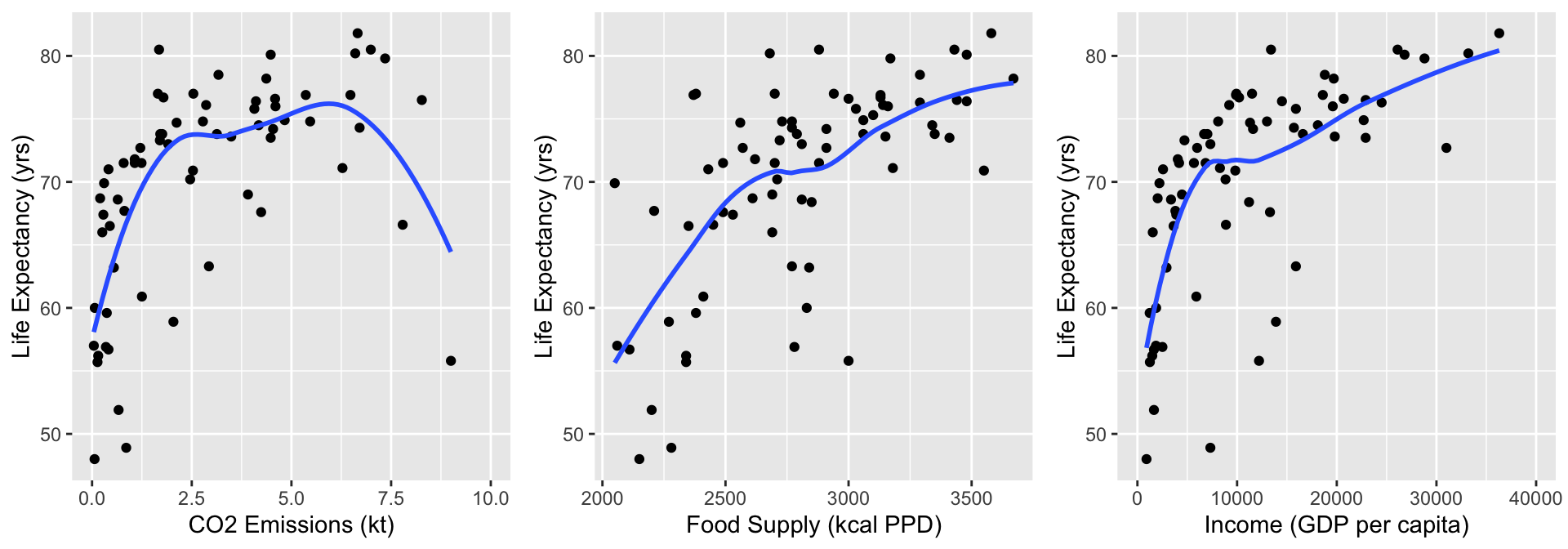
  • Food Supply still looks admissible
  • CO2 Emissions and Income not linear: will address this!!

Step 4: Assess scale for continuous variables

  • Three methods/approaches to address the violation of linearity assumption:


    • Approach 1: Categorize continuous variable


    • Approach 2: Fractional Polynomials


    • Approach 3: Spline functions

Step 4: Approach 1: Categorize continuous variable

  • Categorize continuous variables

    • Percentiles, quartiles, quantiles

      • Create indicator variables corresponding to each quartile
    • Meaningful thresholds

  • Disadvantages:

    • Takes some time to create new variables, especially with multiple continuous covariates

    • Start with quartiles, but might be more appropriate to use different splits

      • No set rules on this
  • Advantage: graphical and visually helps

Step 4: Approach 1: Categorize continuous variable


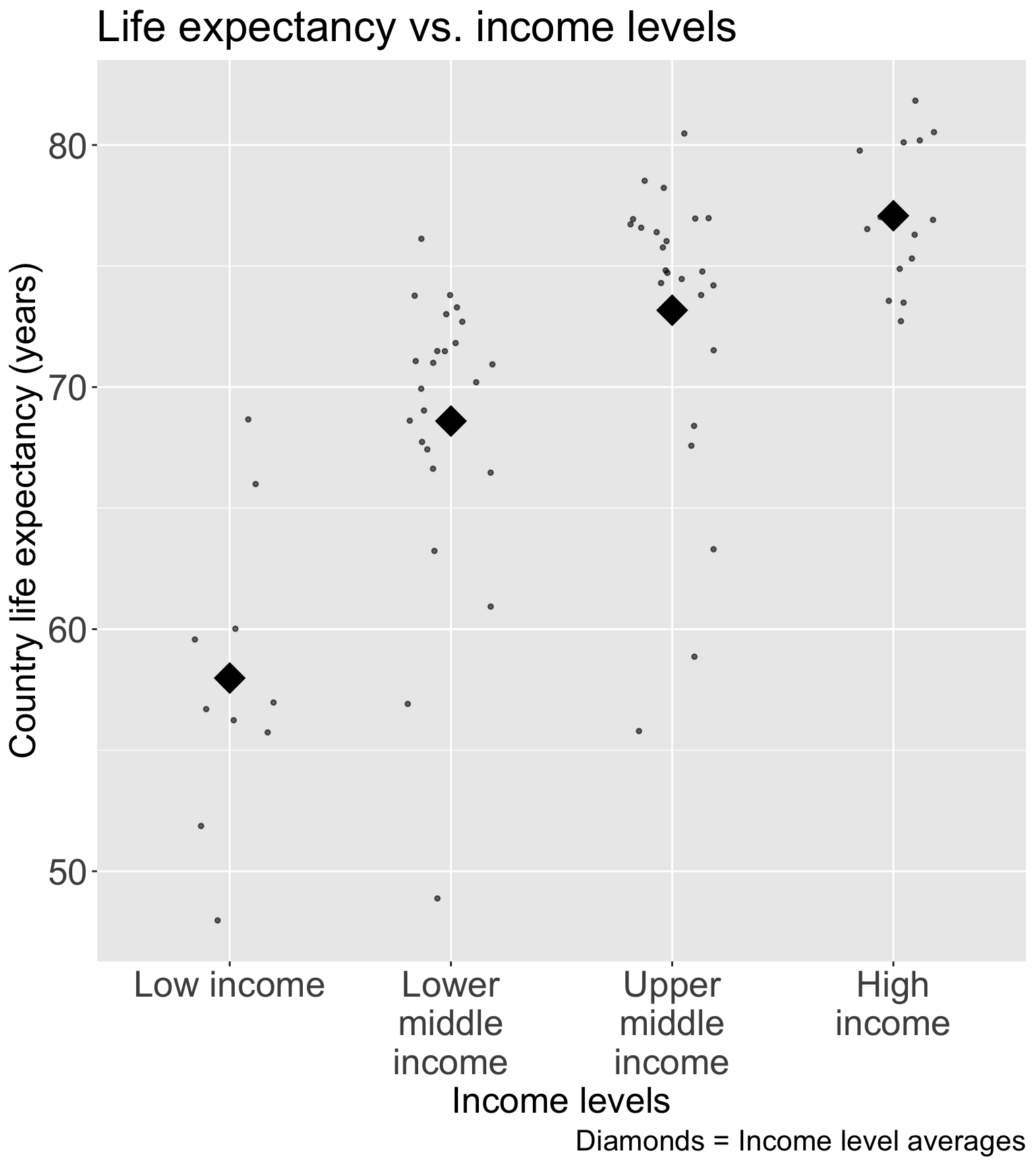
  • Experts in the field have developed these income groups

    • I think this is best solution for income (that was not meeting linearity as a continuous variable)
Step 4: Approach 1: Categorize continuous variable

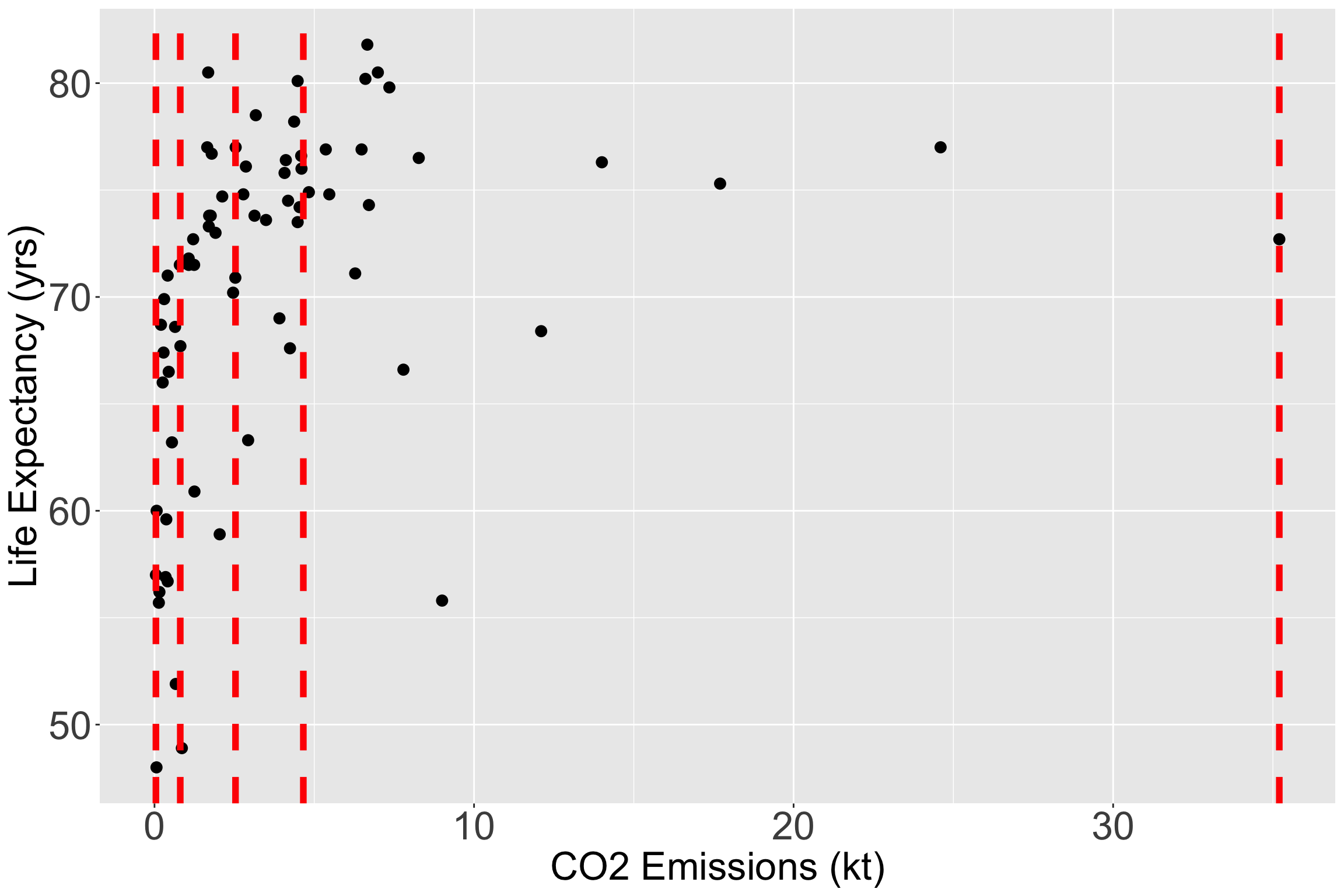
  • Let’s still try it out with CO2 Emissions (kt)

  • I have plotted the quartile lines of food supply with red lines

Take a look at the quartiles within the scatterplot
vline_coordinates= data.frame(Quantile_Name=names(quantile(gapm2$CO2emissions)),
                          quantile_values=as.numeric(quantile(gapm2$CO2emissions)))

ggplot(data = gapm2, aes(y = LifeExpectancyYrs, x = CO2emissions)) + 
  geom_point(size = 3) +
  #geom_smooth(se=F) + 
  labs(x = "CO2 Emissions (kt)", y = "Life Expectancy (yrs)") +
  geom_vline(data = vline_coordinates, aes(xintercept = quantile_values), 
             color = "red", linetype = "dashed", size = 2) +
    theme(axis.title = element_text(size = 25), 
        axis.text = element_text(size = 25), 
        title = element_text(size = 25))
Step 4: Approach 1: Categorize continuous variable

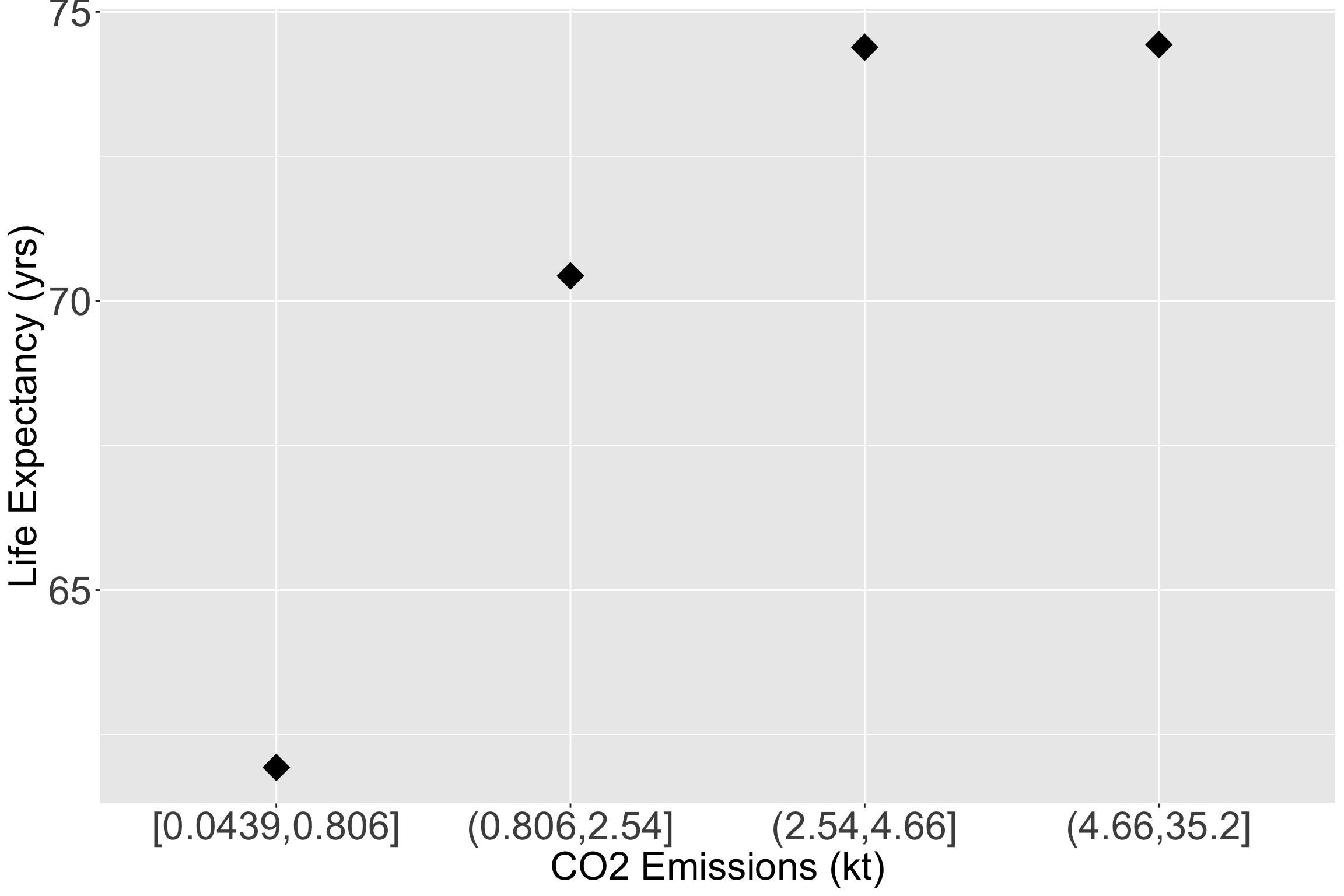
  • Let’s make the quartiles for CO2 emissions:
library(dvmisc)
gapm2 = gapm2 %>% 
  mutate(CO2_q = quant_groups(CO2emissions, groups = 4) %>% factor())
Take a look at the quartile means within the scatterplot
ggplot(data = gapm2, aes(y = LifeExpectancyYrs, x = CO2_q)) + 
  # geom_point(size = 3, aes(y = LifeExpectancyYrs, x = CO2emissions)) +
  stat_summary(fun = mean, geom = "point", size = 8, shape = 18) +
  #geom_smooth(se=F) + 
  labs(x = "CO2 Emissions (kt)", y = "Life Expectancy (yrs)") +
    theme(axis.title = element_text(size = 25), 
        axis.text = element_text(size = 25), 
        title = element_text(size = 25))
Step 4: Approach 1: Categorize continuous variable


  • Let’s fit a new model with the two new representations for income and CO2 emissions


  • Remember, this is the main effects model if we decide to make CO2 into quartiles
Characteristic Beta 95% CI1 p-value
Female literacy rate (%) -0.07 -0.17, 0.02 0.13
CO2 emissions quartiles


    [0.0439,0.806]
    (0.806,2.54] 1.1 -2.7, 4.9 0.6
    (2.54,4.66] -0.29 -5.1, 4.6 >0.9
    (4.66,35.2] -0.60 -5.6, 4.5 0.8
Income levels


    Low income
    Lower middle income 5.4 0.75, 10 0.024
    Upper middle income 6.1 0.20, 12 0.043
    High income 8.0 1.4, 15 0.018
World region


    Africa
    Americas 9.0 4.9, 13 <0.001
    Asia 5.3 2.0, 8.5 0.002
    Europe 6.9 1.1, 13 0.020
Access to omproved water (%) 0.17 0.03, 0.30 0.015
Food supply (kcal PPD) 0.00 0.00, 0.01 0.073
Intergovernmental group


    g77
    oecd 1.1 -4.2, 6.5 0.7
    others 1.0 -4.0, 6.1 0.7
1 CI = Confidence Interval

Step 4: Approach 2: Fractional Polynomials


  • Recall Tukey’s transformation (power) ladder

    • And can use R’s gladder() to see the transformations
Power p -3 -2 -1 -1/2 0 1/2 1 2 3
\(\frac{1}{x^3}\) \(\frac{1}{x^2}\) \(\frac{1}{x}\) \(\frac{1}{\sqrt{x}}\) \(\log(x)\) \(\sqrt{x}\) \(x\) \(x^2\) \(x^3\)


  • We can run through each and test different models, or use the approach from Lesson 7

  • There is also a package we can use!

Step 4: Approach 2: Fractional Polynomials

library(mfp)

fp_model_CO2 = mfp(LifeExpectancyYrs ~ FemaleLiteracyRate + 
                     fp(CO2emissions, df = 4) + income_levels1 + four_regions +
                     WaterSourcePrct + FoodSupplykcPPD + members_oecd_g77,
               data = gapm2, family = "gaussian")

fp_model_CO2$fptable %>% gt(rownames_to_stub = T) %>% tab_options(table.font.size = 24)
df.initial select alpha df.final power1 power2
four_regionsAmericas 1 1 0.05 1 1 .
four_regionsAsia 1 1 0.05 1 1 .
four_regionsEurope 1 1 0.05 1 1 .
WaterSourcePrct 1 1 0.05 1 1 .
income_levels1Lower middle income 1 1 0.05 1 1 .
income_levels1Upper middle income 1 1 0.05 1 1 .
income_levels1High income 1 1 0.05 1 1 .
FoodSupplykcPPD 1 1 0.05 1 1 .
FemaleLiteracyRate 1 1 0.05 1 1 .
CO2emissions 4 1 0.05 1 1 .
members_oecd_g77oecd 1 1 0.05 1 1 .
members_oecd_g77others 1 1 0.05 1 1 .

Step 4: Approach 2: Fractional Polynomials

df.initial select alpha df.final power1 power2
four_regionsAmericas 1 1 0.05 1 1 .
four_regionsAsia 1 1 0.05 1 1 .
four_regionsEurope 1 1 0.05 1 1 .
WaterSourcePrct 1 1 0.05 1 1 .
income_levels1Lower middle income 1 1 0.05 1 1 .
income_levels1Upper middle income 1 1 0.05 1 1 .
income_levels1High income 1 1 0.05 1 1 .
FoodSupplykcPPD 1 1 0.05 1 1 .
FemaleLiteracyRate 1 1 0.05 1 1 .
CO2emissions 4 1 0.05 1 1 .
members_oecd_g77oecd 1 1 0.05 1 1 .
members_oecd_g77others 1 1 0.05 1 1 .
  • Conclusion from fractional polynomial is that CO2 does not need to be transformed

  • A little counter-intuitive to what we saw in quartiles

  • Thus, I think leaving CO2 emissions as quartiles is best!

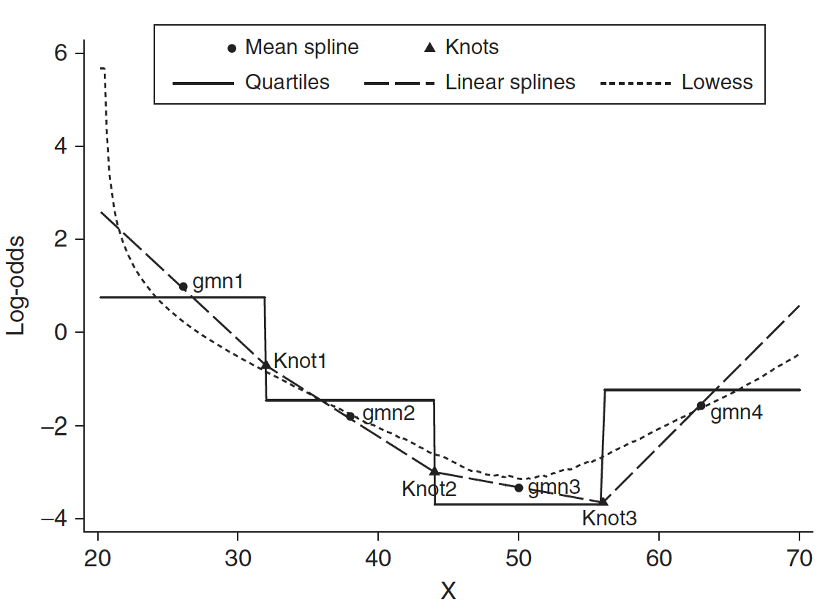
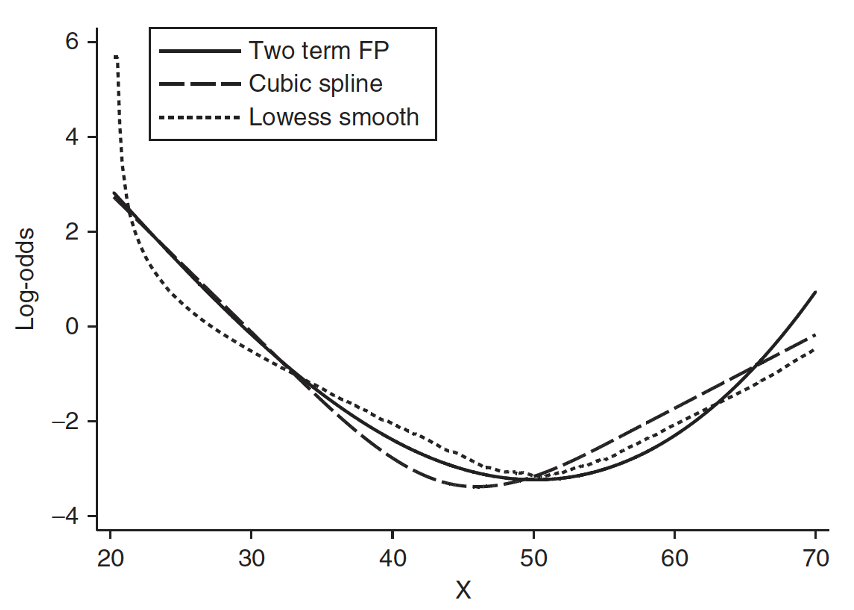
Step 4: Approach 3: Spline functions

  • Spline function is to fit a series of smooth curves that joined at specific points (called knots)
Step 4: Approach 3: Spline functions

  • Need to specify knots for spline functions

    • More knots are flexible, but requires more parameters to estimate
    • In most applications three to five knots are sufficient


  • Within our class, fractional polynomials will be sufficient


  • If you think this is cool, I highly suggest you look into Functional Data Analysis (FDA) or Functional Regression

    • Jeffrey Morris is a big name in that field


Step 4 Conclusion: main effects model

  • We concluded that we will use:

    • Income levels (categorical) that Gapminder created
    • Quartiles for CO2 Emissions

Note

This is also a good step to decide if you would like to score a categorical variable (Lesson 5)

  • Question: Do you see any visual issues with my regression table?
Characteristic Beta 95% CI1 p-value
Female literacy rate (%) -0.07 -0.17, 0.02 0.13
CO2 emissions quartiles


    [0.0439,0.806]
    (0.806,2.54] 1.1 -2.7, 4.9 0.6
    (2.54,4.66] -0.29 -5.1, 4.6 >0.9
    (4.66,35.2] -0.60 -5.6, 4.5 0.8
Income levels


    Low income
    Lower middle income 5.4 0.75, 10 0.024
    Upper middle income 6.1 0.20, 12 0.043
    High income 8.0 1.4, 15 0.018
World region


    Africa
    Americas 9.0 4.9, 13 <0.001
    Asia 5.3 2.0, 8.5 0.002
    Europe 6.9 1.1, 13 0.020
Access to omproved water (%) 0.17 0.03, 0.30 0.015
Food supply (kcal PPD) 0.00 0.00, 0.01 0.073
Intergovernmental group


    g77
    oecd 1.1 -4.2, 6.5 0.7
    others 1.0 -4.0, 6.1 0.7
1 CI = Confidence Interval

Learning Objectives

  1. Understand the overall steps for purposeful selection as a model building strategy
  1. Apply purposeful selection to a dataset using R
  1. Use different approaches to assess the linear scale of continuous variables in logistic regression

Step 5: Check for interactions

  • Create a list of interaction terms from variables in the “main effects model” that has clinical plausibility


  • Add the interaction variables, one at a time, to the main effects model, and assess the significance using a F-test

    • May keep interaction terms with p-value < 0.10 (or 0.05)


  • Keep the main effects untouched, only simplify the interaction terms


  • Use methods from Step 2 (comparing model with all interactions to a smaller model with interactions) to determine which interactions to keep


  • The model by the end of Step 5 is called the preliminary final model

Step 5: Check for interactions

  • We test with \(\alpha = 0.10\)

  • Follow the F-test procedure in Lesson 10 (MLR: Using the F-test)

    • This means we need to follow the 7 steps of the general F-test in previous slide (taken from Lesson 10)
  • Use the hypothesis tests for the specific variable combo:

Binary & continuous variable (Lesson 11, LOB 2)

Testing a single coefficient for the interaction term using F-test comparing full model to reduced model

Multi-level & continuous variables (Lesson 11, LOB 3)

Testing group of coefficients for the interaction terms using F-test comparing full to reduced model

Binary & multi-level variable (Lesson 12, LOB 4)

Testing group of coefficients for the interaction terms using F-test comparing full to reduced model

Two continuous variables (Lesson 12, LOB 5)

Testing a single coefficient for the interaction term using F-test comparing full to reduced model

Poll Everywhere Questions 6-8

Step 5: Check for interactions

  • Use add1() function to compare a full model (interactions with FLR) and reduced model (main effects model)
add1(main_eff_model, scope = ~ FemaleLiteracyRate * . ,  test = "F")
Single term additions

Model:
LifeExpectancyYrs ~ FemaleLiteracyRate + CO2_q + income_levels1 + 
    four_regions + WaterSourcePrct + FoodSupplykcPPD + members_oecd_g77
                                    Df Sum of Sq    RSS    AIC F value Pr(>F)
<none>                                           946.46 215.48               
FemaleLiteracyRate:CO2_q             3    27.171 919.29 219.38  0.5320 0.6623
FemaleLiteracyRate:income_levels1    3    12.802 933.66 220.50  0.2468 0.8633
FemaleLiteracyRate:four_regions      3    95.987 850.47 213.78  2.0315 0.1203
FemaleLiteracyRate:WaterSourcePrct   1     3.040 943.42 217.25  0.1804 0.6726
FemaleLiteracyRate:FoodSupplykcPPD   1    31.063 915.40 215.07  1.9003 0.1735
FemaleLiteracyRate:members_oecd_g77  2    11.513 934.95 218.59  0.3386 0.7142
  • I went through all the ANOVA tables, and found the following significant interactions:

    • None!
  • Think about it: does that track with what we saw in our interactions lecture?

Step 6: Assess model fit

  • Assess the adequacy of the model (diagnostics) and check its fit


  • Methods for diagnostics will be discussed next class

    • Combination of diagnostics and model fit statistics!

    • Looked at model fit statistics in last lesson

    • Look at diagnostics in Lesson 15: MLR Diagnostics


  • If the model is adequate and fits well, then it is the Final model

Step 6: Assess model fit

  • Our final model contains

    • Female Literacy Rate FLR

    • CO2 Emissions in quartiles CO2_q

    • Income levels in groups assigned by Gapminder income_levels

    • World regions four_regions

    • Membership of global and economic groups members_oecd_g77

      • OECD: Organization for Economic Co-operation and Development
      • G77: Group of 77
      • Other
    • Food Supply FoodSupplykcPPD

    • Clean Water Supply WaterSupplePct

Step 6: Assess model fit: Model fit statistics

  • Way I did it in the lab instructions (and last class)
sum_fm = summary(final_model)
model_fit_stats = data.frame(Model = "Final model", 
                             Adjusted_R_sq = sum_fm$adj.r.squared, 
                             AIC = AIC(final_model), BIC = BIC(final_model))

model_fit_stats %>% gt() %>% 
  tab_options(table.font.size = 35) %>% fmt_number(decimals = 3)
Model Adjusted_R_sq AIC BIC
Final model 0.743 421.804 458.230
  • Another (maybe faster?) way to do it (glance() in broom package)
glance(final_model) %>% mutate(Model = "Final model") %>%
  select(Model, adj.r.squared, AIC, BIC) %>% gt() %>% 
  tab_options(table.font.size = 35) %>% fmt_number(decimals = 3)
Model adj.r.squared AIC BIC
Final model 0.743 421.804 458.230

Step 6: Assess model fit: Comparing model fits

  • Remember the preliminary main effects model (at end of Step 3): same as final model but the continuous varaibles, income and CO2 emissions, were not categorized

  • We can compare model fit statistics of the preliminary main effects model and the final model

fm_glance = glance(final_model) %>% mutate(Model = "Final model") %>%
  select(Model, `Adj R-squared` = adj.r.squared, AIC, BIC) 
pmem_glance = glance(prelim_me_model) %>% 
  mutate(Model = "Preliminary main effects model") %>%
  select(Model, `Adj R-squared` = adj.r.squared, AIC, BIC) 
rbind(fm_glance, pmem_glance) %>% gt() %>% 
  tab_options(table.font.size = 35) %>% fmt_number(decimals = 3)
Model Adj R-squared AIC BIC
Final model 0.743 421.804 458.230
Preliminary main effects model 0.747 417.708 445.028
  • Remember, adjusted \(R^2\), AIC, and BIC penalize models for more coefficients

  • Preliminary main effects model: better fit statistics, but violates linearity assumption