Poster Info and Help
2025-06-04
Some notes from last quarter’s posters (1/2)
- Can you all see my feedback from last quarter? Let me know if you cannot, but want to
- In methods, there is a difference between coding procedure and statistical procedure
- Example of something we do NOT report: If we get a dataset where the categorical variables (with worded categories) are represented as integers, then we convert the integers to the categories.
- This is a coding procedure that automatically needs to be done to represent the variable accurately.
- This is NOT a statistics procedure and we don’t report it. We’re not “converting” a continuous variable to a categorical one. We are performing data management to make sure the data code represent the data.
- Example of something we do NOT report: If we get a dataset where the categorical variables (with worded categories) are represented as integers, then we convert the integers to the categories.
- In conclusion/discussion, many people mentioned limitations but not how they affect the results
- Or made a wrong conclusion about the consequences
- See me to double check!!
- “Data” is a plural word!
- Use like “Data are represented in Table…”
Some notes from last quarter’s posters (2/2)
- Results
- No need to interpret the intercept unless you have an interaction
- If purposeful model selection, do NOT skip the odds ratios interpretations!!
- If you are limiting your Regression table to only the main variable, you need to explicitly state that this is from the final model and adjusted for other variables
- There was A LOT of talk about generalizability being an issue because of the spread of our data
- Sample sistribution ALONE does not mean our results are not generalizable
- The more important question is: Are there enough people (in counts) in each group/demographic/etc to make a decent estimate?
- Be really careful around language!!
- Using Why or How in your title is a little misleading – we can only answer “does”
- Make sure you do not make implications that we are uncovering a causal pathway!!
- We are not!
- The study design does NOT support this!
Things you can assume and not assume from your reader
- Things people assume you are doing (correctly) and you do not need to share with an audience
- Following a codebook’s categories
- How you ran a certain model (aka don’t need to say we used
glm()to fit the logistic regression model) - You can assume people can read mathematical equations
- How age is calculated
- Things you cannot assume people know
- How to read R code: do not include your model equation as an
glm()function
- How to read R code: do not include your model equation as an
Some notes
- I will NOT be counting exact bullet points
- If it says 2-3, anything less than 4 is okay
- If it says 5-6, it shouldn’t be 1 and it shouldn’t be >10
- Do NOT make bullet points really long!
- This was a big issue in last quarter’s poster
- Work to make things concise!! You are likely including too much information
- I tried the QMD poster, and it is REALLY hard to troubleshoot
- I highly suggest making your poster in powerpoint!
Background
- Length: 5-8 bullets
- Purpose: Introduce the research question and why it is important to study
- This section is non-technical.
- By reading just the introduction and conclusion, someone without a technical background should have an idea of what they study was about, why it is important, and what the main results are
- You may start with your bullets from Lab 1, but you should edit it and make sure it flows into your report well!
- Should contain some references
Methods
- Length: 8-10 bullets
- Purpose: Describe the analyses that were conducted and methods used to select variables and check diagnostics
- Some important methods to discuss (You may divide these into your sections, not necessarily with these names)
- General approach to the dataset
- Variables and variable creation
- Model building: we performed purposeful selection
- Final model
- Model diagnostics
Methods example-ish
- Data were collected from _____ in ____ year
- We performed a complete case analysis on _____
- We generated categorized variables for CO2 emissions and income levels
- CO2 emissions used quartiles
- Income levels used the specified groupings by Gapminder
- We used purposeful model selection, a combination of field expertise and statistical methods, to determine the final model
- Our final model included our outcome, life expectancy, with a main effect for female literacy rate while adjusting for confounders
- We adjusted for: CO2 emissions, income levels, world region, access to improved water, food supply, and intergovernmental groups
- We included an interaction between ____ and ____
- We investigated model assumptions and diagnostics using ______
- We used R version 4.4.1 to analyze data
Results: What should be in your results?
If you did purposeful model selection:
Table 1
Table showing odds ratios for your main variable + variable from interaction
One additional figure or table to understand your research question
Interpretations of odds ratios from Table in #2
If you did LASSO:
Table 1
Table or plot showing most important variables
One additional figure or table to help understand your question
Interpretations of important variables: identify top 1-3 that predict outcome
1. Table 1 (table summary in Lesson 2)
library(gtsummary)

gapm2_vars = gapm2 %>%
  select(
    CO2emissions,
    FoodSupplykcPPD,
    FemaleLiteracyRate,
    WaterSourcePrct,
    four_regions,
    members_oecd_g77,
    income_levels1
  )

table1 = tbl_summary(
  gapm2_vars,
  label = list(
    FemaleLiteracyRate = "Female literacy rate (%)",
    CO2emissions = "CO2 emissions quartiles",
    income_levels1 = "Income levels",
    four_regions = "World region",
    WaterSourcePrct = "Access to improved water (%)",
    FoodSupplykcPPD = "Food supply (kcal PPD)",
    members_oecd_g77 = "Intergovernmental group"
    ),
  statistic = list(all_continuous() ~ "{mean} ({sd})")
  )

table1| Characteristic | N = 721 |
|---|---|
| CO2 emissions quartiles | 4.1 (5.6) |
| Food supply (kcal PPD) | 2,812 (407) |
| Female literacy rate (%) | 82 (23) |
| Access to improved water (%) | 86 (16) |
| World region | |
| Africa | 20 (28%) |
| Americas | 12 (17%) |
| Asia | 17 (24%) |
| Europe | 23 (32%) |
| Intergovernmental group | |
| Group of 77 | 47 (65%) |
| OECD | 7 (9.7%) |
| Others | 18 (25%) |
| Income levels | |
| Low income | 10 (14%) |
| Lower middle income | 24 (33%) |
| Upper middle income | 24 (33%) |
| High income | 14 (19%) |
| 1 Mean (SD); n (%) | |
2. Regression table or Forest plot (if no interactions)
reg_table = tbl_regression(
  final_model,
  label = list(
    FemaleLiteracyRate ~ "Female literacy rate (%)",
    CO2_q ~ "CO2 emissions quartiles",
    income_levels1 ~ "Income levels",
    four_regions ~ "World region",
    WaterSourcePrct ~ "Access to improved water (%)",
    FoodSupplykcPPD ~ "Food supply (kcal PPD)",
    members_oecd_g77 ~ "Intergovernmental group"
    )) %>%
  as_gt() %>%
  tab_options(table.font.size = 20) %>%
  cols_width(label ~ px(250))
reg_table| Characteristic | Beta | 95% CI1 | p-value |
|---|---|---|---|
| Female literacy rate (%) | -0.07 | -0.17, 0.02 | 0.13 |
| CO2 emissions quartiles | |||
| Quartile 1 | — | — | |
| Quartile 2 | 1.1 | -2.7, 4.9 | 0.6 |
| Quartile 3 | -0.29 | -5.1, 4.6 | >0.9 |
| Quartile 4 | -0.60 | -5.6, 4.5 | 0.8 |
| Income levels | |||
| Low income | — | — | |
| Lower middle income | 5.4 | 0.75, 10 | 0.024 |
| Upper middle income | 6.1 | 0.20, 12 | 0.043 |
| High income | 8.0 | 1.4, 15 | 0.018 |
| World region | |||
| Africa | — | — | |
| Americas | 9.0 | 4.9, 13 | <0.001 |
| Asia | 5.3 | 2.0, 8.5 | 0.002 |
| Europe | 6.9 | 1.1, 13 | 0.020 |
| Access to improved water (%) | 0.17 | 0.03, 0.30 | 0.015 |
| Food supply (kcal PPD) | 0.00 | 0.00, 0.01 | 0.073 |
| Intergovernmental group | |||
| Group of 77 | — | — | |
| OECD | 1.1 | -4.2, 6.5 | 0.7 |
| Others | 1.0 | -4.0, 6.1 | 0.7 |
| 1 CI = Confidence Interval | |||
2. Regression table or Forest plot (if no interactions)
library(broom.helpers)
model_tidy = tidy_and_attach(final_model, conf.int=T) %>%
  tidy_remove_intercept() %>%
  tidy_add_reference_rows() %>% tidy_add_estimate_to_reference_rows() %>%
  tidy_add_term_labels() %>%
  mutate(var_label = case_match(var_label,
                               "Female literacy rate (%)" ~ "",
                               "Food supply (kcal PPD)" ~ " ",
                               "Access to improved water (%)" ~ "   ",
                               "CO2 emissions quartiles" ~ "CO2 emissions \n quartiles",
                               "Income levels" ~ "Income levels",
                               "Intergovernmental group" ~ "Intergovern- \n mental group",
                               .default = var_label
                         ))

forest_plot = ggplot(data=model_tidy, aes(y=label, x=estimate, xmin=conf.low, xmax=conf.high)) +
  facet_grid(rows = vars(var_label), scales = "free",
             space='free_y', switch = "y") +
  geom_point(size = 3) +  geom_errorbarh(height=.2) +
  geom_vline(xintercept=0, color='#C2352F', linetype='dashed', alpha=1) +
  theme_classic() +
  labs(x = "Beta", y = "Variables") +
  theme(axis.title = element_text(size = 20), axis.text = element_text(size = 20),
        title = element_text(size = 20), strip.placement = "outside",
        strip.text.y.left = element_text(size = 18, angle = 0),
        strip.background = element_blank())
2. Regression table or Forest plot (if no interactions)
- This is a fun one to investigate!
- Stick to the regression table if you are having trouble with this!
library(broom.helpers)

model_tidy = tidy_and_attach(final_model, conf.int=T) %>%
  tidy_remove_intercept() %>%
  tidy_add_reference_rows() %>% tidy_add_estimate_to_reference_rows() %>%
  tidy_add_term_labels() %>%
  mutate(var_label = case_match(var_label,
                               "Female literacy rate (%)" ~ "",
                               "Food supply (kcal PPD)" ~ " ",
                               "Access to improved water (%)" ~ "   ",
                               "CO2 emissions quartiles" ~ "CO2 emissions \n quartiles",
                               "Income levels" ~ "Income levels",
                               "Intergovernmental group" ~ "Intergovern- \n mental group",
                               .default = var_label
                         ))

forest_plot = ggplot(data=model_tidy, aes(y=label, x=estimate, xmin=conf.low, xmax=conf.high)) +
  facet_grid(rows = vars(var_label), scales = "free",
             space='free_y', switch = "y") +
  geom_point(size = 3) +  geom_errorbarh(height=.2) +
  geom_vline(xintercept=0, color='#C2352F', linetype='dashed', alpha=1) +
  theme_classic() +
  labs(x = "Beta", y = "Variables") +
  theme(axis.title = element_text(size = 20), axis.text = element_text(size = 20),
        title = element_text(size = 20), strip.placement = "outside",
        strip.text.y.left = element_text(size = 18, angle = 0),
        strip.background = element_blank())
forest_plot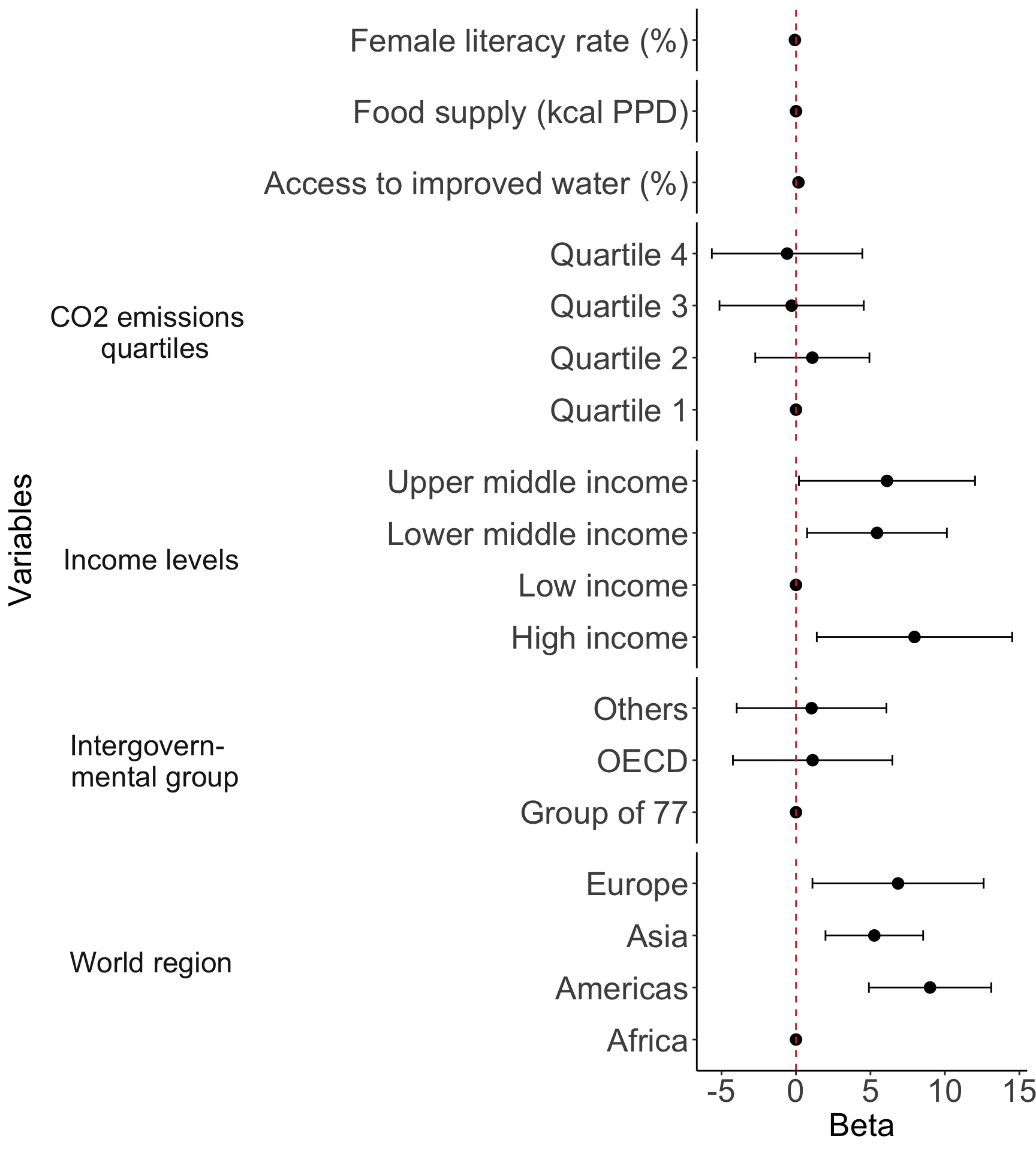
Important note if you have interactions
Please check your Quiz 3 feedback!
- Many of you are not quite interpreting interactions correctly
There is extra care to reporting results from interactions
Please make sure you use
estimable()to get the correct effects!- If you have an interaction with a categorical variable, then your main variable’s “effect” should be reported for each category
See HW 3 and Lecture 10 for reporting!
You will NOT include the adjusting variables in the table/plot
- But you need to say adjusting for all other variables in model from methods
Table/plot if you have interactions!!
- Let’s say my model from HW 3 included other variables and my main research question is about association between death and if infection is probable at ICU intake
Table __: Estimated odds ratios and confidence intervals of death at discharge. Odds ratios are comparing infection probable and not probable at ICU intake depending for two cases when cancer is and is not part of problem. Odds ratios adjust for all other variable in the model presented in methods.
| Cancer | Infection | Estimated OR | 95% CI |
|---|---|---|---|
| Cancer part of present problem | Infection probable at ICU intake | ||
| No | |||
| Yes | FILL HERE | FILL HERE | |
| Cancer not part of present problem | Infection probable at ICU intake | ||
| No | |||
| Yes | FILL HERE | FILL HERE |
Saving tables
- For tables:
gtsavein thegtpackage should work! - For figures/plots:
ggsavein theggplot2package should work!
- When I first ran the above, I got the following message:
The package "webshot2" is required to save gt tables as images. ✖ Would you like to install it? 1: Yes 2: No- I inputted
1
- I inputted
Any other questions about the poster?
Poster info