Lesson 2: Introduction to Simulations

Nicky Wakim

2026-09-30

Learning Objectives

  1. Describe random variables and distinguish between discrete and continuous types
  2. Explain the role of simulation in approximating probabilities and distributions
  3. Use R to run simulations of discrete random variables
  4. Apply and interpret the four-step simulation process

Where are we?

Learning Objectives

  1. Describe random variables and distinguish between discrete and continuous types
  1. Explain the role of simulation in approximating probabilities and distributions
  2. Use R to run simulations of discrete random variables
  3. Apply and interpret the four-step simulation process

Recall: Outcomes, events, sample spaces

Definition: Outcome

The possible results in a random phenomenon.

Definition: Sample Space

The sample space \(S\) is the set of all outcomes

Definition: Event

An event is a collection of some outcomes. An event can include multiple outcomes or no outcomes (a subset of the sample space).

When thinking about events, think about outcomes that you might be asking the probability of. For example, what is the probability that you get a heads or a tails in one flip? (Answer: 1)

We need to understand random variables

Definition: Random Variable

For a given sample space \(S\), a random variable (r.v.) is a function whose domain is \(S\) and whose range is the set of real numbers \(\mathbb{R}\). A random variable assigns a real number to each outcome in the sample space.

  • A random variable’s value is completely determined by the outcome \(\omega\), where \(\omega \in S\)

    • What is random is the outcome \(\omega\)
  • A random variable is a function from the sample space (with outcomes \(\omega\)) to the set of real numbers

    • We typically write \(X(\omega)\) (or \(X\) for short), where \(X\) is our random variable
  • Thus, we can take our sample space (all outcomes) and make functional transformations to it

The cool (and tricky) thing about random variables

Do you remember our coin example from Lesson 1? We tossed one or two coins.

  • For each coin, the sample space is heads and tails (\(S = \{H,T\}\))
  • If we want the sample space for both coins in order, then we have combinations (\(S=\{(H,H), (H,T), (T,H), (T,T)\}\))


We make the random variable a function of the sample space.

  • For one coin toss, we can say random variable \(X\) is \(1\) if we toss a heads (\(\omega = \text{H}\)) and \(X=0\) if we get a tails
  • For the two coins, we can say \(X\) is the count of heads, so if \(\omega = \text{(H, T)}\), then \(X=1\)

Types of random variables

There are two types of random variables:

  • Discrete random variables (RVs): the set of possible values is either finite or can be put into a countably infinite list

    • You could theoretically list the specific possible outcomes that the variable can take

    • If you sum the rolls of three dice, you must get a whole number. For example, you can’t get any number between 3 and 4.

  • Continuous random variables (RVs): take on values from continuous intervals, or unions of continuous intervals

    • Variable takes on a range of values, but there are infinitely possible values within the range

    • If you keep track of the time you sleep, you can sleep for 8 hours or 7.9 hours or 7.99 hours or 7.999 hours …

  • Discrete random variables (RVs) are a little easier to simulate right now
    • We will only do discrete RVs today

Learning Objectives

  1. Describe random variables and distinguish between discrete and continuous types
  1. Explain the role of simulation in approximating probabilities and distributions
  1. Use R to run simulations of discrete random variables
  2. Apply and interpret the four-step simulation process

What is a simulation?

A probability model for a random phenomenon includes a sample space, events, random variables, and a probability measure.

Simulation

Simulation involves using a probability model to artificially recreate a random phenomenon, many times, usually using a computer.

We simulate outcomes and values of random variables according to the model’s assumptions.

The Foundation: Relative Frequencies

  • Probabilities can be interpreted as long-run relative frequencies


  • By simulating a random phenomenon a large number of times, we can approximate the probability of an event by calculating the relative frequency of its occurrence
    • Basically, out of all the trials we run, how many times did the event happen?


  • Simulation is a powerful tool to approximate a few things:
    • Probabilities
    • Distributions of random variables
    • Long-run averages

We saw an example of long-run relative frequency in our coin flip

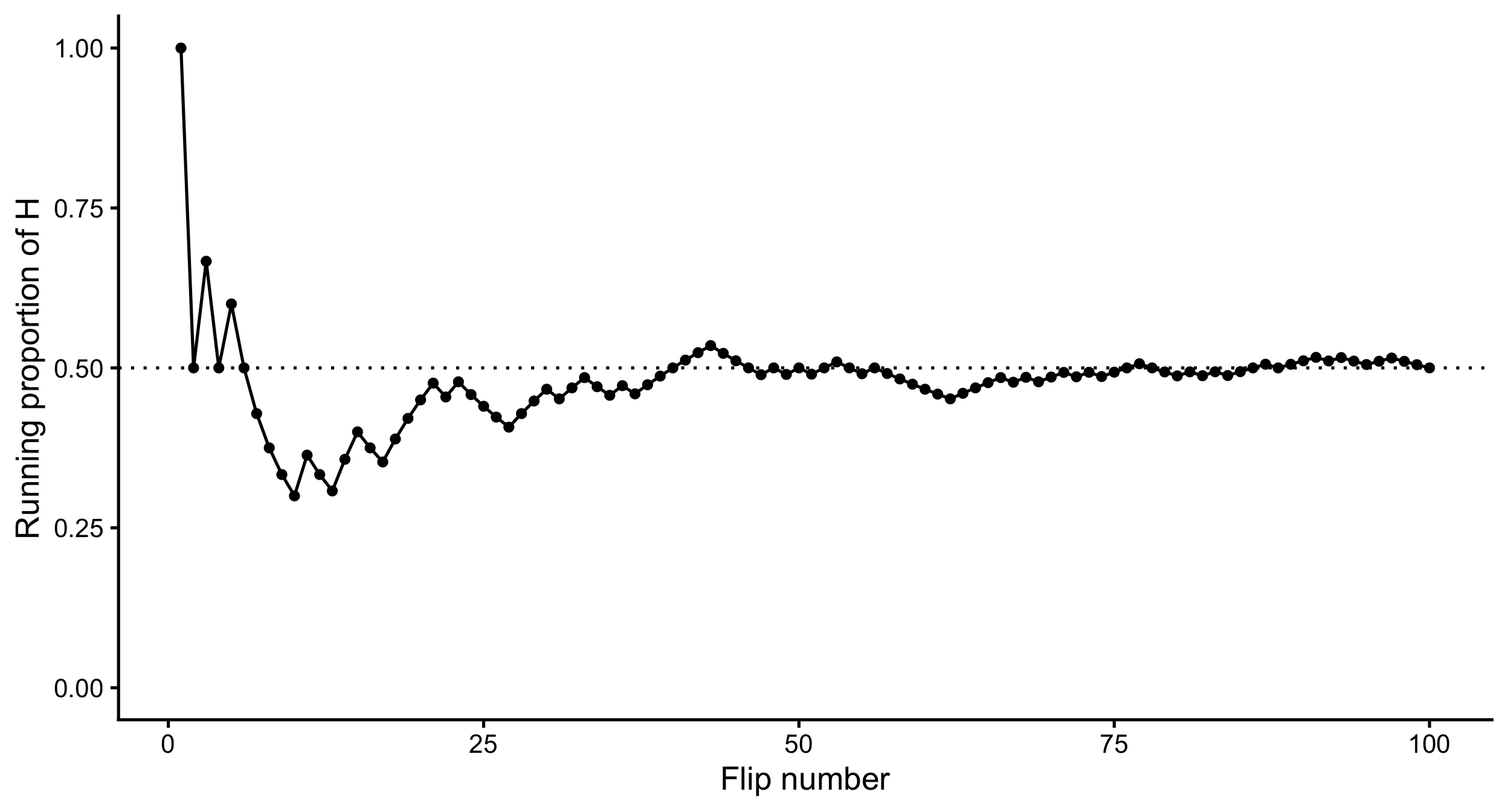
In Lesson 1, we flipped a coin 100 times and recorded the proportion of heads.

  • We tossed 50 heads out of the 100 flips
  • Our long-run relative frequency was \(50/100 = 0.5\), which approximated the probability of getting a head on any one flip
Tactile simulations

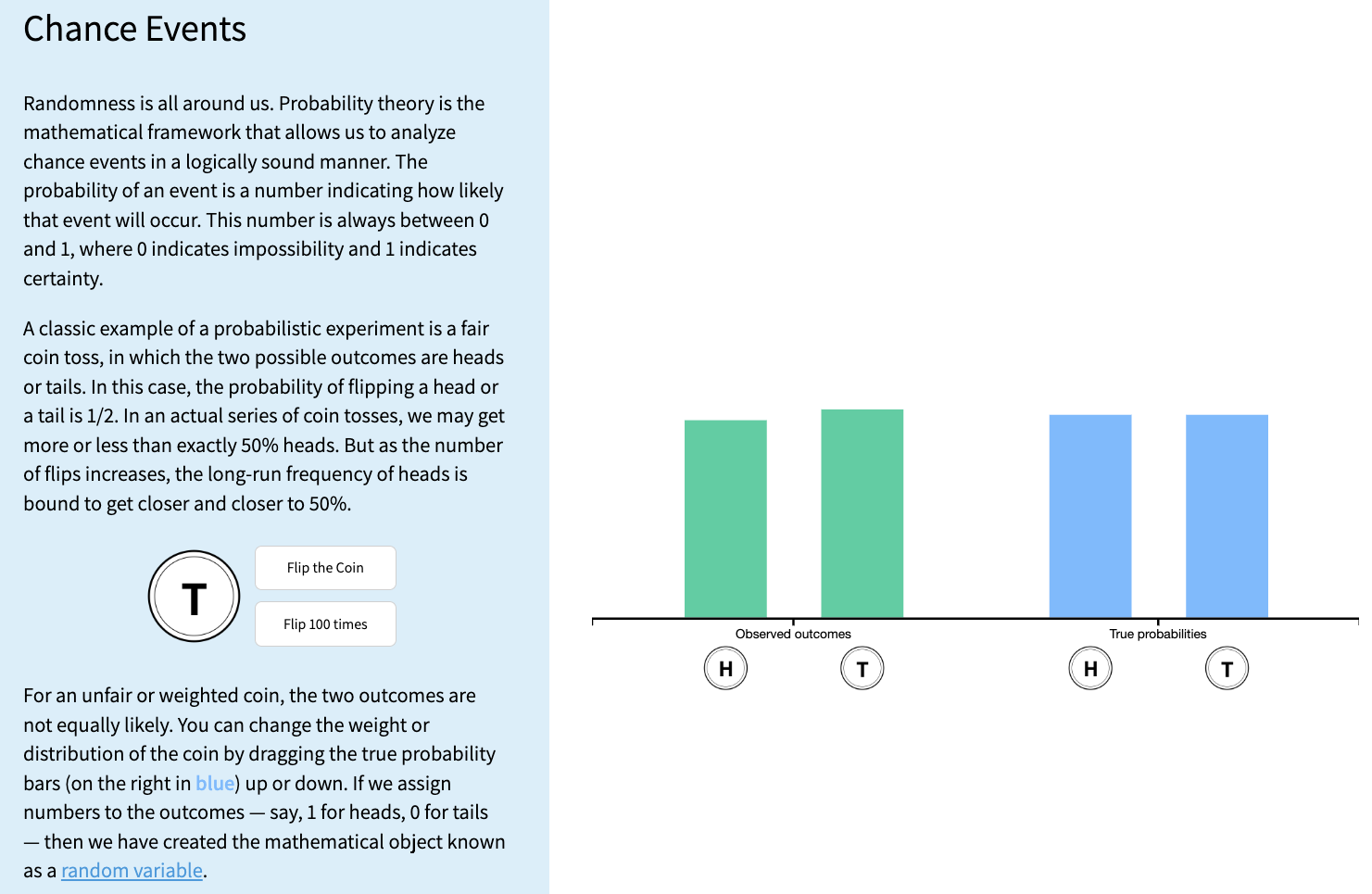
  • We’ve already seen coin flips!
  • We can also use cards, dice, and other objects to simulate discrete random variables


  • Other common method: A box model uses a box/hat/bucket of “tickets” with labels to represent possible outcomes
    • Allows us to increase the number of “tickets” with appropriate labels
    • Coin flip as box model: A box with two tickets (H and T).
    • 90% free throw shooter: A box with 10 tickets (9 “make” and 1 “miss”).
    • Draws can be with replacement (e.g., coin flips) or without replacement (e.g., dealing a poker hand).

Learning objectives

  1. Describe random variables and distinguish between discrete and continuous types
  2. Explain the role of simulation in approximating probabilities and distributions
  1. Use R to run simulations of discrete random variables
  1. Apply and interpret the four-step simulation process

Example to build our simulation skills

Example: Simulating Two Rolls of a Fair Four-Sided Die

We’re going to roll two four-sided dice. Let \(X\) be the sum of two rolls, and \(Y\) be the larger of the two rolls. How would we simulate \(X\) and \(Y\) separately?


  • Note: this example is not asking for a probability!
    • We can simulate a random variable and look at its distribution without calculating any probabilities.


  • We will focus on simulating \(X\) first


Let’s build up some coding tools to do this!

How do we simulate something like a single roll of a die?

  • We can also use R to sample from the box or spinner

  • The sample() function is a powerful tool for simulating draws from a box model.

  • For example, we can simulate a coin flip

    • What is x?
    • What is size?
sample(x = c("H", "T"), size = 1)
1
sample() draws at random from the values in x. c("H", "T") puts “H” and “T” together as a box of two tickets, and size = 1 draws one ticket.
[1] "T"


  • Or a roll of a four-sided die
sample(x = c(1, 2, 3, 4), size = 1)
1
Same idea for a four-sided die: the box has tickets 1, 2, 3, and 4, and we draw one.
[1] 1

What if we have multiple rolls at once?

  • We can set size to be larger than 1 to simulate multiple draws at once
sample(x = c("H", "T"), size = 5, replace = TRUE)
1
size = 5 draws 5 tickets. replace = TRUE puts each ticket back before the next draw, so “H” and “T” can come up again, just like flipping the same coin 5 times.
[1] "T" "T" "T" "H" "T"
  • We can simulate our example of the two four-sided dice
sample(x = c(1, 2, 3, 4), size = 2, replace = TRUE)
1
Two rolls of a four-sided die. Because of replace = TRUE, both rolls can show the same number.
[1] 3 3


  • What happens if we set replace = FALSE?
sample(x = c(1, 2, 3, 4), size = 2, replace = FALSE)
sample(x = c(1, 2, 3, 4), size = 4, replace = FALSE)
1
Without replacement, a ticket cannot be drawn twice, so the two numbers are always different.
2
Drawing all 4 tickets without replacement just shuffles 1, 2, 3, and 4.
[1] 4 2
[1] 2 1 3 4

Can we start to simulate many rolls of two dice?

Example: Simulating Two Rolls of a Fair Four-Sided Die

We’re going to roll two four-sided dice. Let \(X\) be the sum of two rolls, and \(Y\) be the larger of the two rolls. How would we simulate \(X\) and \(Y\) separately?

  • To repeat our pair of rolls many times, we make a table with one row for every roll
    • sim numbers each simulation (each pair of rolls), and die says which die was rolled
    • expand_grid() makes every combination of sim and die, and n() is the number of rows


  • Let’s start with 5 simulations
reps <- 5

rolls <- expand_grid(sim = 1:reps, die = 1:2) |>
  mutate(roll = sample(1:4, n(), replace = TRUE))
1
Save the number of simulations as reps, so it is easy to change later.
2
Make a table with every combination of simulation number (1 to 5) and die number (1 or 2), which gives 10 rows. The pipe |> passes this table to the next line.
3
mutate() adds a new column called roll. n() is the number of rows (10), so we get one random roll of a four-sided die for every row.

What does our table of rolls look like?

rolls
1
Typing the name of a saved object prints it.
# A tibble: 10 × 3
     sim   die  roll
   <int> <int> <int>
 1     1     1     1
 2     1     2     4
 3     2     1     2
 4     2     2     1
 5     3     1     3
 6     3     2     1
 7     4     1     3
 8     4     2     2
 9     5     1     3
10     5     2     2


  • Each row is one roll of one die


  • Each simulation (sim) takes up two rows: one for die 1 and one for die 2
    • For example, the two rows with sim = 1 are the first pair of rolls


  • Next, we combine the two rolls in each simulation to get \(X\)

Then we calculate \(X\) for each simulation

  • \(X\) is the sum of the two rolls, so we add up the rolls within each simulation
    • group_by(sim) tells R to treat each simulation separately
    • summarise() collapses each group into one row
rolls |>
  group_by(sim) |>
  summarise(X = sum(roll))
1
Start with the table of rolls and pass it to the next line.
2
Group the rows by simulation, so each pair of rolls is handled separately.
3
Add up the rolls in each simulation. This makes one row per simulation, with the sum saved in a new column called X.
# A tibble: 5 × 2
    sim     X
  <int> <int>
1     1     5
2     2     3
3     3     4
4     4     5
5     5     5


  • Now we have one row per simulation and one value of \(X\) in each row

We need more reps for long-run relative frequencies

  • Same code, but now with 10,000 simulations
reps <- 10000

rolls <- expand_grid(sim = 1:reps, die = 1:2) |>
  mutate(roll = sample(1:4, n(), replace = TRUE))

X_sims <- rolls |>
  group_by(sim) |>
  summarise(X = sum(roll))
1
The only change: 10,000 simulations instead of 5.
2
Same as before: one row per roll (now 20,000 rows), each with a random roll.
3
Same as before: add up the rolls in each simulation. We save the result as X_sims.
  • Let’s look at the first few simulations
X_sims
1
A tibble (table) only prints its first 10 rows, followed by a note saying how many rows are left.
# A tibble: 10,000 × 2
     sim     X
   <int> <int>
 1     1     5
 2     2     4
 3     3     7
 4     4     2
 5     5     7
 6     6     5
 7     7     8
 8     8     5
 9     9     3
10    10     5
# ℹ 9,990 more rows

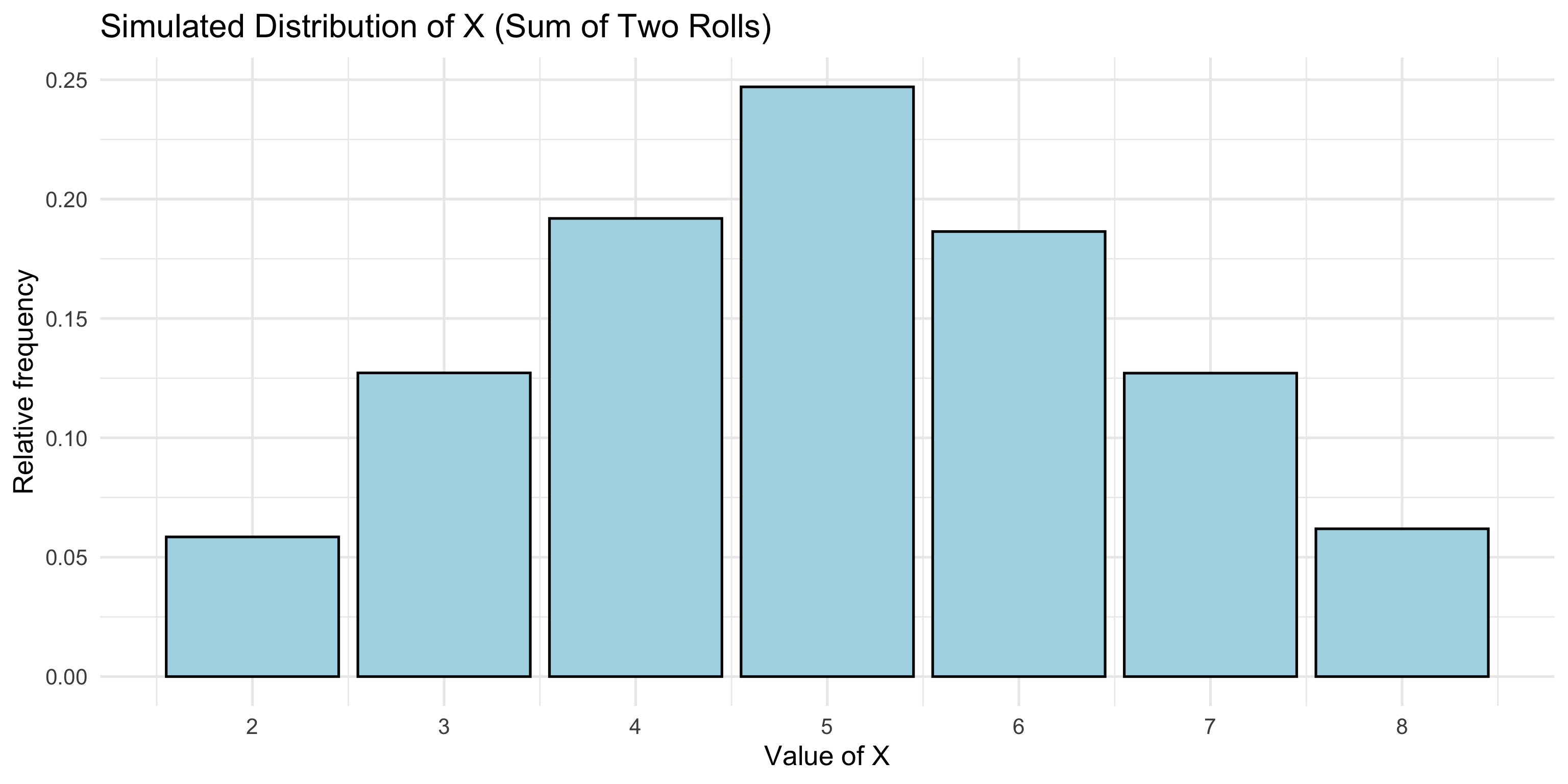
We can look at the plot of random variable \(X\)
If we want to calculate something else, we can!

  • summarise() can calculate several summaries at once:
    • Average and standard deviation of \(X\)
    • Probability that \(X = 5\) and probability that \(X < 3\)
X_sims |>
  summarise(
    average     = mean(X),
    std_dev     = sd(X),
    prob_5      = mean(X == 5),
    prob_less_3 = mean(X < 3)
  )
1
Start with the 10,000 simulated values of X.
2
summarise() collapses the whole table into one row. Each name inside it becomes a column.
3
The average and standard deviation of the simulated values of X.
4
X == 5 and X < 3 are TRUE or FALSE for each simulation, so their mean is the proportion of simulations where the event happened.
# A tibble: 1 × 4
  average std_dev prob_5 prob_less_3
    <dbl>   <dbl>  <dbl>       <dbl>
1    5.00    1.57  0.247      0.0585


Probabilities (relative frequencies) are the proportion of simulations where the event occurs:

  • X == 5 is TRUE or FALSE for each simulation
  • R treats TRUE as 1 and FALSE as 0, so mean(X == 5) is the number of times the event occurs divided by the total number of simulations (reps)

Learning objectives

  1. Describe random variables and distinguish between discrete and continuous types
  2. Explain the role of simulation in approximating probabilities and distributions
  3. Use R to run simulations of discrete random variables
  1. Apply and interpret the four-step simulation process

4 (S)teps of a Simulation

  1. Set up

Define the probability space and related random variables and events, including assumptions.

  1. Simulate

Run the simulation to generate outcomes according to the assumptions.

  1. Summarize

Analyze the output using plots and summary statistics like relative frequencies and averages.

  1. Sensitivity analysis

Investigate how results change when assumptions or parameters of the model are altered.

Example: Dice Rolls

Example: Simulating Two Rolls of a Fair Four-Sided Die

We’re going to roll two four-sided dice. Let \(X\) be the sum of two rolls, and \(Y\) be the larger of the two rolls. How would we simulate \(X\) and \(Y\) separately?

  • Use the steps to run simulation for \(Y\) now

  1. Set up

Define the probability space and related random variables and events, including assumptions.

  • Random variable: \(Y(\omega)\) is the larger of the two rolls in outcome \(\omega\)
  • Goal: simulate \(Y\), the larger of two rolls of a fair four-sided die
  • Sample space: all possible outcomes of rolling two four-sided dice
    • Not necessary, but helpful to define the sample space

\[\begin{aligned} S = \{ &(1,1), (1,2), (1,3), (1,4), (2,1), (2,2), (2,3), (2,4),\\ & (3,1), (3,2), (3,3), (3,4), (4,1), (4,2), (4,3), (4,4)\} \end{aligned}\]

  • Assumptions: each die is fair and rolls are independent
    • Each outcome in \(S\) is equally likely with probability \(1/16\)

  1. Simulate

Run the simulation to generate outcomes according to the assumptions.

  • Same code as for \(X\), but we take the max() of each simulation instead of the sum()
  • We also save the number of dice as n_dice, so it is easy to change later
reps <- 10000
n_dice <- 2

rolls <- expand_grid(sim = 1:reps, die = 1:n_dice) |>
  mutate(roll = sample(1:4, n(), replace = TRUE))

Y_sims <- rolls |>
  group_by(sim) |>
  summarise(Y = max(roll))
1
Save the settings for the simulation: 10,000 simulations with 2 dice each.
2
Same as for X: one row per roll, with a random roll of a four-sided die in each row.
3
The only change from X: max() keeps the larger roll in each simulation instead of adding them up.
  • We can look at the first 30 simulations
head(Y_sims$Y, 30)
1
Y_sims$Y pulls out the Y column, and head(..., 30) shows its first 30 values.
 [1] 4 2 4 3 2 2 3 4 4 4 2 4 4 4 2 3 4 4 1 4 4 3 4 4 2 4 4 4 1 4

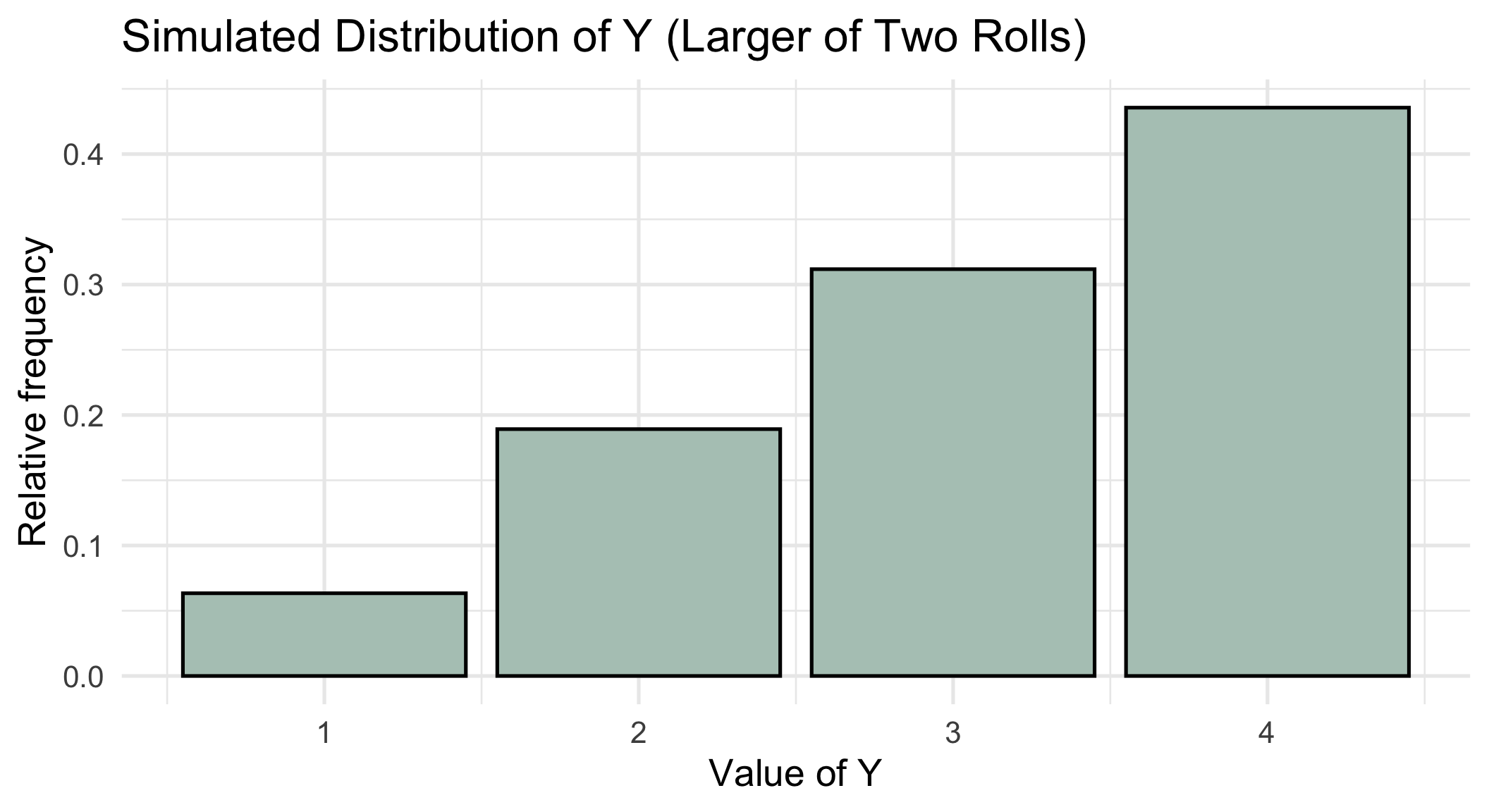
  1. Summarize

Analyze the output using plots and summary statistics like relative frequencies and averages.

Show/Hide Code for plotting Y
ggplot(Y_sims, aes(x = Y, y = after_stat(prop))) +
  geom_bar(color = "black", fill = "#B3C8BF") +
  scale_x_continuous(breaks = 1:4) +
  labs(title = "Simulated Distribution of Y (Larger of Two Rolls)",
       x = "Value of Y",
       y = "Relative frequency") +
  theme_minimal(base_size = 20)
1
Start a plot of Y_sims with Y on the x-axis. after_stat(prop) makes each bar’s height a proportion (relative frequency) instead of a count. Layers are added with +.
2
Draw one bar for each value of Y, with a black outline.
3
Put tick marks at 1, 2, 3, and 4.
4
Add a title and axis labels.
5
Use a simple theme with larger text so the plot is readable on slides.
If the problem asked us for something else, we could compute it:

  • Average of \(Y\)
  • Probability that \(Y = 1\)
  • Probability that \(Y > 3\)
Y_sims |>
  summarise(
    average     = mean(Y),
    prob_1      = mean(Y == 1),
    prob_over_3 = mean(Y > 3)
  )
1
Collapse the 10,000 simulated values of Y into one row of summaries.
2
The average of Y.
3
The proportion of simulations where Y = 1 and where Y > 3. These approximate the probabilities.
# A tibble: 1 × 3
  average prob_1 prob_over_3
    <dbl>  <dbl>       <dbl>
1    3.12 0.0634       0.436

  1. Sensitivity analysis

Investigate how results change when assumptions or parameters of the model are altered.

What if we rolled three dice instead of two?

  • We only need to change n_dice! Everything else stays the same (the changed line is highlighted)
reps <- 10000
n_dice <- 3

rolls <- expand_grid(sim = 1:reps, die = 1:n_dice) |>
  mutate(roll = sample(1:4, n(), replace = TRUE))

Y_sims <- rolls |>
  group_by(sim) |>
  summarise(Y = max(roll))
1
Still 10,000 simulations.
2
The only change: roll 3 dice in each simulation instead of 2.
3
Exactly the same code as before. Because we wrote n_dice instead of typing 2, each simulation now gets three rows automatically.

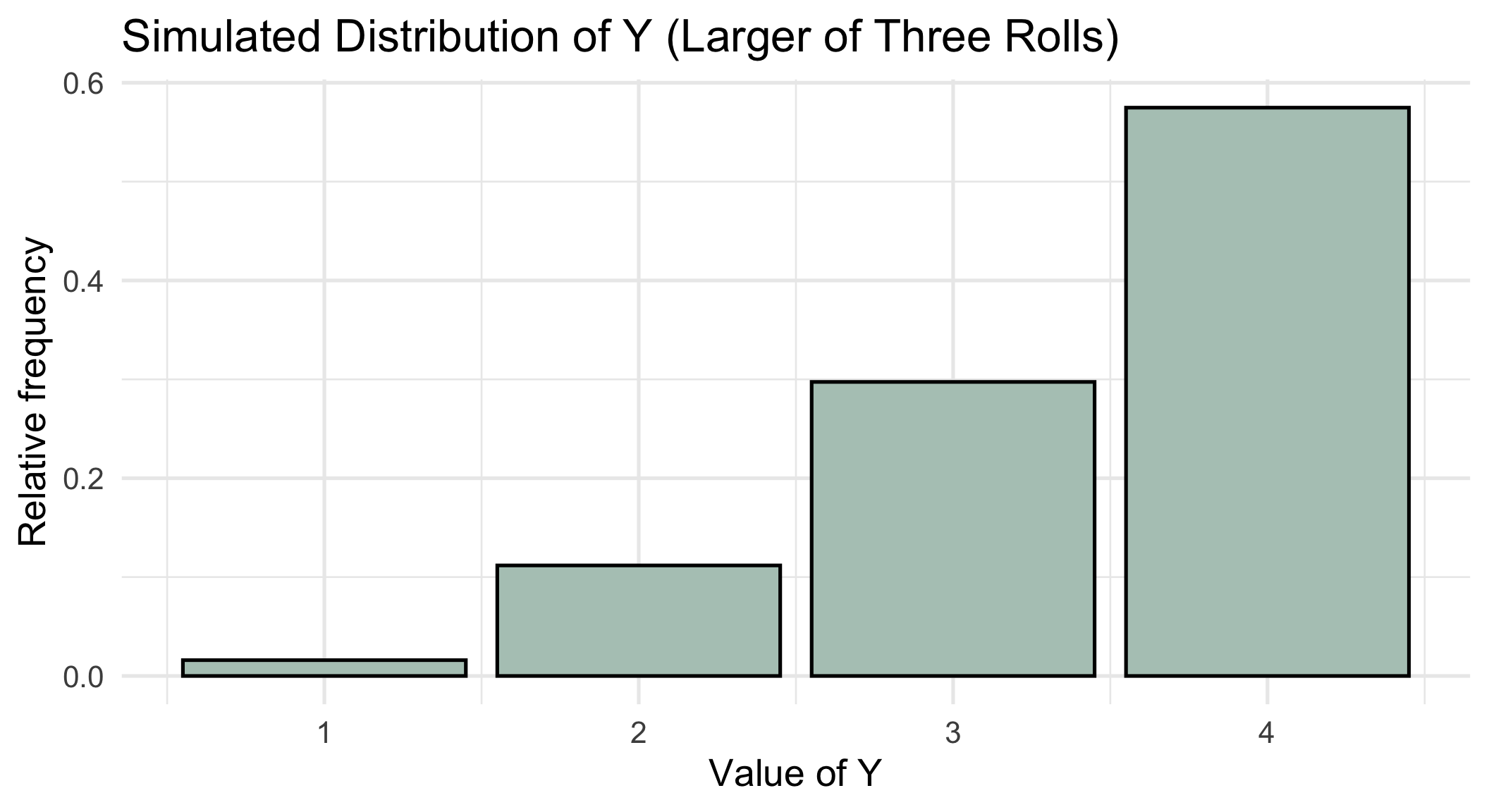
  1. Sensitivity analysis

Investigate how results change when assumptions or parameters of the model are altered.

  • What changed? Each simulation now has three rolls, like the first one here:
rolls |> filter(sim == 1)
1
filter() keeps only the rows that match a condition. Here, that is the three rolls from simulation 1.
# A tibble: 3 × 3
    sim   die  roll
  <int> <int> <int>
1     1     1     2
2     1     2     4
3     1     3     2


  • With more dice, it is more likely that at least one die shows a 4
    • \(P(Y = 4)\) goes from about 0.44 with two dice to about 0.58 with three dice
Show/Hide Code for plotting Y
ggplot(Y_sims, aes(x = Y, y = after_stat(prop))) +
  geom_bar(color = "black", fill = "#B3C8BF") +
  scale_x_continuous(breaks = 1:4) +
  labs(title = "Simulated Distribution of Y (Larger of Three Rolls)",
       x = "Value of Y",
       y = "Relative frequency") +
  theme_minimal(base_size = 20)
1
Start a plot of Y_sims with Y on the x-axis. after_stat(prop) makes each bar’s height a proportion (relative frequency) instead of a count. Layers are added with +.
2
Draw one bar for each value of Y, with a black outline.
3
Put tick marks at 1, 2, 3, and 4.
4
Add a title and axis labels.
5
Use a simple theme with larger text so the plot is readable on slides.
Learning Objectives

  1. Describe random variables and distinguish between discrete and continuous types
  2. Explain the role of simulation in approximating probabilities and distributions
  3. Use R to run simulations of discrete random variables
  4. Apply and interpret the four-step simulation process