Objects
Nicky Wakim
What are R objects?
- R objects are stored “things” in R
- R objects can be data, numbers, text, model output, etc.
- It can be a…
- single piece of data
- like the number
5
- like the number
- collection of data
- like a dataset with 100 rows and 10 columns
- single piece of data
- It can be a…
- R objects are created with assignments that can be used in later commands
How can we create an object?
Here is the generic way we assign something like a value to an object_name:
- Reads as “object name gets value” or “value is assigned to object name”
A note on the assignment operator
- Can assign a variable using either
=or<-- Using
<-is preferable for certain occasions - I usually just use
=because less typing hehe
- Using
Types of objects: single piece of data
| Class | What is it? | Examples | |
|---|---|---|---|
| Doubles | dbl |
Numbers | -5.3, 14.5, or 2000.0001 |
| Integers | int |
Whole numbers (no decimals), more specific than doubles | -5, 14, or 2000 |
| Characters | chr |
These are text or words that are in quotations. Math cannot be done on these. | “My example character” |
| Factor | fct |
Categorical variables stored with levels/groups (good pkg: forcats) |
"blue", "red", "purple" |
| Logical | lgl |
Values that take TRUE or FALSE | TRUE or FALSE |
| Date | date |
Character that represents a date (good pkg: lubridate) |
"12-13-2005" |
Types of objects: collection of data
| Class | Dimension | What does it contain? | |
|---|---|---|---|
| Vector |  |
1D | all the same type* of pieces of data |
| Matrix | 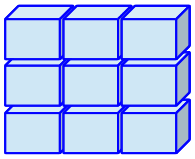 |
2D | all the same type* of pieces of data |
| Array | 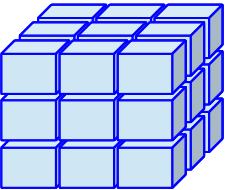 |
ND | all the same type* of pieces of data |
| Data frame / table | 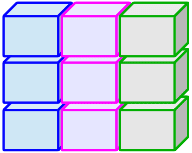 |
2D | different types of pieces of data |
| List | 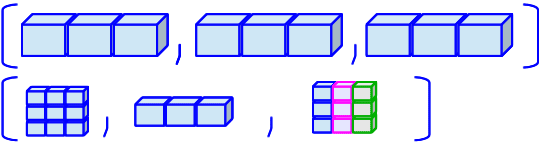 |
1D | other types of collections of data |
*If you put different types of data in a vector, matrix, or array, they will be coerced into characters
Most datasets are data frames
- 1
-
The
class()function tells us the class of the object (in this case,hrs_datais a data frame)
[1] "data.frame"- 2
-
I want to take a look at the data, so I use the
tibble()function to print it as a tibble
# A tibble: 2,728 × 32
   hhid  pn    id    birthyr birthmo birthdate proxy coupled sex   age_mo age_yr
   <fct> <fct> <chr>   <dbl>   <dbl>     <dbl> <fct> <fct>   <fct>  <dbl>  <dbl>
 1 5527… 010   5527…    1967       9      2814 Resp… Not a … Fema…    665     55
 2 5553… 020   5553…    1966       7      2387 Resp… Couple… Fema…    676     56
 3 5597… 010   5597…    1967       3      2602 Resp… Couple… Male     663     55
 4 5581… 020   5581…    1973      10      5036 Resp… Couple… Male     600     50
 5 5547… 020   5547…    1950       7     -3153 Resp… Couple… Male     860     71
 6 5510… 010   5510…    1970       1      3667 Resp… Not a … Fema…    632     52
 7 5505… 010   5505…    1960       1        14 Resp… Not a … Male     749     62
 8 5590… 010   5590…    1971       4      4122 Resp… Couple… Male     621     51
 9 5562… 020   5562…    1952       9     -2664 Resp… Couple… Male     845     70
10 5507… 010   5507…    1966       1      2206 Resp… Couple… Male     679     56
# ℹ 2,718 more rows
# ℹ 21 more variables: ed <dbl>, degree <fct>, race_original <fct>,
#   smoke_ever <fct>, smoke_now <fct>, drink <fct>, height <dbl>, srh <fct>,
#   act_vig <fct>, bp <fct>, diab <fct>, cancer <fct>, lung <fct>, hrt <fct>,
#   strk <fct>, psych <fct>, sleep <fct>, arth <fct>, cond_count <dbl>,
#   cesd <dbl>, income <dbl>
Data frames and tibbles
- Did you notice the output of the tibble?
- Tibbles are a newer object type
- They are a modern take on data frames that are part of the tidyverse
- Main difference is that tibbles print a little nicer within the console
- So we’ll often see them as output for functions that display data frames
Did you see the variables in the data frame?
- The columns in a data frame are called “variables”
- We can see the variable types in the tibble display
# A tibble: 2,728 × 32
   hhid  pn    id    birthyr birthmo birthdate proxy coupled sex   age_mo age_yr
   <fct> <fct> <chr>   <dbl>   <dbl>     <dbl> <fct> <fct>   <fct>  <dbl>  <dbl>
 1 5527… 010   5527…    1967       9      2814 Resp… Not a … Fema…    665     55
 2 5553… 020   5553…    1966       7      2387 Resp… Couple… Fema…    676     56
 3 5597… 010   5597…    1967       3      2602 Resp… Couple… Male     663     55
 4 5581… 020   5581…    1973      10      5036 Resp… Couple… Male     600     50
 5 5547… 020   5547…    1950       7     -3153 Resp… Couple… Male     860     71
 6 5510… 010   5510…    1970       1      3667 Resp… Not a … Fema…    632     52
 7 5505… 010   5505…    1960       1        14 Resp… Not a … Male     749     62
 8 5590… 010   5590…    1971       4      4122 Resp… Couple… Male     621     51
 9 5562… 020   5562…    1952       9     -2664 Resp… Couple… Male     845     70
10 5507… 010   5507…    1966       1      2206 Resp… Couple… Male     679     56
# ℹ 2,718 more rows
# ℹ 21 more variables: ed <dbl>, degree <fct>, race_original <fct>,
#   smoke_ever <fct>, smoke_now <fct>, drink <fct>, height <dbl>, srh <fct>,
#   act_vig <fct>, bp <fct>, diab <fct>, cancer <fct>, lung <fct>, hrt <fct>,
#   strk <fct>, psych <fct>, sleep <fct>, arth <fct>, cond_count <dbl>,
#   cesd <dbl>, income <dbl>
Accessing variables in a data frame
- We can access variables in a data frame using the
$operator
- I want to look at the first five entries of birth year
- I want to look at the first five entries of degree
[1] <NA>                                High school diploma
[3] <NA>                                Master's degree
[5] Master's degree                     Professional degree (Ph.D./M.D./JD)
7 Levels: High school diploma ... Bachelor's degree- Notice, degree will also show the levels of the factor variable
Checking the object type of a variable
- We can also check the object type of each variable without viewing the whole data frame
- Birth year is a numeric variable, so it is a double (
dbl)
- While degree is a factor variable, so it is a factor (
fct)
Wrap-up
- We learned about…
- R objects
- Assigning values to objects
- Different types of objects
- single piece of data
- collection of data
- Data frames and tibbles
Resources
- There is an additional textbook: Hands-On Programming with R by Garrett Grolemund
- Page on tibble package
Objects