2025-05-12
Understand the components of calculations for logistic regression diagnostics
Plot and determine observations where regression does not fit well or are influential using specific diagnostic values
Overall measurements of fit
How well does the fitted logistic regression model predict the outcome?
Different ways to measure the answer to this question
| Measure of fit | Hypothesis tested? | Equation | R code |
|---|---|---|---|
| Pearson residual | Yes | \(X^2=\sum_{j=1}^{J}{r\left(Y_j,{\widehat{\pi}}_j\right)^2}\) | Not given |
| Hosmer-Lemeshow test | Yes | \(\widehat{C}=\sum_{k=1}^{g}\frac{\left(o_k-n_k^\prime{\bar{\pi}}_k\right)^2}{n_k^\prime{\bar{\pi}}_k(1-{\bar{\pi}}_k)}\) | hoslem.test() |
| AUC-ROC | Kinda | Not given | auc(observed, predicted) |
| AIC | Only to compare models | \(AIC = -2 \cdot \text{log-likelihood} + 2q\) | AIC(model_name) |
| BIC | Only to compare models | \(BIC = -2 \cdot \text{log-likelihood} + q\text{log}(n)\) | BIC(model_name) |
Numerical problems
Different numerical problems to look out for
Linear Regression Assumptions
Logistic Regression Assumptions
For example: model contains two binary covariates (history of fracture and smoking status), there will be 4 unique combination of these factors
Now we need to investigate diagnostics looking at individual data or covariate pattern data
Two diagnostic statistics computation approach
Approach 1: computed by covariate pattern
Approach 2: individual observation approach
Why prefer covariate patterns approach?
Model diagnostics of logistic regression can be assessed by checking how influential a covariate pattern is:
Look at change in residuals if a covariate pattern is excluded
Change in standardized Pearson Chi-square statistic due to deletion of subjects with covariate pattern \(x_j\): \[\Delta X_j^2 = r_{sj}^2 = \dfrac{r_j^2}{1-h_j}\]
Aka: Does model fit way better when we delete a covariate pattern group?
Don’t need to know this: change in standardized deviance statistic due to deletion of subjects with covariate pattern \(x_j\): \[\Delta D_j = \dfrac{d_j^2}{1-h_j}\]
Refer to Lesson 12: Assessing Model Fit for expression of Pearson residual
In logistic regression, we mainly rely on graphical methods
Four plots for analysis of diagnostics in logistic regression:
Outcome variable: any fracture in the first year of follow up (FRACTURE: 0 or 1)
Risk factor/variable of interest: history of prior fracture (PRIORFRAC: 0 or 1)
Potential confounder or effect modifier: age (AGE, a continuous variable)
Fitted model with interactions: \[\begin{aligned} \text{logit}\left(\widehat\pi(\mathbf{X})\right) & = \widehat\beta_0 &+ &\widehat\beta_1\cdot I(\text{PF}) & + &\widehat\beta_2\cdot Age& + &\widehat\beta_3 \cdot I(\text{PF}) \cdot Age \\ \text{logit}\left(\widehat\pi(\mathbf{X})\right) & = -1.376 &+ &1.002\cdot I(\text{PF})& + &0.063\cdot Age& -&0.057 \cdot I(\text{PF}) \cdot Age \end{aligned}\]
Nice function in the R script Logistic_Dx_Functions.R
source(here("lessons", "13_Model_diagnostics", "Logistic_Dx_Functions.R"))
dx_glow = dx(glow_m3)
glimpse(dx_glow)Rows: 71
Columns: 16
$ `(Intercept)` <dbl> 1, 1, 1, 1, 1, 1, 1, 1, 1, 1, 1, 1, 1, 1, 1, 1, 1…
$ priorfracYes <dbl> 1, 0, 1, 0, 1, 0, 0, 1, 1, 0, 0, 0, 0, 0, 1, 0, 0…
$ age_c <dbl> 1, -7, 7, -2, 10, 20, 1, -2, 2, 8, 18, -8, 11, 10…
$ `priorfracYes:age_c` <dbl> 1, 0, 7, 0, 10, 0, 0, -2, 2, 0, 0, 0, 0, 0, -3, 0…
$ y <dbl> 2, 2, 3, 2, 2, 1, 3, 3, 1, 5, 1, 3, 2, 1, 1, 4, 1…
$ P <dbl> 0.4088354, 0.1402159, 0.4162991, 0.1822879, 0.420…
$ n <int> 5, 15, 7, 10, 5, 2, 12, 8, 3, 15, 2, 18, 7, 4, 3,…
$ yhat <dbl> 2.0441770, 2.1032389, 2.9140936, 1.8228786, 2.100…
$ Pr <dbl> -0.04018670, -0.07677228, 0.06586860, 0.14507476,…
$ dr <dbl> -0.04023255, -0.07730975, 0.06577949, 0.14332786,…
$ h <dbl> 0.008844090, 0.003811004, 0.008725450, 0.00290085…
$ sPr <dbl> -0.04036559, -0.07691899, 0.06615786, 0.14528564,…
$ sdr <dbl> -0.04041165, -0.07745749, 0.06606836, 0.14353620,…
$ dChisq <dbl> 0.001629381, 0.005916530, 0.004376863, 0.02110791…
$ dDev <dbl> 0.001633102, 0.005999662, 0.004365028, 0.02060264…
$ dBhat <dbl> 1.453897e-05, 2.263418e-05, 3.852626e-05, 6.14091…
For each covariate pattern (which is each row) …
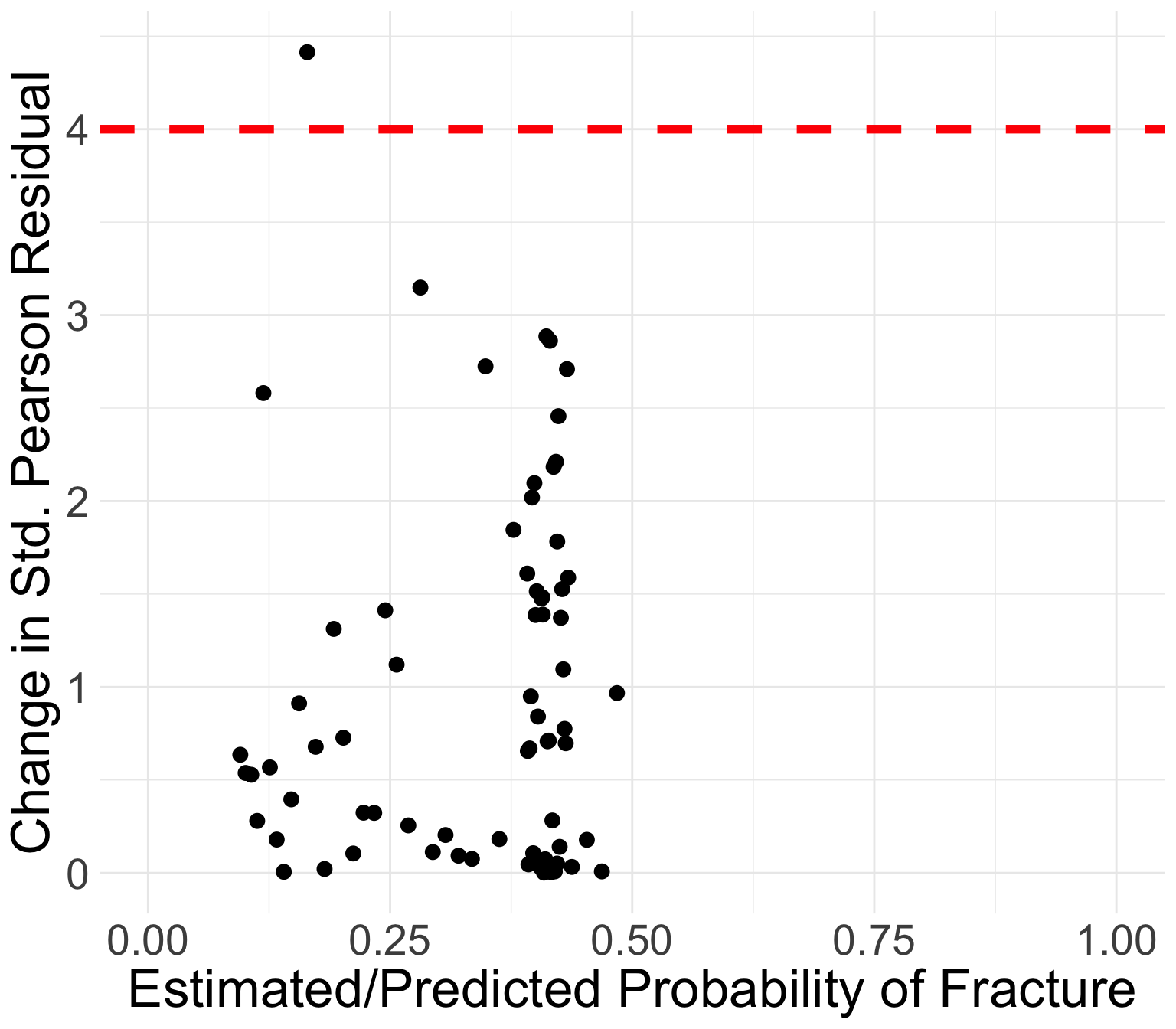
y: Number of eventsP: Estimated probability of events (\(\widehat{\pi}\))n: Number of observations (\(m_j\))yhat: Estimated number of eventsPr: Pearson residualdr: Devianceh: leveragesPr: Standardized Pearson residualsdr: Standardized deviancedChisq: Change in standardized Pearson residualdDev: Change in standardized deviancedBhat: Change in coefficient estimatesThe plots allow us to identify those covariate patterns that are…
Poorly fit
Influential on estimated coefficients
If you are interested to look at the contribution of leverage (\(h_j\)) to the values of the diagnostic statistic, you may also look at plots of:
Generally, the points that curve from top left to bottom right of plot correspond to covariate patterns with \(Y_j = 1\)
Points in the top left or top right corners identify the covariate patterns that are poorly fit
We may use 4 as a crude approximation to the upper 95th percentile for \(\Delta X_j^2\)
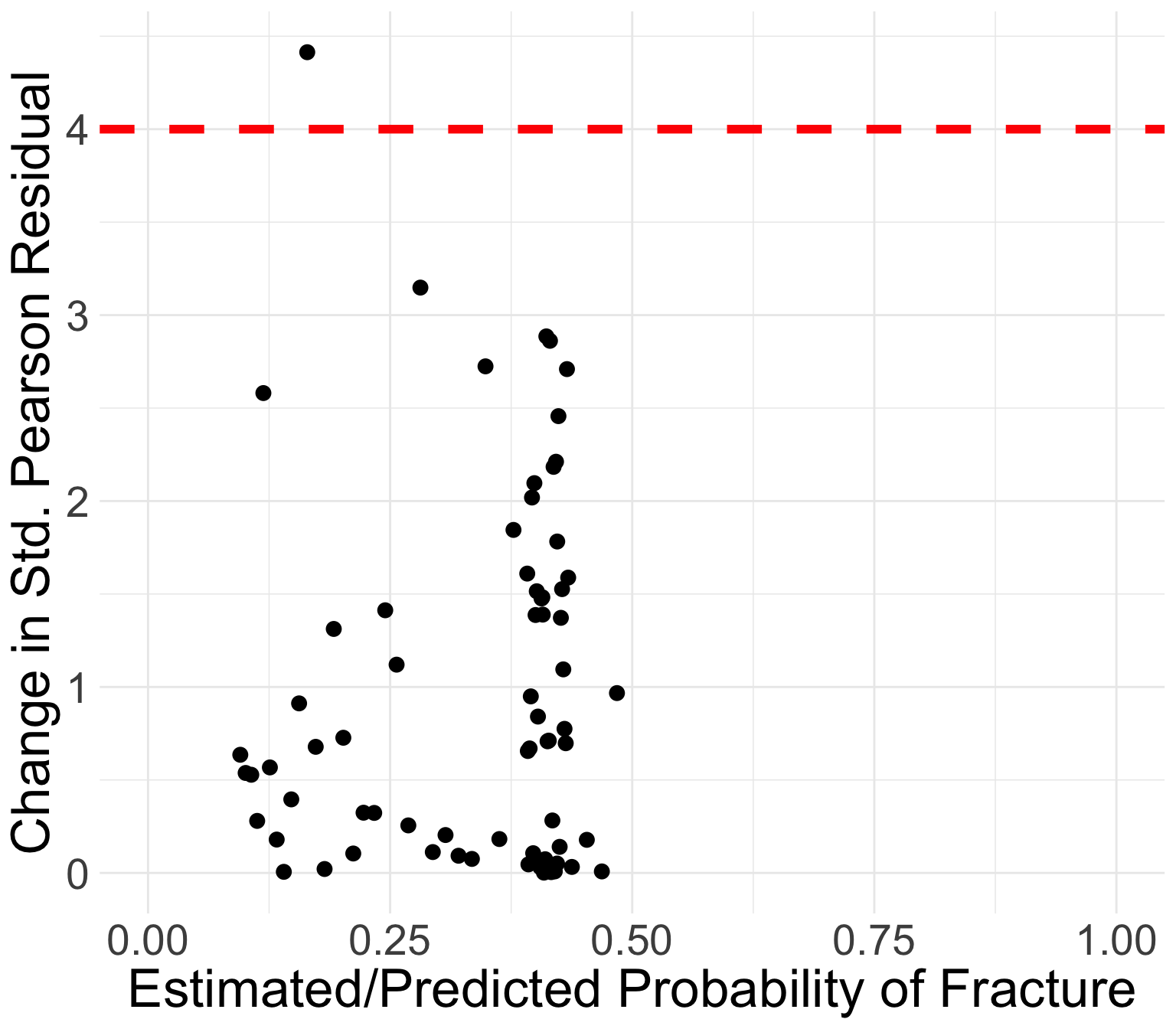
Generally, the points that curve from top left to bottom right of plot correspond to covariate patterns with \(Y_j = 1\)
Points in the top left or top right corners identify the covariate patterns that are poorly fit
We may use 4 as a crude approximation to the upper 95th percentile for \(\Delta X_j^2\)
Which point is over 4?
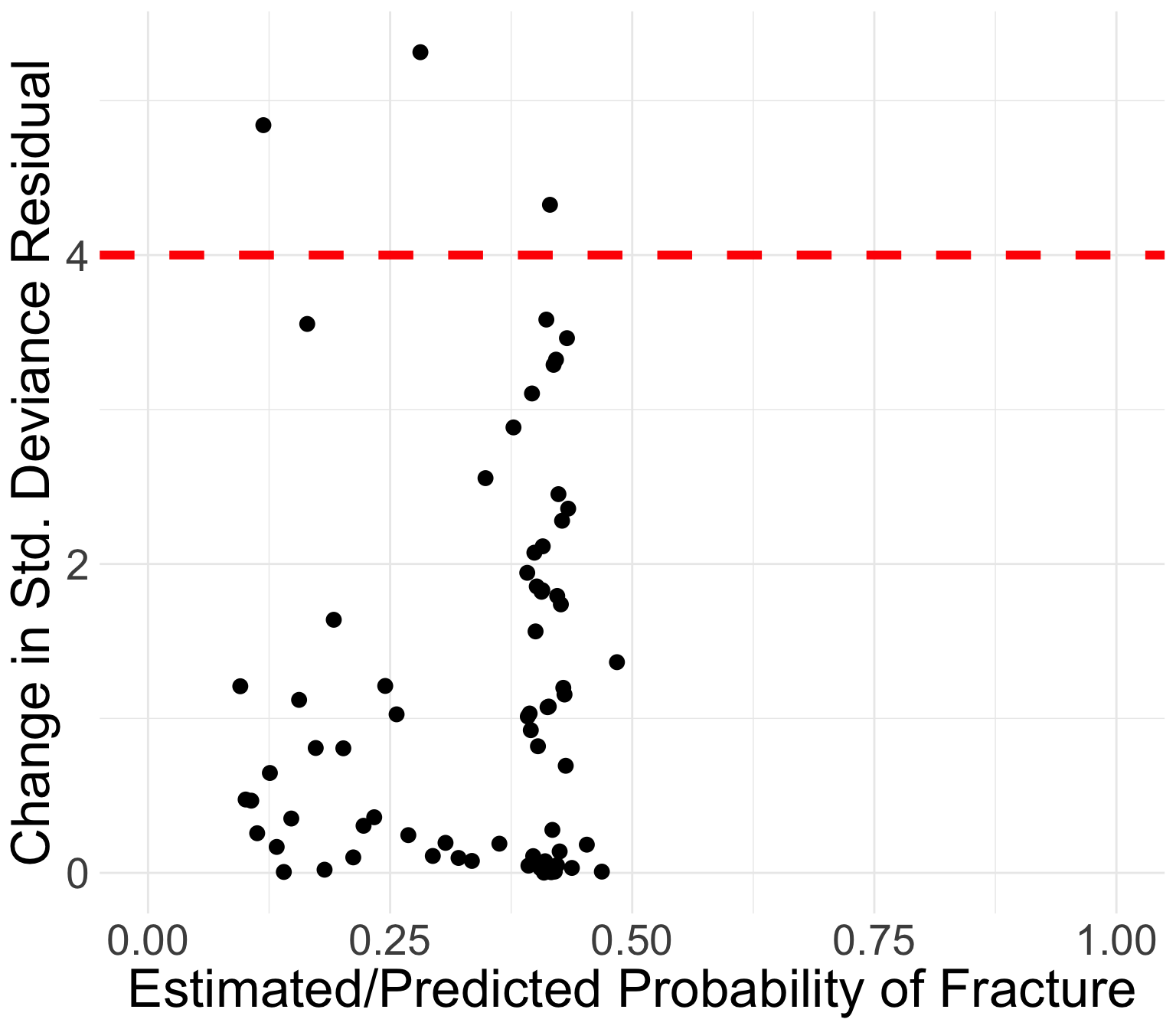
Same investigation as Pearson residuals
Points in the top left or top right corners identify the covariate patterns that are poorly fit
Use 4 as a crude approximation to the upper 95th percentile
Which point is over 4?
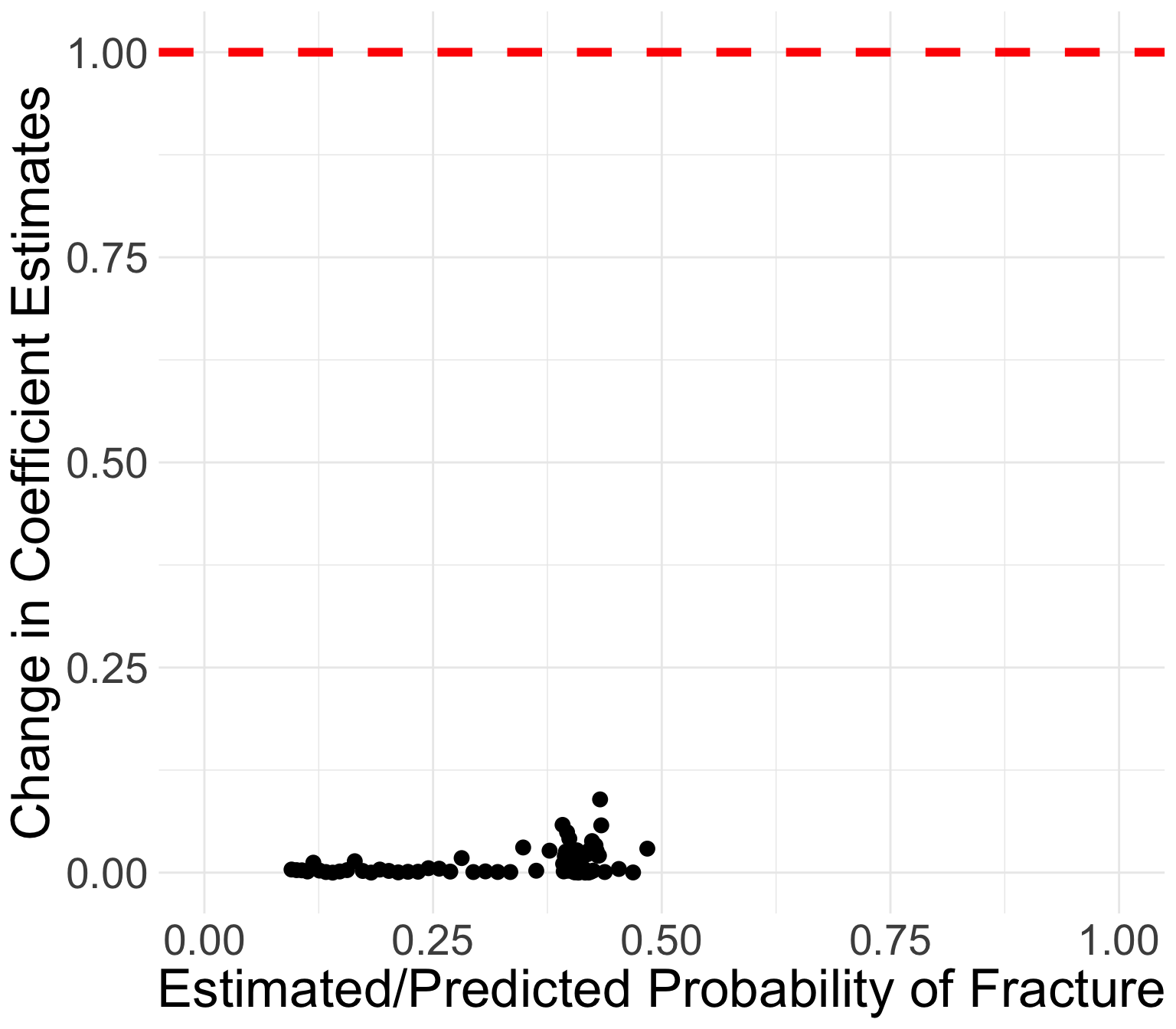
Book recommends flagging certain covariate patterns if change in coefficient estimates are greater than 1
All values of \(\Delta\widehat{\beta}_j\) are below 0.09
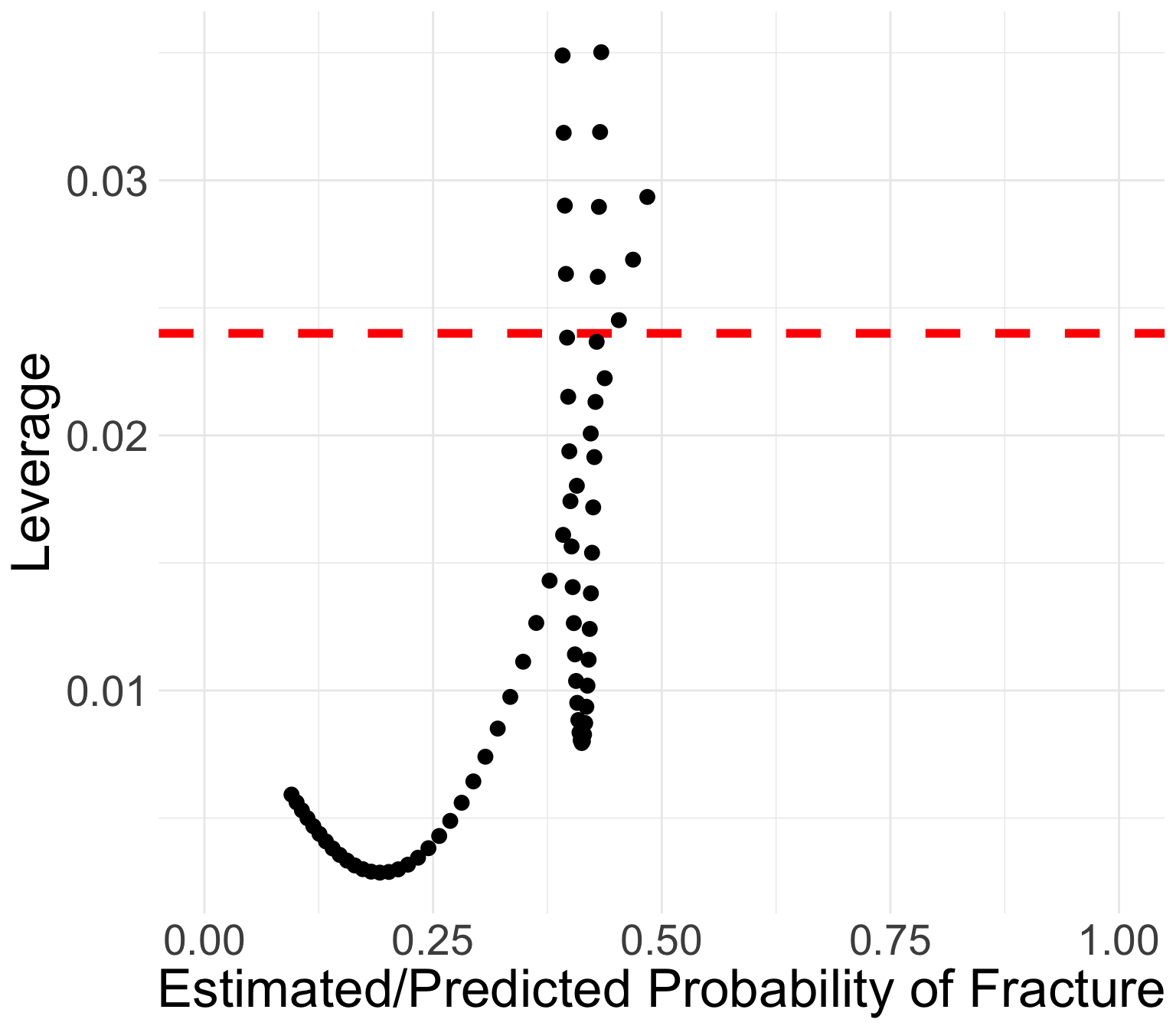
We can use the same rule as linear regression: \(h_j > 3p/n\)
Points with high leverage
priorfracYes age_c P h
<num> <num> <num> <num>
1: 0 20 0.4686423 0.02688958
2: 1 -12 0.3928116 0.03186122
3: 0 19 0.4531105 0.02451738
4: 1 -11 0.3940365 0.02900675
5: 1 19 0.4313389 0.02895824
6: 1 18 0.4300804 0.02621708
dx_glow %>% mutate(Cov_patt = 1:nrow(.)) %>%
filter(dChisq > 4 | dDev > 4 | dBhat > 1 |
h > 3*4/500) %>%
select(Cov_patt, y, P, h, dChisq, dDev, dBhat, h) %>%
round(., 3) Cov_patt y P h dChisq dDev dBhat
<num> <num> <num> <num> <num> <num> <num>
1: 6 1 0.469 0.027 0.008 0.008 0.000
2: 22 1 0.393 0.032 0.046 0.047 0.002
3: 36 1 0.453 0.025 0.178 0.183 0.004
4: 43 0 0.119 0.005 2.581 4.841 0.012
5: 45 6 0.164 0.003 4.414 3.554 0.014
6: 47 0 0.281 0.006 3.148 5.314 0.018
7: 48 0 0.394 0.029 0.670 1.032 0.020
8: 49 2 0.431 0.029 0.698 0.693 0.021
9: 50 0 0.430 0.026 0.775 1.155 0.021
10: 53 0 0.415 0.008 2.862 4.326 0.024
11: 57 2 0.395 0.026 0.949 0.924 0.026
12: 63 0 0.484 0.029 0.967 1.364 0.029
13: 69 0 0.434 0.035 1.588 2.358 0.058
14: 70 1 0.392 0.035 1.610 1.943 0.058
15: 71 2 0.433 0.032 2.710 3.462 0.089
Do a data quality check
If only a few covariate patterns do not fit well (\(y_j\) differs from \(m_j\widehat\pi_j\) ), we are not too worried
If quite a few covariate patterns do not fit well, potential reasons can be considered:
The link used in logistic regression model is not appropriate for outcome
One or more important covariates missing in the model
Methods: To assess the overall model fit, we calculated the AUC-ROC. We also calculated several model diagnostics including standardized Pearson residual, standardized deviance, change in coefficient estimates, and leverage. We identified covariate patterns with high standardized Pearson residual (greater than 4), standardized deviance (greater than 4), change in coefficient estimates (greater than 1), and leverage (greater than 0.024).
Results: Our final logistic regression model consisted of the outcome, fracture, and predictors including prior fracture, age, and their interaction. The AUC-ROC was 0.68. Out of 71 convariate patterns, we identified 11 with high leverage and 4 with high standardized Pearson residual, standardized deviance, or change in coefficient estimates. No identified observations were omitted.
Discussion:
AUC-ROC low: Included covariates were pre-determined
Influential points were kept in because all observations were within feasible range of the predictors and outcome. (we could try age-sqaured and see if that helps AUC and/or diagnostics)
Lesson 13: Model Diagnostics